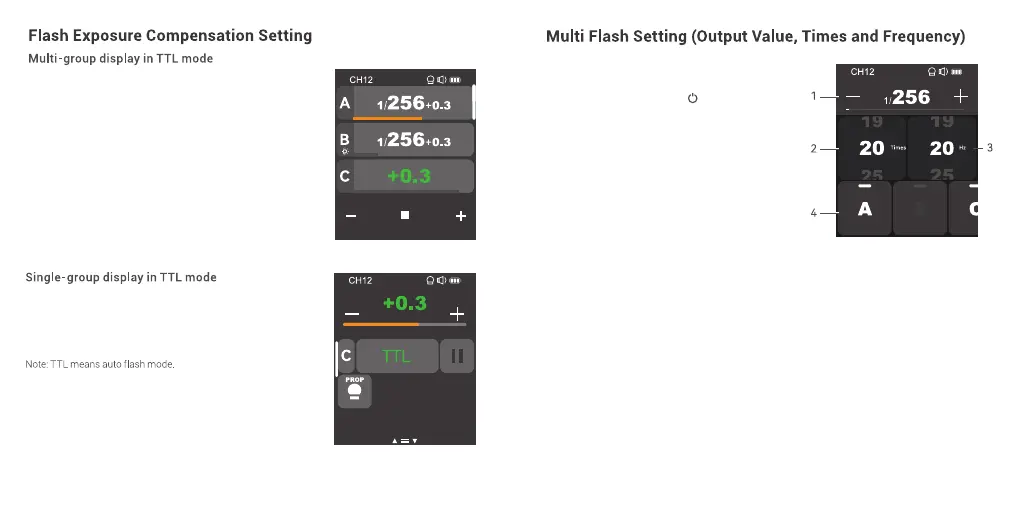
Press <+> to increase FEC values of multi-group at the
same time, press <-> to decrease FEC values of
multi-group at the same time, which will change from -3
to 3 in 1/3 step increments. You can also slide the
progress bar to quickly adjust the FEC values.
The FEC values of multi-group can not be increased or
decreased at the same time if a certain group has already
reached the lowest or highest FEC value.
Press <+> to increase FEC value of a certain group, press
<-> to decrease FEC value of a certain group, which will
change from -3 to 3 in 1/3 step increments. You can also
slide the progress bar to quickly adjust the FEC value.
In main interface, slide the screen down from the
top to display <Multi>, press it to enter multi flash
setting. Or you can press <M/ > button to make
the panel display <Multi>, then press it to enter
multi flash setting.
1. Output Power (Min. ~ 1/4 or Min. ~ 8.0)
Press <+> to increase output power level, press <->
to decrease output power level, which will change
from Min. to 1/4 or from Min. to 8.0 in integer steps.
You can also slide the progress bar to quickly
adjust the output power.
2. Flash Times
Slide the left column <Times> to adjust flash times from 1 to 100.
3. Flash Frequency (Hz)
Slide the right column <Hz> to adjust flash frequency from 1 to 199.
4. Group A/B/C/D/E
You can select a certain group or multi groups (five groups at most).
Note:
1. As flash times are restricted by flash output value and flash frequency, the flash times can not
surpass the upper value that permitted by the system. The times that transported to the receiver end are
real flash time, which is also related to the camera’s shutter setting.
2. Min. refers to the minimum value that can be set in M or multi mode. The minimum value can be set to
1/128, 1/256, 1/512, 3.0, 2.0 or 1.0.
53 54



 To Next Page