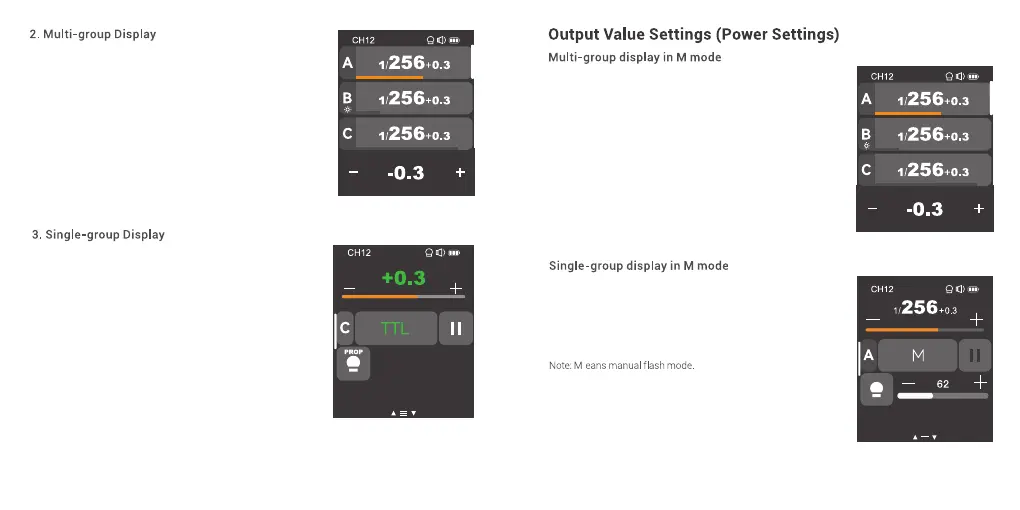
Press <+> to increase output power levels of multi-group
at the same time, press <-> to decrease output power
levels of multi-group at the same time, which will change
from Min. to 1/1 or from Min. to 10 in 0.1 or 1/3 step
increments. The output power levels of multi-group can
not be increased or decreased at the same time if a
certain group has already reached the lowest or highest
power level. You can also slide the progress bar to quickly
adjust the output power.
Press <+> to increase output power level of a certain
group, press <-> to decrease output power level of a
certain group, which will change from Min. to 1/1 or from
Min. to 10 in 0.1 or 1/3 step increments. You can also slide
the progress bar to quickly adjust the output power.
Note: Min. refers to the minimum value that can be set in M or
multi mode. The minimum value can be set to 1/128, 1/256,
1/512, 3.0, 2.0 or 1.0.
51 52
The main interface will display multi-group parameters
after group selection, you can check output power of
each group.
In main interface, press the output power of a certain
group to enter more settings such as power level, flash
mode and modeling lamp of that group.
In single-group display interface, you can switch the
group by sliding the screen up or down.



 To Next Page