49 50
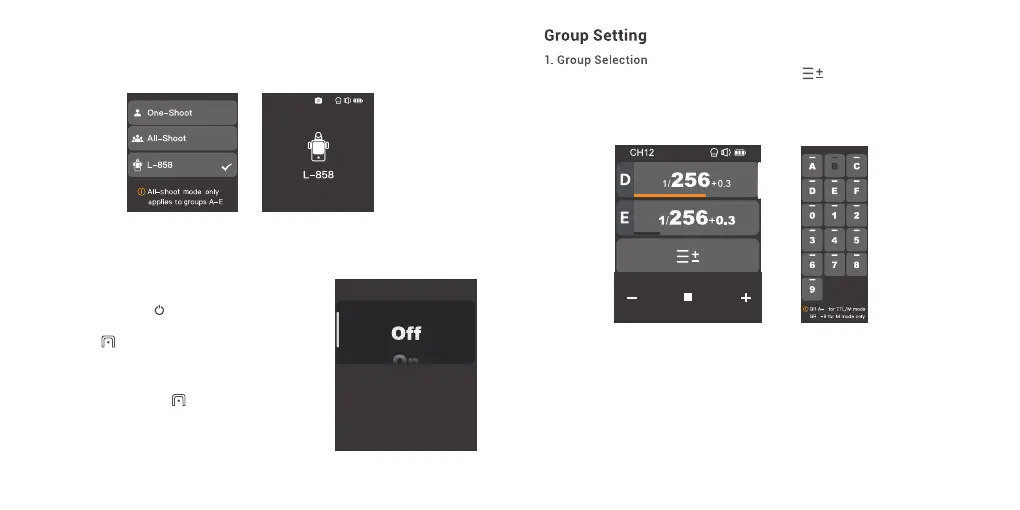
L-858: The flash parameters can be adjusted directly on Sekonic L-858 Light Meter when
collocating with it, and the transmitter only transmits SYNC signal.The main interface will
only display L-858 when it's turned on, all the parameters are unavailable to adjust since
only the flash triggering function is available.
CH12
In main interface, slide the screen to the bottom until < > is displayed on the panel, press
the icon to enter group selection setting, you can select group among A to F and 0 to 9.
Note: Group A-E can be set to TTL auto flash mode or M manual flash mode, while group F/0-9 is
set to M manual flash mode by default.
E
F
1. In main interface, slide the screen down from the top to
display <Setting>, press <Setting> to enter C.Fn. menu.
Or you can press the <M/ > button to display <Setting>
on the panel, then press <Setting> to enter C.Fn. menu.
2. Press the < > to enter the legacy hotshoe setting
and choose to turn on or off. The multi mode, TTL mode
and all-shoot mode are unavailable when the legacy hot
shoe is turned on.
3. The legacy hotshoe icon < > will display on the main
interface when it's turned on, then it means the legacy
hotshoe function is available.
Note:
1. Not all the cameras support legacy hot shoe function.
2. The flashes may be out of sync if you trigger at high speed shutter in legacy hotshoe mode.
Legacy Hotshoe



 To Next Page