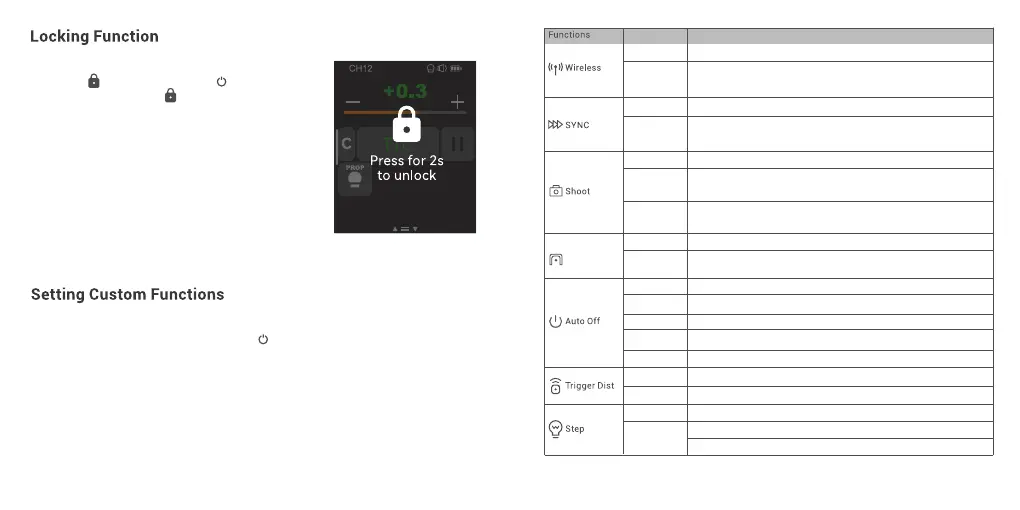
In main interface, slide the screen down from the top
to display < >, or you can press <M/ > button
to make the panel display < >, then press to lock
the screen. When the screen displays “Press for 2s to
unlock”, means the screen is locked and operations
are unavailable, you can press and hold the screen or
the select dial for 2s to unlock the screen.
In main interface, slide the screen down from the top to display <Setting>, press it to enter
custom function settings. Or you can press <M/ > button to make the panel display <
Setting >, then press it to enter custom function settings.
The following table lists the available and unavailable custom functions of this flash:
57 58
Settings and Descriptions
32 channels:1-32
OFF:off
1-99:optional from 1 to 99
Front Curtain Sync
High Speed Sync
Only send triggering signals in the M & Multi mode when camera is shooting
Send parameters and triggering signal when camera is shooting (suitable
for multi person photography)
Select among 30/60/90 min
No "Auto Off" options
Power off automatically after 30 minutes of idle use
Power off automatically after 60 minutes of idle use
Power off automatically after 90 minutes of idle use
For extremely close distance triggering in a range from 0 to 30m
For far distance triggering in a range from 1m to 100m
Min. Power: 1/128, 1/256, 1/512, 3.0, 2.0 or 1.0
0.3: 1/3 step increment
0.1:0.1 step increment
Parameters
CH
ID
Front Curtain
High Speed
One-Shoot
All-Shoot
L-858
OFF
ON
“Auto Off” ON
“Auto OFF” OFF
30 min
60 min
90 min
0-30m
1-100 m
Min. Power
Step
Turn off legacy hotshoe
The flash parameters can be adjusted directly on Sekonic L-858 Light Meter
when collocating with it, and the transmitter only transmits SYNC signal.
Turn on legacy hotshoe, the multi mode, TTL mode and all-shoot mode
are unavailable
Legacy
Hotshoe



 To Next Page