
 Need help?
Do you have a question about the Godrej ET4C1E and is the answer not in the manual?
Key safety precautions and warnings for operating the DVR.
Guidelines for the optimal temperature, humidity, and placement of the DVR.
General description of the DVR series and its capabilities.
Details on the main functions like surveillance, storage, compression, backup, and playback.
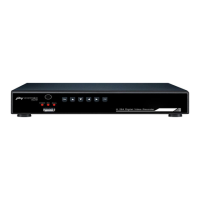
Identifies and explains the buttons and indicators on the DVR's front panel.
Step-by-step instructions for installing a hard disk drive in the DVR.
Instructions for safely turning the DVR on and off using the power switch or menu.
Details on logging into the system with 'admin' or 'guest' accounts and password security.
How to switch between preview windows and view system information.
How to access and use the shortcut menu for main menu, playback, record mode, and PTZ.
Configuring recording modes such as schedule, manual, and stop for channels.
Introduction to PTZ direction control, zoom, focus, iris, and setup operations.
Setting, calling, and deleting preset camera positions for PTZ control.
Creating and managing automated camera tours by connecting multiple preset points.
Configuring and calling repeating camera scan patterns.
Setting the left and right boundaries for PTZ camera movement.
Controlling horizontal camera rotation and resetting PTZ parameters.
Using auxiliary functions via page switching and controlling PTZ menus.
Adjusting image parameters like brightness and output settings for TV.
Logging out, shutting down, rebooting, and switching preview window layouts.
Overview of recording configuration, playback, and backup functions.
Overview of motion detect, video loss, and abnormality alarm functions.
Configuration of system time, language, format, and output.
Configuration of network, services, PTZ, serial port, and tour.
Configuring recording channels, redundancy options, and file length.
How to play back recorded video files.
Procedure for backing up video files to external storage.
Configuring motion detection sensitivity, regions, and time periods.
Configuring alarms for video loss and other system abnormalities.
Setting system date, time, date format, and separators.
Configuring video/audio compression, resolution, and frame rate.
Configuring network card, DHCP, IP address, subnet mask, and gateway.
Configuring PPPOE, NTP, DDNS, and network transfer policies.
Customizing channel names, time display, recording status, and transparency.
Setting PTZ camera protocols, addresses, baud rates, and tour intervals.
Configuring and managing hard disk status, type, and capability.
Adding, modifying, and deleting users and groups with specific permissions.
Managing user groups, viewing online users, and disconnecting sessions.
Setting auto-reboot, file deletion, and restoring system defaults.
Steps for upgrading the DVR firmware via USB.
Viewing hard disk status and real-time code stream statistics.
Searching and viewing system operation, configuration, and alarm logs.
Viewing hardware, software edition, and issue data.
Answers to frequently asked questions regarding DVR startup and basic functions.
Troubleshooting common problems related to the DVR not booting or rebooting unexpectedly.
Resolving problems with image brightness, color distortion, and clarity.
Troubleshooting issues with finding video files and local video clarity.
Troubleshooting PTZ control failures and inability to log in via web.
Resolving issues with motion detection not working and incorrect system time.
Troubleshooting network instability and unclear images in preview or playback.
Resolving problems with USB backup and keyboard control of the DVR.
Troubleshooting issues with alarms not working and remote controller failures.
Addressing insufficient storage time and issues with downloading files.
Guidelines for cleaning components and ensuring proper electrical connections.
Proper procedures for powering off the DVR and maintaining adequate ventilation.
Explanation of the serial numbers, names, and functions of the remote controller buttons.
Details on using buttons like Multi-window, Numeric, Esc, and Direction.
Using double-click actions for playback, zoom, and full-screen display.
Using left-click, right-click, and drag operations for menu navigation and settings.
Information on E-waste management rules, producer responsibilities, and consumer obligations.
Ensuring environmentally sound management and understanding the WEEE symbol.
Notes on product design changes, renewals, and copyright restrictions.
Information regarding the functions described in the manual and model variations.

 To Next Page
 General