5
• Power Jack: Connect the included 12V DC power adapter
here (or the Receiver's power jack)
• Power LED: On when the Transmitter is powered
• Link LED: On when the Cat5e/6/7 cable is connected/
linked properly between the Transmitter and Receiver
• LED Indicator: On when Receiver's HDMI out is connected
to an HDMI display and the HDMI signal is outputted
• RJ45: Link to the Receiver's RJ45 via a Cat5e/6 cable
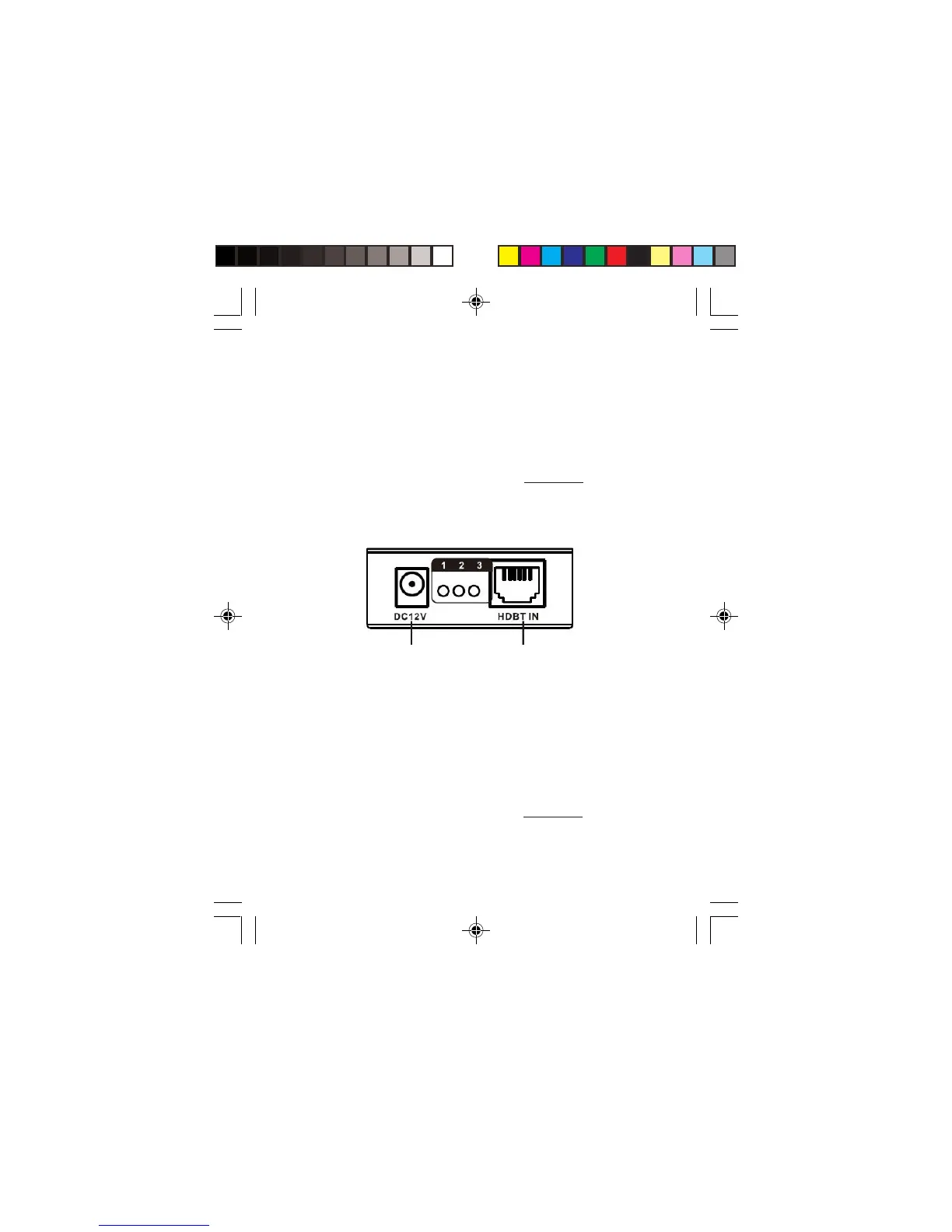
• Power Jack: Connect the included 12V DC power adapter
here (or the Transmitter's power jack)
• Power LED: On when the Receiver is powered
• Link LED: On when the Cat5e/6/7 cable is connected/
linked properly between the Transmitter and Receiver
• LED Indicator: On when Receiver's HDMI out is connected
to an HDMI display and the HDMI signal is outputted
• RJ45: Link to the Transmitter's RJ45 via a Cat5e/6/7 cable
Figure 3: Receiver (RX) - RJ45 Input
Power Jack
RJ45
1: Power LED
2: Link LED
3: LED Indicator


 To Next Page