Need help?
Do you have a question about the Goji GTCBTNC18 and is the answer not in the manual?
Inspect for damage after unpacking; do not operate if damaged.
Avoid extreme temperatures; charge between 5° and 40°C.
Never place naked flames or candles near the unit.
Avoid placing near appliances that may cause interference.
Lists Main Unit, USB Charging Cable, 3.5mm Audio Cable, Carry Pouch, Instruction Manual.
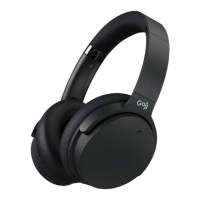
Identifies buttons, indicators, and ports on the headphones.
Details the audio cable's multifunction button and microphone.
Explains the meaning of red and blue indicators during charging.
Describes automatic connection to the last paired device when switching on.
Steps to enter Bluetooth pair mode, indicator behavior, and timeout.
How to search and select headphones, enter passcode, and confirm connection.
Adjust volume and navigate tracks using the headphone buttons.
How to answer, end, reject, and redial calls using the headphones.
Control music playback, including play, pause, and skipping tracks.
Manage calls and music playback using the multifunction button with an audio cable.
Notes that the Bluetooth feature is disabled when using the audio cable.
How to slide the NC button to ON and the NC indicator lighting up.
Connect the USB cable to a charging source to perform a hardware reset.
Steps to resolve issues like product not working, charging, or pairing.
Details model, sensitivity, impedance, frequency response, Bluetooth, battery, etc.
 General
| Noise Cancelling | Yes |
|---|---|
| Bluetooth | Yes |
| Driver Size | 40 mm |
| Frequency Response | 20 Hz - 20 kHz |
| Microphone | Yes |
| Water Resistance | No |
| Wireless Range | 10 m |
| Impedance | 32 Ohm |

 To Next Page