16
V. OPERATION
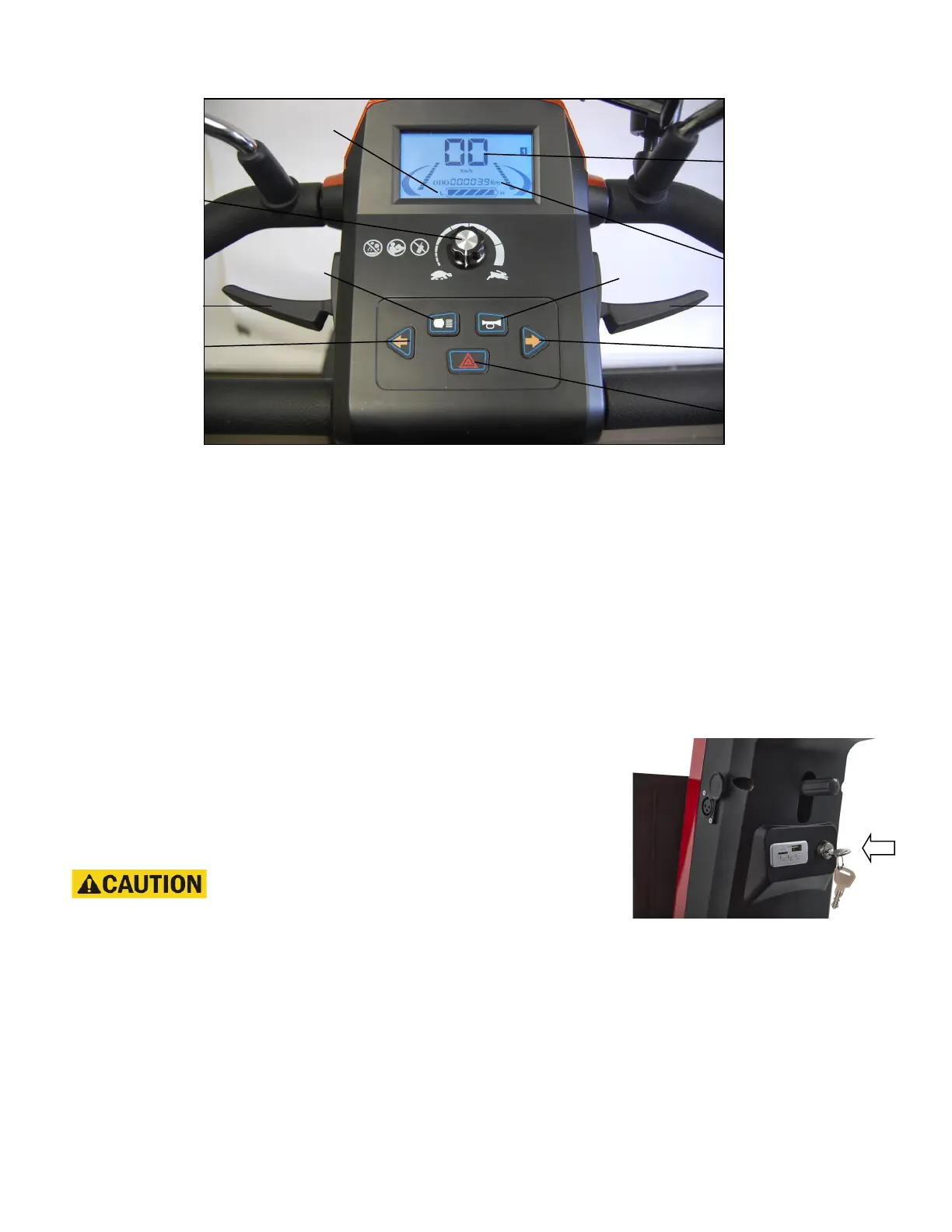
Figure 5. Delta Tiller Control Panel with LCD Display
CONTROL PANEL
Speed Adjustment Dial
• The speed adjustment dial allows you to pre-select the maximum top speed of your
Golden Eagle. See figure 5.
• Turn the dial counterclockwise to operate your scooter at the lowest speed level.
• Turn the dial clockwise to increase the operational speed of your scooter.
• We recommend that you select a speed setting at which you feel comfortable, safe, and
in control of your Golden Eagle.
Key Switch
This switch turns the power on and off to your Golden Eagle. See figure 6.
• Insert the key into the key switch.
• Turn the key 90 degrees clockwise to turn on your scoot-
er's power. The LCD (Liquid Crystal Display) display will
light up indicating that power is on.
• Turn the key back to the vertical position to turn off your
scooter's power.
Always make certain that the key is re-
moved from the key switch before getting on or off your
Golden Eagle or before lowering the tiller completely.
Horn Button
Press this button to sound the horn. See figure 5.
DC Battery Voltage Meter
This meter (see figure 5) shows the amount of voltage in your Golden Eagle’s batteries.
• Full bars indicates a full charge on the batteries.
• Lesser bars indicates a diminished charge left on the batteries.
• One bar indicates that the batteries have a minimal charge remaining.
See section X. “Care and Maintenance” for instruction concerning charging the batteries.
Horn
Right Turn
Signal
Speed
Adjustment
Flashers
(Hazard)
Battery Meter
Head Light
Left Turn
Signal
Throttle Lever
Throttle Lever
Odometer
Speedometer
&
Fault Codes
Figure 6. Key Switch


 To Next Page