REVA_082012
43
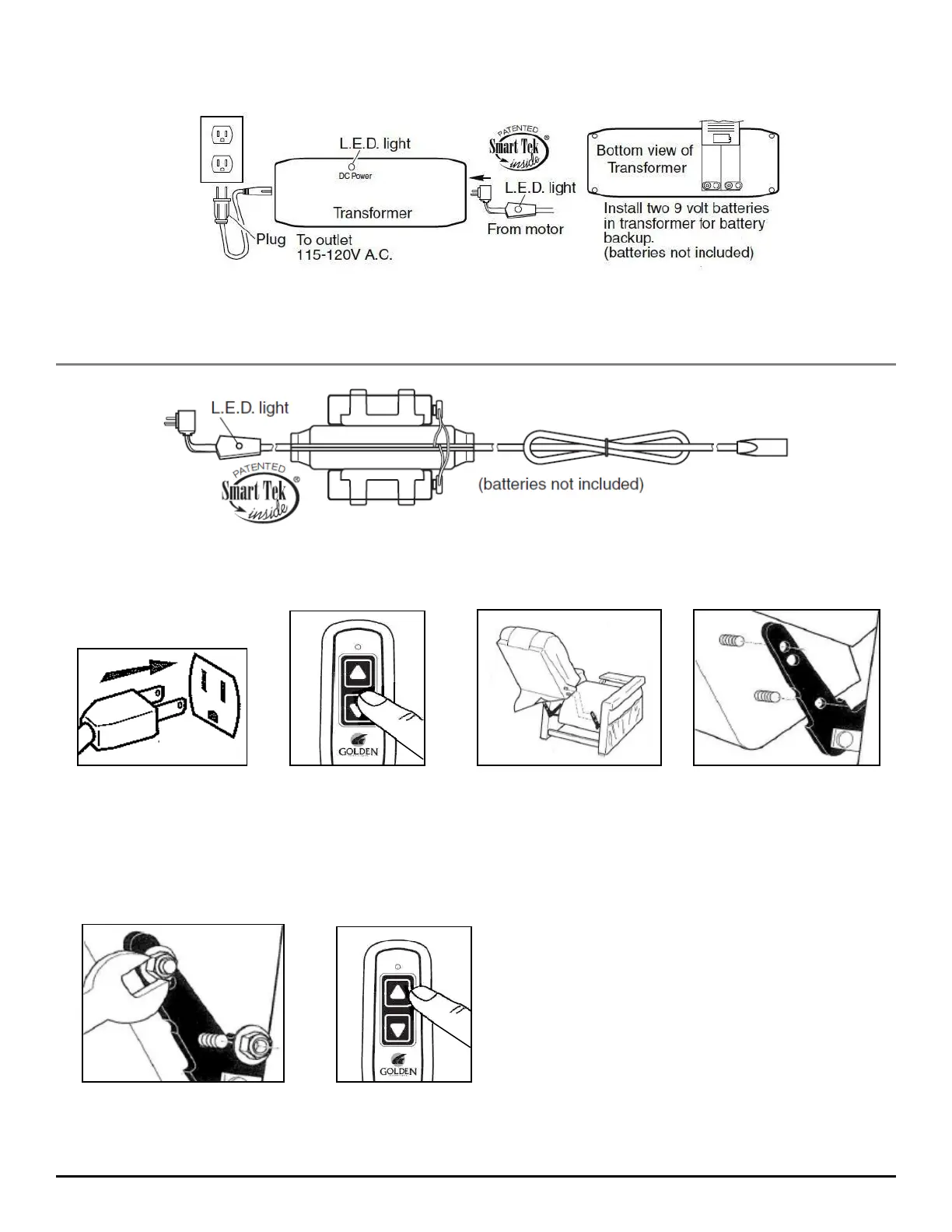
Power Connections
Step 1. Plug the lift chair into a standard (115-120VAC) wall outlet.
Step 2. Press the down arrow on the hand control until the footrest is about parallel to the floor.
This will expose the back brackets at the rear of chair.
Step 3. Slide the back down between the brackets until the threaded studs on the back slip thru
the holes in the brackets as shown.
Step 5. Attach the bottom of the outside back to the Velcro on the arm cross rail.
Models: PR-200, PR-355M, PR-355L, PR-359M, PR-359L, PR-401, PR-401L, PR-410, PR-451, PR501JP,
PR-501S, PR-501S-23, PR-501M, P5-501L, PR-501T, PR-643, PR-747, PR-751TY, PR-752, PR-906,
PR-756MC, PR-756L, PR-505JP, PR-505S, PR-505M, PR-505L, PR-506, PR-510, PR502
Models: PR-501M-26D, PR-501L-26D, PR-501T-28D
Ste
1 Ste
2 Ste
3
Ste
4 Ste
5
Back Installation:
Step 4. Thread the flange lock nuts onto the
studs and tighten securely using the supplied
wrench or a 7/16" box wrench. Return the
chair to the seated upright position by pressing
the up arrow on the hand control.



 To Next Page