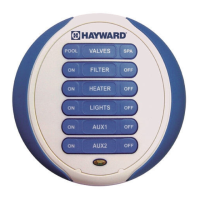
Heater ON/OFF Provided that the filter pump is running, normal Pro Logic/Aqua
Logic operation will turn the heater (HEATER1 output) on until
the desired temperature (see Settings Menu) is attained. The
heater will then turn on periodically, as required, to maintain that
temperature. When the "ON" button is pushed, the heater will
turn on for a minimum of 5 minutes or until the water reaches
104°F. This allows users in the spa to temporarily override the
normal temperature setting. When the "OFF" button is pushed,
the heater is turned off regardless of the water temperature and
will remain off until either the "ON" button is pressed, or the start
of the next normal filter timer period.
Lights ON/OFF The "ON"/"OFF" buttons allow manual operation that will over-
ride any automatic control settings (e.g. timeclock). The manual
setting will remain active until the next scheduled automatic turn
on/off event.
Aux1 ON/OFF The "ON"/"OFF" buttons allow manual operation that will over-
ride any automatic control settings (e.g. timeclock). The manual
setting will remain active until the next scheduled automatic turn
on/off event. Note that the Aux3 - Aux6 outputs on Pro Logic/
Aqua Logic -PS-8 models (Aux3-Aux14 on PS-16 models) can
NOT be controlled by this remote.
Battery Replacement
The spaside remote runs on two AAA batteries. Since the internal circuits are only
active when you push a button, it is anticipated that the original, factory-installed,
batteries should provide years of service. If you do not at least see a single flash of the
LED indicator when you push a button, then the batteries may need replacement.
It is IMPORTANT that you carefully follow this procedure to ensure that your spaside
remote retains its watertight integrity:
1. Use a Phillips head screwdriver to remove the 4 screws on the back of the
spaside remote. These are special screws with built-in O-rings and are an impor-
tant part of making the spaside remote watertight.
2. Separate the 2 halves of the remote. Do not touch the O-rings or allow any
debris to fall onto the O-ring surface.
3. Replace the 2 AAA batteries. Alkaline batteries are recommended for maxi-
mum life. If you observe any corrosion or water damage, contact the Goldline
Technical Service Dept. Monday through Friday, 8AM to 8PM at 908-355-7995
for assistance.
4. Carefully replace the back cover on the spaside remote.
5. Reinstall all 4 of the original screws.
a. Loosely tighten all four screws.
b. Then go back and firmly tighten each screw.
6. The spaside remote will remember the ID code of the base station, so it is not
necessary to perform the “Teach Wireless” procedure again. Verify proper
operation by pressing any button and observing 2 flashes indicating that the
message was transmitted to the base station and a confirmation was received.
Troubleshooting
1. Can’t find the “Teach Wireless” display: Press the “menu” button (possibly
more than once) until “Settings Menu” is displayed. Next, press the “<“ or “>”
buttons (possibly more than once) unit the “Teach Wireless” display appears.
If you get to the point where “Settings Menu” appears again, then this means
that the Pro Logic/Aqua Logic control unit is not communicating with the base
station. Check that the 4 wire cable from the base station is plugged into the
“wireless" connector on the main printed circuit board. If this connector is
already plugged in (for more than 30 seconds), then call Goldline Technical
Service for assistance.
2. “Teach Wireless” failed: Ensure that the remote is powered when pressing
the button. This is indicated by a single flash of the LED on the spaside remote
or a message on the display of the in-house remotes. If the remote is powered,
then the next most likely cause is that the distance between the base station
and the remote is too great—try moving the remote closer to the base station.
Lastly, there may be other equipment in the neighborhood that is using the
same frequency. To see if this is the case, go to the Settings Menu/Wireless
Channel and select another channel. Note that after you change the channel
you will have to “re-teach” every wireless remote device in the system.
3. Unreliable communication with remote devices: The most likely cause is
that the distance between the base station and the remote is too great—try
moving the remote closer to the base station. Lastly, there may be other
equipment in the neighborhood that is using the same frequency. To see if this
is the case, go to the Settings Menu/Wireless Channel and select another
channel. Note that after you change the channel you will have to “re-teach”
every wireless remote device in the system.
4. Single LED flash when a button is pushed: The radio signal may be too
weak—try pointing the spaside remote in the direction of the pool equipment
or try moving closer to the pool equipment. If that doesn’t work, then try the
“Teach Wireless” procedure to ensure that the remote knows the ID code of the
base station and also what channel to communicate on. If this procedure is not
successful, then refer to the “Teach Wireless” failed section above.
5. The filter pump won’t turn off when the "OFF" button is pressed: (1) If the
heater cooldown feature is enabled and the heater is on, then pressing the
"OFF" button will cause the heater to turn off but leave the filter pump running
for 5 more minutes to allow the heater to cooldown. Pressing the "OFF" button
a 2
nd
time will override the cooldown period and turn the pump off. (2) If the
freeze protection feature is enabled and the air temperature is less than 38°F
then the pump will run continuously and any OFF button press will be disre-
garded.
6. Functions won’t turn on when the "ON" button is pressed: (1) If the "SYS-
TEM OFF" button (PS versions only) has been pushed then all functions are
disabled. Press the "System Off" button again to resume normal operation. (2)
If the Pro Logic/Aqua Logic system is in service mode, then functions can
only be turned on at the main unit display/keypad. Press the "SERVICE"
button once (or twice) until normal operation is restored. (3) The filter pump is
turned off for a short period of time while the valves are rotating. Normal
operation will resume automatically when the valve(s) have finished their rota-
tion.
43


 To Next Page
 Loading...