EasyManua.ls Logo

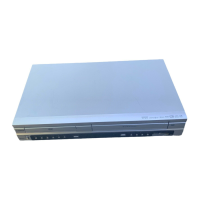
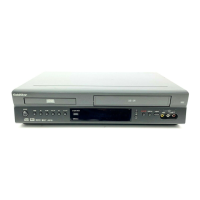
Goldstar GBV241 - User Manual

Goldstar GBV241
40 pages
Print Icon
To Next Page IconTo Next Page
Loading...
DVD Player+
Video Cassette Recorder
OWNER’S MANUAL
MODEL : GBV 241
Before connecting, operating or adjusting this product,
please read this instruction booklet carefully and completely.

Questions and Answers

Summary

Safety Precautions

Electric Shock and Fire Warnings

Cautions regarding electric shock, fire hazards, and exposure to moisture. Includes warnings about opening the unit and plug safety.

Installation and Environmental Precautions

Guidelines for safe installation, avoiding confined spaces, water exposure, and general apparatus placement.

Important Safety Instructions

General Safety Guidelines

Instructions on reading, keeping, and heeding all safety and operating guidelines provided in the manual.

Operational and Environmental Safety

Precautions for unit ventilation, heat sources, power cord protection, and safety during lightning storms.

Servicing and Maintenance Safety

Guidelines on when to refer servicing to qualified personnel and safety related to maintenance.

Before Use

Remote Control Operations

Connecting Antenna and Cable TV

Direct Antenna;Cable Connection Methods

Procedures for connecting without a cable box and instructions for connecting with a cable box.

Basic and Preferred TV Connections

Connecting to Amplifiers and Audio Systems

VCR Setup and Channel Selection

VCR Setup Menu Configuration

Adjusting options like language, audio mode, broadcast type, and audio output in the VCR setup menu.

Channel Tuning and Memory Management

Performing auto channel programming and managing stored TV channels in memory.

Clock and Timer Settings

Manual Clock Setting Procedure

Step-by-step guide to manually set the unit's clock and date for accurate operation.

DVD Setup Menu Configuration

DVD Sound and Other Settings

DVD Parental Control and Country Code

Parental Control Setup and Password Management

Setting parental ratings for content restrictions and managing the 4-digit access password.

Country Code Configuration and Selection

Setting the country code for disc region compatibility and managing alternative scene selections.

VCR Tape Operation - Normal Playback

Basic Playback and Tracking Adjustment

Steps for inserting tape, initiating playback, and adjusting tracking for clear picture.

Special Playback Modes and Features

Using search, still picture, slow motion, CM skip, and EZ review functions for tape viewing.

VCR Tape Operation - Recording

Normal Recording Procedure

Steps for initiating and performing a standard recording of TV programs onto tape.

Timer Recording Setup and Operation

Programming the VCR to record specific programs automatically based on schedule.

VCR Timer Recording Management

Setting Recording Speed and Repeat Options

Adjusting recording speed (SP/SLP) and setting repeat options (Once, Weekly, Daily) for timer recordings.

Checking, Erasing, and Program Priority

Reviewing programmed timers, deleting them, and understanding how overlapping recordings are prioritized.

VCR Recording and Content Copying

Instant Timer Recording

Quickly setting a recording for a specific duration without full timer programming.

Dubbing from External Sources and DVD to VCR Copying

Connecting external devices for recording and copying content from DVDs to VHS tapes.

DVD Advanced Playback Functions

Troubleshooting Common Issues

Power, Picture, and Sound Problems

Solutions for issues like no power, no picture, no sound, and poor playback quality.

Playback Start and Remote Control Issues

Troubleshooting discs not starting playback and the remote control not functioning correctly.

Troubleshooting Advanced Issues

Signal, Input, and Timer Recording Issues

Fixing problems with channels, camcorder input, and timer recording setup.

Stereo Audio and Moisture Condensation

Addressing stereo playback problems and issues related to moisture condensation.

Summary

Safety Precautions

Electric Shock and Fire Warnings

Cautions regarding electric shock, fire hazards, and exposure to moisture. Includes warnings about opening the unit and plug safety.

Installation and Environmental Precautions

Guidelines for safe installation, avoiding confined spaces, water exposure, and general apparatus placement.

Important Safety Instructions

General Safety Guidelines

Instructions on reading, keeping, and heeding all safety and operating guidelines provided in the manual.

Operational and Environmental Safety

Precautions for unit ventilation, heat sources, power cord protection, and safety during lightning storms.

Servicing and Maintenance Safety

Guidelines on when to refer servicing to qualified personnel and safety related to maintenance.

Before Use

Remote Control Operations

Connecting Antenna and Cable TV

Direct Antenna;Cable Connection Methods

Procedures for connecting without a cable box and instructions for connecting with a cable box.

Basic and Preferred TV Connections

Connecting to Amplifiers and Audio Systems

VCR Setup and Channel Selection

VCR Setup Menu Configuration

Adjusting options like language, audio mode, broadcast type, and audio output in the VCR setup menu.

Channel Tuning and Memory Management

Performing auto channel programming and managing stored TV channels in memory.

Clock and Timer Settings

Manual Clock Setting Procedure

Step-by-step guide to manually set the unit's clock and date for accurate operation.

DVD Setup Menu Configuration

DVD Sound and Other Settings

DVD Parental Control and Country Code

Parental Control Setup and Password Management

Setting parental ratings for content restrictions and managing the 4-digit access password.

Country Code Configuration and Selection

Setting the country code for disc region compatibility and managing alternative scene selections.

VCR Tape Operation - Normal Playback

Basic Playback and Tracking Adjustment

Steps for inserting tape, initiating playback, and adjusting tracking for clear picture.

Special Playback Modes and Features

Using search, still picture, slow motion, CM skip, and EZ review functions for tape viewing.

VCR Tape Operation - Recording

Normal Recording Procedure

Steps for initiating and performing a standard recording of TV programs onto tape.

Timer Recording Setup and Operation

Programming the VCR to record specific programs automatically based on schedule.

VCR Timer Recording Management

Setting Recording Speed and Repeat Options

Adjusting recording speed (SP/SLP) and setting repeat options (Once, Weekly, Daily) for timer recordings.

Checking, Erasing, and Program Priority

Reviewing programmed timers, deleting them, and understanding how overlapping recordings are prioritized.

VCR Recording and Content Copying

Instant Timer Recording

Quickly setting a recording for a specific duration without full timer programming.

Dubbing from External Sources and DVD to VCR Copying

Connecting external devices for recording and copying content from DVDs to VHS tapes.

DVD Advanced Playback Functions

Troubleshooting Common Issues

Power, Picture, and Sound Problems

Solutions for issues like no power, no picture, no sound, and poor playback quality.

Playback Start and Remote Control Issues

Troubleshooting discs not starting playback and the remote control not functioning correctly.

Troubleshooting Advanced Issues

Signal, Input, and Timer Recording Issues

Fixing problems with channels, camcorder input, and timer recording setup.

Stereo Audio and Moisture Condensation

Addressing stereo playback problems and issues related to moisture condensation.

Goldstar GBV241 Specifications

General IconGeneral
BrandGoldstar
ModelGBV241
CategoryDVD VCR Combo
Progressive ScanNo
Video Playback FormatsVHS
OutputsComposite video
Remote ControlYes
Playable Disk TypesDVD, CD
VCR Heads4-head

Related product manuals