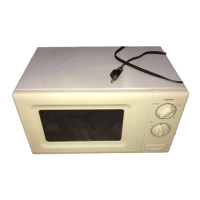
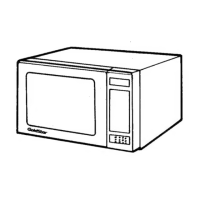
This document is a service manual for the GoldStar Microwave Oven, model MA-2117W/B. It provides comprehensive information for servicing, operating, and maintaining the device.
Function Description
The GoldStar Microwave Oven MA-2117W/B is designed for household use only, offering a range of cooking functionalities. It operates on a single-phase, 3-wire grounded system, ensuring safe operation. The oven is equipped with a control panel that allows users to select various cooking modes, set time, and adjust power levels. It features a turntable for even cooking and a safety door lock system to prevent operation when the door is open. The device is designed to provide efficient and convenient microwave cooking for everyday needs.
Important Technical Specifications
- Model: MA-2117W/B
- Power Requirement: 120 Volts AC 60 Hz, 1,500 Watts (13.0 A)
- Power Output: 1,150 Watts full microwave power (IEC705)
- Microwave Frequency: 2,450 MHz
- Magnetron: 2M246, 2M248J
- Timer: 0 ~ 99 min. 99 sec.
- Outside Dimensions (W x H x D): 23⁷/₈" x 13⁹/₁₆" x 18¹³/₁₆"
- Cavity Dimensions (W x H x D): 17¹/₂" x 11" x 18¹/₂"
- Net Weight: 42 lbs (approx.)
- Shipping Weight: 46 lbs (approx.)
- Control Complement: Touch Control System
- Clock: 1:00 - 12:59
- Microwave Power for Variable Cooking (Power Level):
- Full power throughout the cooking time
- 9 (Saute): approx. 90% of Full power, 8 (Reheat): approx. 80%
- 7 (Med-High): approx. 70%, 6 (Medium): approx. 60%
- 5 (Med-Low): approx. 50%, 4 (Defrost): approx. 40%
- 3 (Low): approx. 30%, 2 (Simmer): approx. 20%
- 1 (Warm): approx. 10%
Usage Features
The microwave oven offers a user-friendly interface with a touch control panel. Key operating instructions include:
- Setting the Clock: Users can set the clock to a 12-hour format.
- Cancel Function: The "CLEAR" pad can be used to cancel an entry or a function currently in use.
- EZ On: This feature allows for quick cooking by simply pressing the "EZ On" pad, which adds 1 minute of cooking time per press.
- One Touch Cooking: Dedicated buttons for Popcorn, Potato, Beverage, Pizza, Frozen Dinner, Baked Potato, Fresh Vegetable, and Casserole provide convenient preset cooking options.
- Time Cooking: Users can manually set the cooking time and power level.
- Multi-Stage Cooking: The oven supports multi-stage cooking, allowing for different power levels and times within a single cooking cycle.
- Auto Defrost Cooking: This feature provides a quick and efficient way to defrost food by weight.
- Child Lock: A safety feature that locks the control panel to prevent accidental operation, especially by children.
- More/Less: These buttons allow for fine-tuning of cooking time, increasing or decreasing it by 10 seconds.
- Indicators: The control panel includes indicators for power level, cooking time, and other settings.
- Display Window: Shows the time of day, cooking time, power level, or defrost weight.
Maintenance Features
The manual emphasizes safety precautions and provides detailed instructions for servicing the microwave oven. It is stressed that the device should only be serviced by properly qualified service personnel.
Safety Precautions for Servicing:
- Always disconnect the power supply cord before servicing.
- Do not operate or allow the oven to be operated with the door open.
- Make safety checks on all ovens to be serviced before activating the magnetron or other microwave source, including interlock operation, proper door closing, seal and sealing surfaces, arcing, wear, and other damage, and damage to or loosening of hinges and latches.
- Before turning on microwave power for any service test or inspection, check the magnetron, wave guide or transmission line, and cavity for proper alignment, integrity, and connection.
- Any defective or misadjusted components in the interlock, monitor, door seal, and microwave generation and transmission systems must be repaired, replaced, or adjusted by procedures described in this manual before the oven is released to the owner.
- A microwave leakage check must be verified to comply with the Federal Performance Standard after each oven repair.
Component Test Procedures:
The manual includes detailed test procedures for various components to aid in troubleshooting and repair:
- Switches (Primary, Secondary, Monitor): Continuity checks with an Ohm-meter for both door open and closed states.
- High Voltage Transformer: Measurement of resistance for primary, secondary, and filament windings.
- Magnetron: Measurement of resistance for the filament terminal and continuity to chassis.
- High Voltage Capacitor: Measurement of resistance from terminal to terminal and terminal to case.
- High Voltage Diode: Continuity checks in forward and reverse directions.
- Relay 2: Check for continuity and its operation with varying power levels.
- Fan Motor: Measurement of resistance.
- Turntable Motor: Measurement of resistance.
Troubleshooting:
A comprehensive troubleshooting guide is provided, outlining common conditions, their causes, and remedies. This includes issues such as:
- Microwave oven does not work.
- Output power is too low.
- Sparks occur.
- Uneven cooking.
- No input can be programmed.
- Some inputs cannot be programmed.
- Display shows a number or figure different from one touched.
- Random programming when touching other pads.
- Display is fixed at some figure and can not accept any input.
- Fuse blows.
- Setting time does not count down when touching START pad.
- Fan motor or oven lamp do not turn on.
- Oven seems to be operating but little heat is produced in oven load.
- No microwave oscillation even though oven lamp and fan motor run.
- Output is full power when you set lower power level.
The manual also includes exploded views and parts lists for various sections of the oven (Oven Cavity, Door, Controller, Latch Board, Interior, Base Plate), along with schematic diagrams and printed circuit board layouts, to facilitate accurate identification and replacement of components during servicing.

 Need help?
 General

 To Next Page