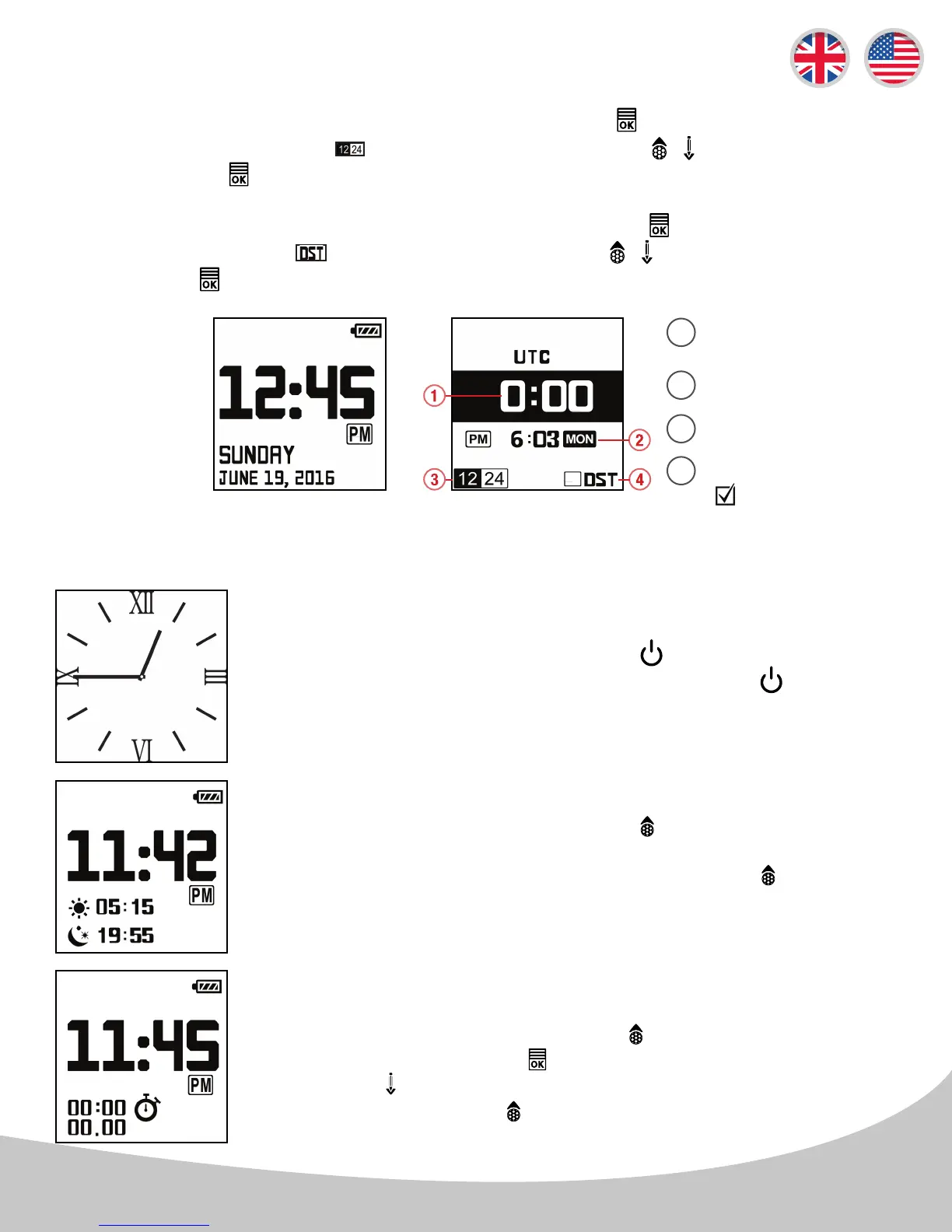
Daylight Savings Time: After entering the time setting mode, press the button three times to edit
the DST. When the blinking icon appears, navigate with the / buttons to turn on/o DST
mode. Press the button once to apply the changes and return to time mode.
12/24 hour Format: After entering the time setting mode, press the button twice to edit the 12/24
Hour Format. When the blinking icon appears, navigate with the / buttons to the desired
selection. Press the button twice to apply the changes and return to time mode.
2.3 Time Setting (continued)
2.4 Time Mode Features
From the Time/Date screen, press the button to view the Sunrise/
Sunset Time (CT2 automatically acquires GPS signal for this feature). To
exit this function and to return to time mode, press the button twice.
Sunrise/Sunset Time
Stop Watch
From the Time/Date screen, press the button twice to use the Stop
Watch Function. Press the button to start/stop the Stop Watch, and
press the button to reset the record. To exit this function and to return
to time mode, press the button.
Time + Sunrise/
Sunset
From the Time/Date screen, press the button to view the Analog
Timeface. To exit this analog timeface, just press the button once
again.
Optional Analog Time Face
*Note: Sunrise and Sunset is in 24-hour format only.
Default Time/Date Time Settings
UTC Zone Setting
Language
Time Format
Daylight Savings Time
( for ON)
5
1
2
3
4



 To Next Page