Need help?
Do you have a question about the Golfstream Vision Brake and is the answer not in the manual?
Details items included with the Vision Brake trolley and initial setup instructions.
Provides step-by-step instructions for initial assembly and operation of the Vision Brake trolley.
Explains how to use the Distance Control feature to send the trolley forward specific distances.
Describes the battery indicator on the main screen and its limitations in certain modes.
Details how to access and use Programming Mode for various settings like Name, Clock, and Reset.
Instructions for switching between Simple and Normal modes to customize trolley functionality.
Guidance on setting the trolley for left or right-handed operation, reversing control knob function.
How to set the clock and exit programming mode on the Vision Brake trolley.
Tips for lifting the trolley safely and advice on managing speed control on hilly terrain.
Instructions for disengaging wheels for pushing and general cleaning advice for the trolley.
Information on purchasing colour packs and details about the product's guarantee policy.
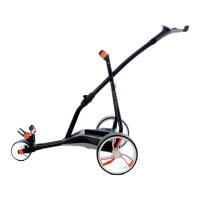
The Golfstream Vision Brake is a lightweight and easy-to-fold/unfold golf trolley designed for convenience and performance on the golf course. It features a super clear, large numeral color LCD display, high-grip tires, and an easy-off wheel system, along with a "no twist" system to keep your golf bag secure.
The primary function of the Vision Brake is to transport your golf bag effortlessly around the course. It incorporates an active electronic brake system that provides effective downhill control, ensuring the trolley maintains a steady pace on varying terrains. The trolley is powered by a Caddycell LiFePO4 battery, supplied as standard, which illuminates the screen upon connection.
The control knob is central to operating the trolley. A single press activates the motor at the selected speed, which can be adjusted by rotating the knob. To stop the trolley, press the control knob again, and the display will revert to flashing. For downhill control, rotating the knob into the red area slows the machine, with greater braking force applied as the speed approaches zero. For a parking brake, set the speed to zero. On very steep slopes, it's recommended to turn the trolley 45 degrees to the slope to prevent gradual creep.
The Vision Brake also includes a Distance Control (DC) function, allowing you to send the trolley forward for approximately 10, 20, or 30 meters. To activate DC mode, press and hold the control knob for 2 seconds until "DC" appears. Rotate the knob to select the desired distance, then press the knob down to confirm. The trolley will proceed at a speed of 6.0, and the display will count down the remaining distance. The machine can be stopped at any time by pressing the control knob.
Folding and Unfolding: The Vision Brake boasts a unique one-touch fold/unfold mechanism, making it one of the simplest trolleys to set up and pack away. It folds flatter than many competing models. When carrying the folded trolley, lift it from the area highlighted in the manual; a magnetic catch prevents it from flaying open. For a more secure hold, the battery strap can be used over the central tube. To unfold, lay the trolley flat, lift from the handle, and extend the handle upwards until it clicks into place.
Display and Controls: The bright and clear color LCD screen features extra-large numerals for easy reading. The screen can also display a personalized welcome message. Speed settings can be adjusted in 0.5 increments, allowing you to perfectly match the trolley's pace to your walking speed. The display shows "0.0" flashing when no power is offered to the motor, indicating it's ready for speed adjustment.
Braking System: The active electronic brake provides effective downhill control. The braking force is inversely proportional to the speed setting: lower speeds apply greater braking force (indicated by red on the display), while higher speeds apply less (indicated by green).
Wheels: The trolley features easy-off main wheels equipped with slick, low-profile, high-grip tires designed to last up to five times longer than standard tires. These wheels can be moved into an outer disengaged position, allowing the machine to be pushed very easily. To do this, press in the sprung hub cap while pulling the wheel away from the trolley until it locates in the outer groove. Repeat for the other side.
Programmable Features (Programming Mode): To access programming mode, turn on the power, and while "0.0" is flashing, press and hold the on/off knob for 10 seconds until "Program" is displayed. By rotating the control knob, you can scroll through various settings:
Battery Indicator: A battery indicator in the top right of the main screen provides an indication of the remaining power in your battery. Note that this indicator will not show in Simplicity/Competition Mode.
Hills: The Vision's super grip tires provide excellent traction. However, to maintain maximum grip, especially on hills, it's recommended to increase the speed control gradually rather than ramping it up quickly, which could cause the wheels to spin.
 General
| Display | LCD |
|---|---|
| Range | Up to 36 holes |
| Foldable | Yes |
| Material | Aluminum |
| Battery | Lithium |
| Distance Control | Yes |

 To Next Page