0.0
00:08
Mode : Normal
0.0
00:08
Mode : Normal
kph / mph
PRESS ONCE
10 - 20 - 30
PRESS & HOLD 2 sec
FULLY
CHARGED
Program
00
DC
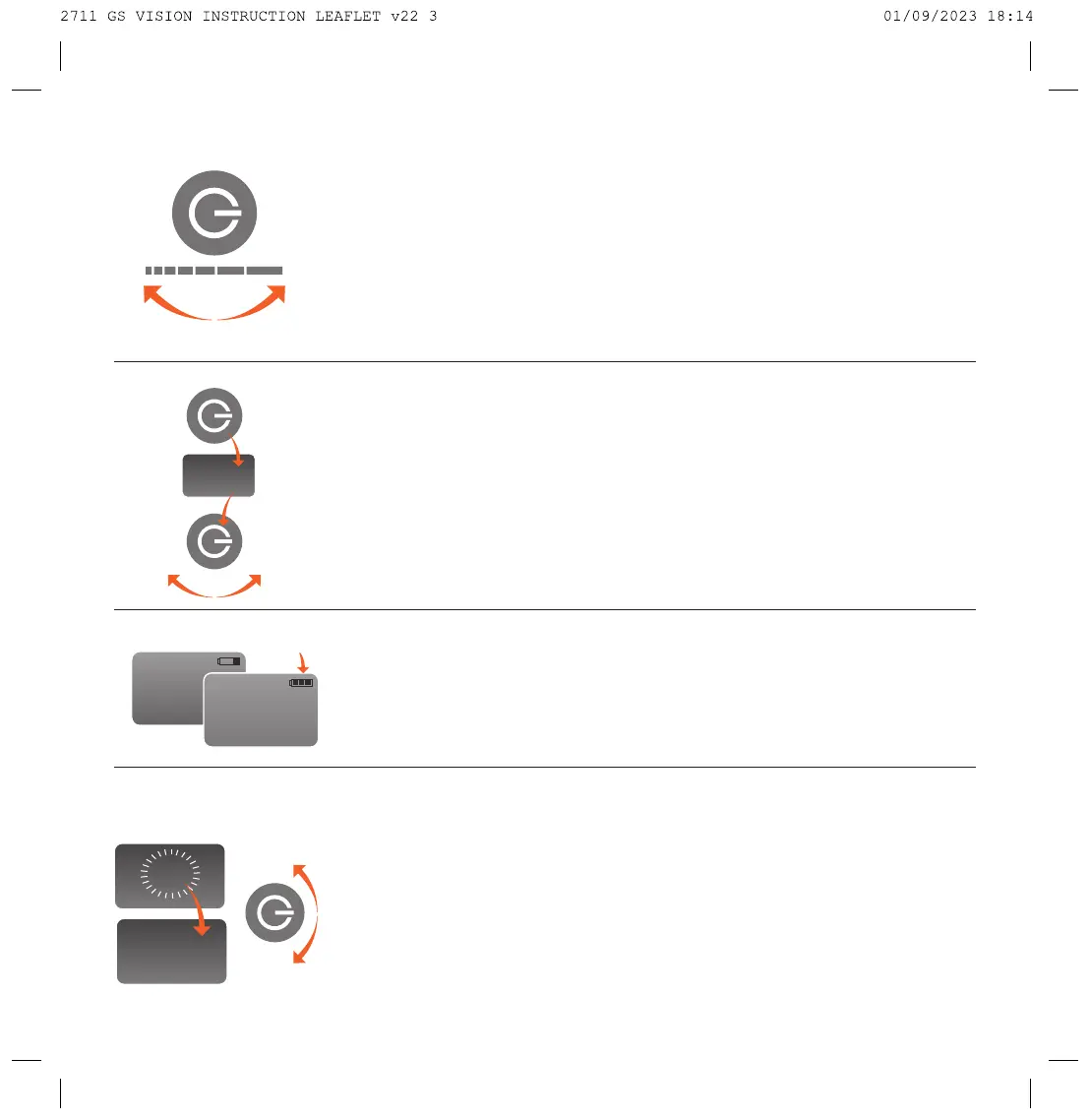
A single press of the control knob will offer power to the motor at the selected speed,
speed can be controlled with the control knob.
Press the control knob to stop the trolley and the display will revert to ashing.
Please note:
As you have the Vision Brake, your machine will stop quite quickly when
you press the off button, be careful not to walk into the back of the handle. Going
downhill, dial down the rotary control into the red area, the further you go towards
zero, the slower the machine will go. For a parking brake, put the machine
on zero. If VERY steep, turn the trolley 45 degrees to the slope to avoid gradual creep.
.
DISTANCE CONTROL
Your Vision trolley comes with a Distance Control function allowing you to send
your trolley off on its own for 10, 20 or 30 metres (approx.) Sometimes it can be
useful to send your machine off towards the next Tee whilst you putt out.
To access DC Mode press and hold the control knob for 2 seconds, DC will appear.
Whilst DC is showing, rotate the control knob to cycle between 10, 20 and 30.
Press the control knob down when the distance required appears on the screen.
Your machine will then proceed at speed 6.0 and the display will count down.
You can stop the machine by pressing the control knob.
BATTERY INDICATOR
Your Vision comes with a battery indicator on the top right of the main screen –
this will give you an indication of how much power you have remaining in your
battery. Please note – in Simplicity/Competition Mode the battery indicator
will not show.
PROGRAMMING MODE
With the power on and “0.0” ashing press and hold the on/off knob down for
10 seconds until “Program” is displayed.
By rotating the control knob, you will scroll
between “Normal”, “Simple”, “Name”, “Reset”, “Clock”, “Hand” and Exit Functions
NAME–
Here you can add a personalised greeting to your machine. You can enter
your name or nick name in two rows of 8 letters or digits. The relevant digit will ash
when it is available for change, pressing once moves you on one step. There is also
the option to choose a blank if you wish to centre. To save, hold down for 5 seconds.
Now go to EXIT to come out of programming.


 To Next Page
 Loading...