13
User manual
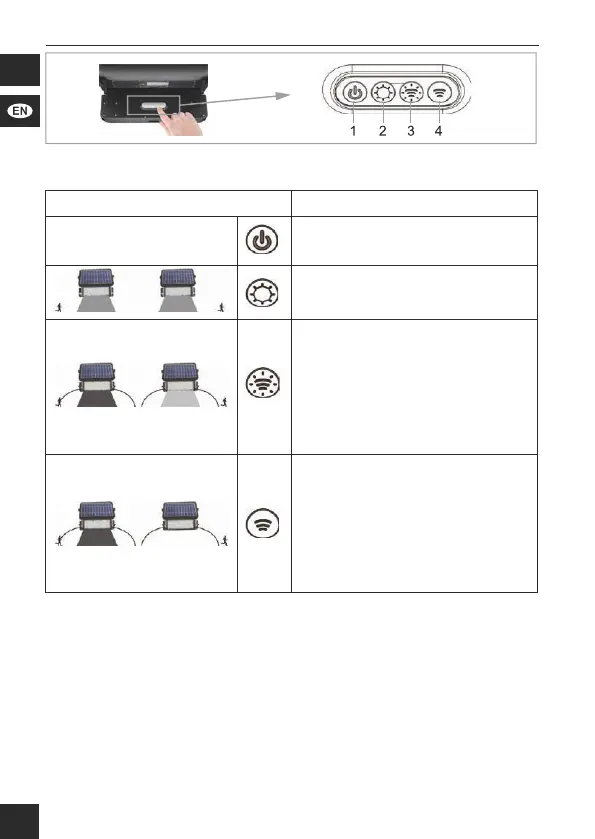
Fig. 6 : Operating
Figure Function
1 ON/OFF
2 The light is automatically swit-
ched on at dusk and lights up
with 20% of the maximum power.
3 The light shines at full power
after being triggered by a
movement in the detection area
of ≤ 8m.
After 20 seconds without move-
ment, performance is reduced
permanently to 3 % until new
motion detection.
4 The light shines at full power
after being triggered by a
movement in the detection area
of ≤ 8m.
After 30 seconds without move-
ment, the light switches off until
movement is detected again.
Ta b . 4 : Selection of the desired mode.
7 Replacement of the battery pack
1. Loosenthexingscrewsonthewall.
2. Remove the product from its attachment to the wall.
3. Loosen the screws of the battery compartment on the back of the
product.
4. Carefully open the battery compartment.
5. Disconnect the rechargeable battery pack plug from the connector
socket.
6. Remove the rechargeable battery pack from the battery compartment.
7. Replace the battery pack with the same type.


 To Next Page
 Loading...