EasyManua.ls Logo

GOODEE W80 - Page 8

GOODEE W80
20 pages
Print Icon
To Next Page IconTo Next Page
To Previous Page IconTo Previous Page
Loading...
Instruction
for
Wireless
Cellphone
Connection
(Screen
Mirroring)
=N(07)
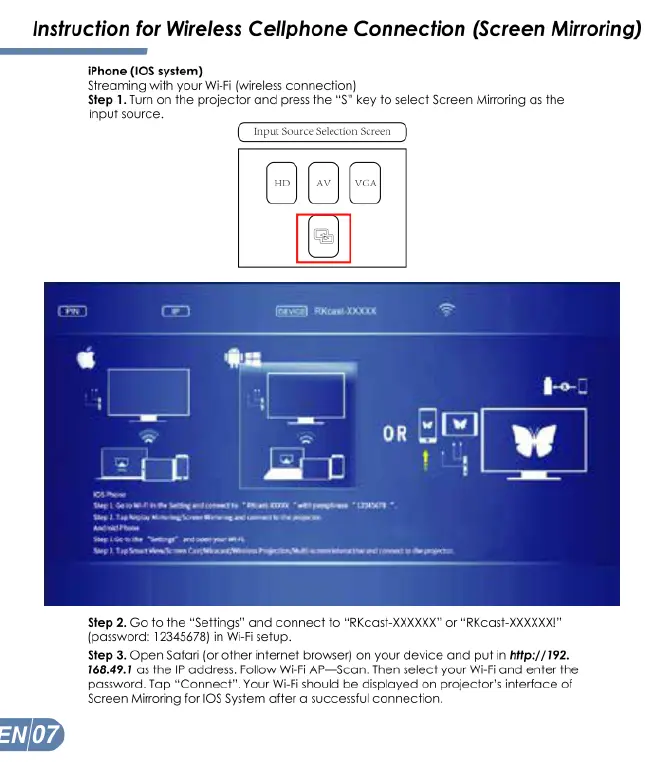
iPhone
(1OS
system)
Streaming
with
your
Wi-Fi
(wireless
connection)
Step
1.
Tum
on
the
projector
and
press
fhe
S"
key
1o
select
Screen
Mioring
as
the
input source.
Tnput
electior
()
Aeam
000k
Step
2.
Go
fo
the
“Settings"
and
connect
o
“RKCast-XXKXXX”
or
“RKCast-XXXKKXI"
(password:
12345678)
in
Wi-Fi
setup.
Step
3.
Open
Safari
(o
ofher
infernef
browser)
on
your
device and
put
in
hifp://192.
168.49.1
s
the
IP
addfess.
Follow
Wi-Fi
AP—Scan.
Then
select
your
Wi-Fi
and
enfer
the
password.
Tap
“Connect”.
Your
Wi-Fi
should
be
displayed
on
projector's
inferface
of
Screen
Mirroring
for
[0S
System
affer
a
successful
connection.

Related product manuals