Need help?
Do you have a question about the GOODEE W80 and is the answer not in the manual?
Lists all the accessories included in the projector package, such as cables and remote control.
Frequently asked questions covering mobile phone connection, image clarity, and mounting.
Detailed instructions for connecting MACs and various mobile phones (Android, iPhone) via adapters.
Steps to resolve blurry images by adjusting keystone and focus, with effective projection distance.
Explains the projector's compatibility with standard tripods and adjustable mounting.
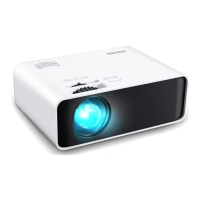
Diagrams illustrating the projector's external features, ports, and remote control layout.
Step-by-step instructions for initial setup, connecting devices, and adjusting image settings.
Instructions for connecting USB drives and SD cards for media playback.
Guide on connecting external devices via HDMI for video and audio input.
Instructions for connecting computers or devices using a VGA cable.
Guide for connecting devices using the AV cable, suitable for DVD players.
Detailed steps for wirelessly mirroring an iPhone's screen using Wi-Fi or cable.
Instructions for Android devices to screen mirror wirelessly via Multi-screen or Smart View.
Steps to mirror an iPhone screen using the original lightning cable connection.
Guide for Android phones to mirror via USB cable, including app installation and USB debugging.
Visual representation of screen sizes achievable at different projection distances.
Table detailing supported audio, picture, and video file formats and their decoding.
Key technical specifications including model, image system, resolution, connectivity, and dimensions.
Safety instructions to prevent fire or electric shock, covering ventilation, humidity, dust, and temperature.
Provides email addresses for customer support in the US and UK regions.
Offers contact information for suggestions or troubleshooting, emphasizing 24/7 availability.
 General
| Contrast Ratio | 10000:1 |
|---|---|
| Display Technology | LCD |
| Projection Size | 45-300 inches |
| Aspect Ratio | 16:9 |
| Input Ports | HDMI, USB, AV |
| Power Supply | AC 100-240V 50/60Hz |
| Native Resolution | 1920x1080P (1080P) |
| Speaker | 10W |

 To Next Page