EasyManua.ls Logo

GOODEE W80 - Connecting via Charging Cable (iOS)

GOODEE W80
20 pages
Print Icon
To Next Page IconTo Next Page
To Previous Page IconTo Previous Page
Loading...
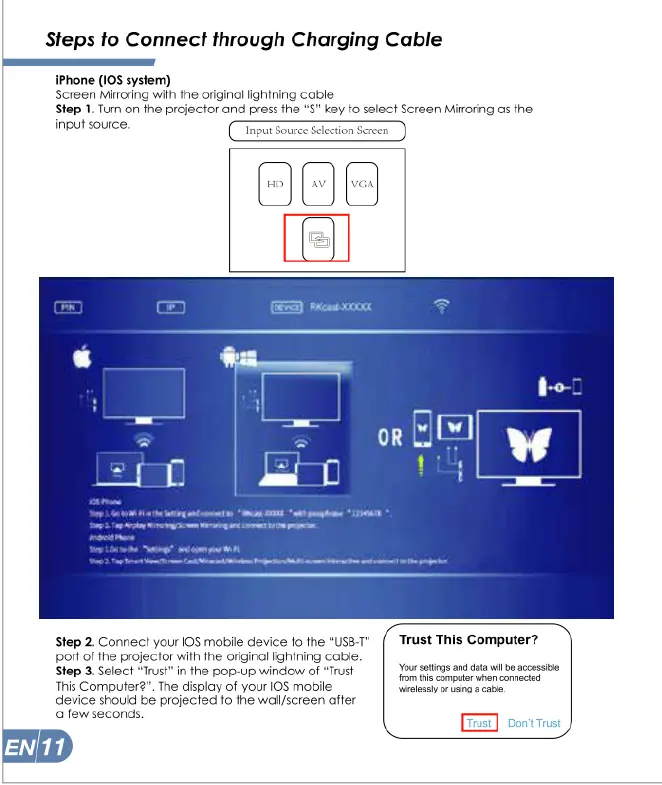
Steps
to
Connect
through
Charging
Cable
iPhone
(1OS
system)
Screen
Mirroring
with
the
original
lightning
cable
Step
1.
Turn
on
the
projector
and
press
the
“S”
key
to
select
Screen
Mirroring
as
the
input
source.
Input
Sour
()
et
0000
Step
2.
Connect
your
108
mabile
device
fo
the
"Usa-1"
(*
Trust
This
Computer?
ot
of
the
projector
with
the
orginal
ightning
cable.
Step
3.
Select
“Trust"
in
the
pop-up
window
of
“Trust
This
Computer2”.
The
display
of
your
I0S
mobile
device
should
be
projected
to
the
wall/screen
after
afew
seconds.
END
Your
stings
and
daa
wil
b
accesside
fomtis
camputer
when
conneciad
welesely
o
ung
8
ca
=]

Related product manuals