EasyManua.ls Logo

GOODEE W80 - Android Wireless Connection

GOODEE W80
20 pages
Print Icon
To Next Page IconTo Next Page
To Previous Page IconTo Previous Page
Loading...
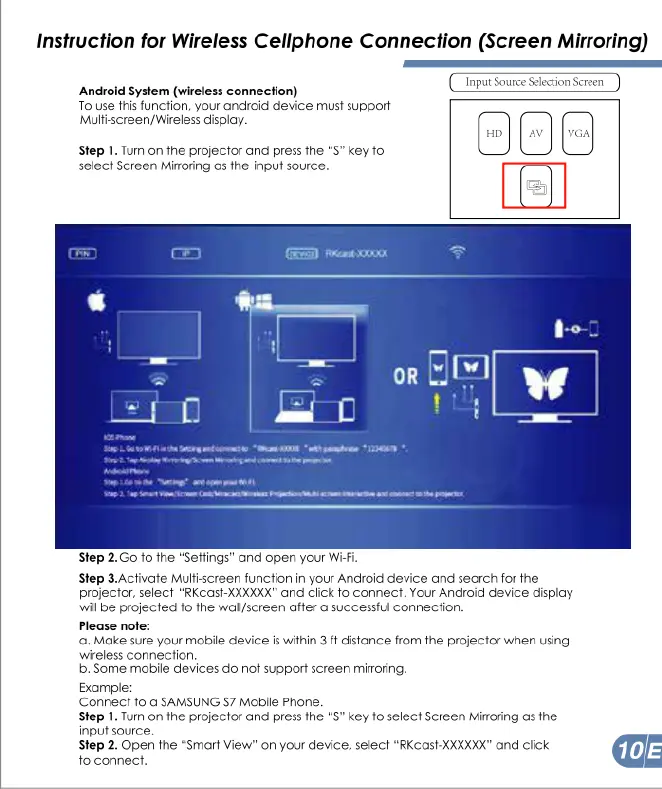
Instruction
for
Wireless
Cellphone
Connection
(Screen
Mirroring)
Android
System
(wireless
connection)
To
use
this
function,
your
andioid
device
must
support
Multiscreen/Wireless
display.
Step
1.
Tum
on
the
projector
and
press
fne
“S”
key
to
select
Screen
Miroring
as
the
input
source.
Step
2.Go
fo
fhe
“Seffings"
and
open
your
Wi
Step
3.Activate
Mulfiscreen
function
in
your
Android
device
and
search
for
the
projector,
select
"RKCas-XXXXXX"
and
ciick
fo
connect.
Your
Andioid device
dispiay
wil
be
projected
fo
fhe
wallscreen
affer
o
successful
connection
Please
nofe:
.
Make
sure
your
mobile
device
is
within
3
ft
distance
from
the
projector
when
using
wireless
connection
b.
Some
mabile
devices
do
not
support
screen
mioring.
Example:
Connect
1o
@
SAMSUNG
57
Mobile
Phone.
Step
1.
Tum
on
fhe
projector
and
press
fhe
"S”
key
1o
select
Screen
Mioring
o
the
input source.
Step
2.
Open
the
"Smart
View"
on
your
device,
select
"RKcast-XXXXXX"
and
click
@E
fo
connect.

Related product manuals