EasyManua.ls Logo

GOODEE W80 - Page 10

GOODEE W80
20 pages
Print Icon
To Next Page IconTo Next Page
To Previous Page IconTo Previous Page
Loading...
Instruction
for
Wireless
Cellphone
Connection
(Screen
Mirroring)
I—
WHY
DOES
THE
PROJECTOR'S
WI-FI
STOP
SHOWING
ON MY IPHONE'S
WI-FI'S
LIST?
After
the
inilial
connection
1o
the
selected
Wi-Fi
on your
device,
fhe
projector
wil
be
automatically
conneced
fo
the
same
Wi-Fiin
the
future,
and
the
projector's
Wi-Fi
no
longer
appears
on
the
Wi-Fi
list
of
your
device.
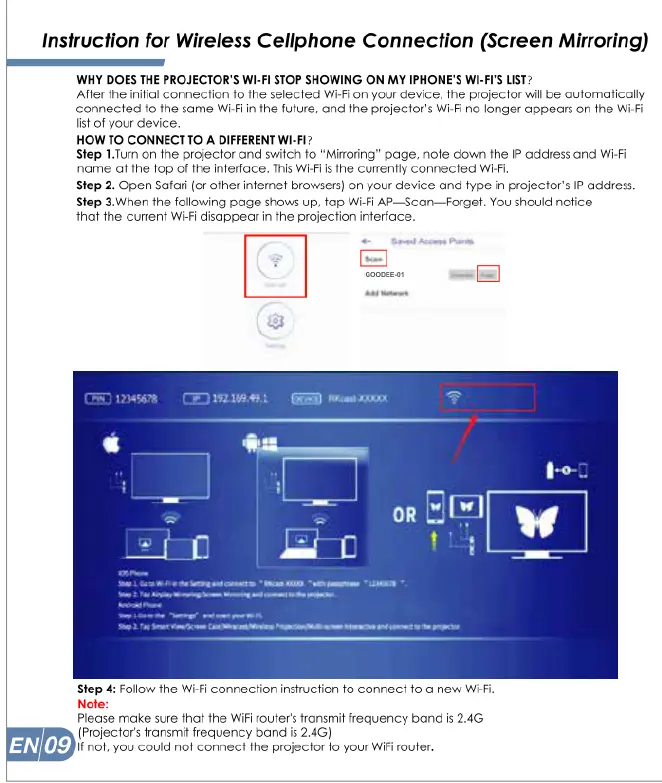
HOW
TO
CONNECT
TO
A
DIFFERENT
WI-Fi?
Step
1.Tum
on
the
projector
and
switch
fo
“Miraring”
page.
nofe
down
the
IP
address
and
Wi-Fi
name
at
fhe
fop
of
the
interface.
This
Wi-Fils
the
currently
connected
Wi-Fi
Step
2.
Open
Safari
(or
other
infemet
browsers)
on
your
device
and
fype
in
projector’s
IP
address.
Step
3.When
the
following
page
shows
up,
tap
Wi-Fi
AP—Scan—Forget.
You
should nofice
that
the
current
Wi-Fi
disappecr
in
the
projection
inferface.
(oo
(Projectors
fransmif
frequency band
is
2.4G)
If
not.
you
could
not
connect
the
projector
fo
your
Wifi
router.

Related product manuals