Need help?
Do you have a question about the Goodmans GHC-50 and is the answer not in the manual?
Positioned on top of or underneath the television for optimal listening pleasure.
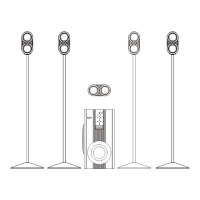
Positioned either side of the television to form an equilateral triangle with the listener.
Mounted on a wall or stands, level with seat, angled towards each other, above head height.
Can be positioned anywhere as human ears cannot resolve low frequency sound direction.
Connect speakers, plug in, switch on, and adjust levels using remote for 5.1 surround sound.
Press CENTRE button and use UP/DOWN volume buttons to adjust level.
Press FRONT L&R buttons and use UP/DOWN volume buttons to adjust level.
Press SURROUND L&R buttons and use UP/DOWN volume buttons to adjust level.
Press BASS or TREBLE buttons and use UP/DOWN volume to adjust tone.
Press SUBWOOFER button and use UP/DOWN volume buttons to adjust level.
Use AUX, TV, or CD input, press VIRTUAL SURROUND for 5.1 sound if applicable.
Press MASTER button and use UP/DOWN volume to adjust all speaker levels simultaneously.
Press Standby/On button on remote to switch system off; indicator will illuminate.
Remove cover, insert 2 AAA batteries, replace cover.
Clean unit bottom, attach rubber feet with self-adhesive tape to corners.
 General
| Configuration | 5.1 |
|---|---|
| Satellite Speakers | 4 |
| Center Speaker | 1 |
| Subwoofer | 1 |
| Speaker Type | Home Cinema |
| Total Power Output | 50W |
| Frequency Response | 20Hz - 20kHz |

 To Next Page