GoodMeasure Integrator Installation Guide v3.1 www.goodmeasure.net Page 2
Step 2: Mount and connect the Integrator hardware
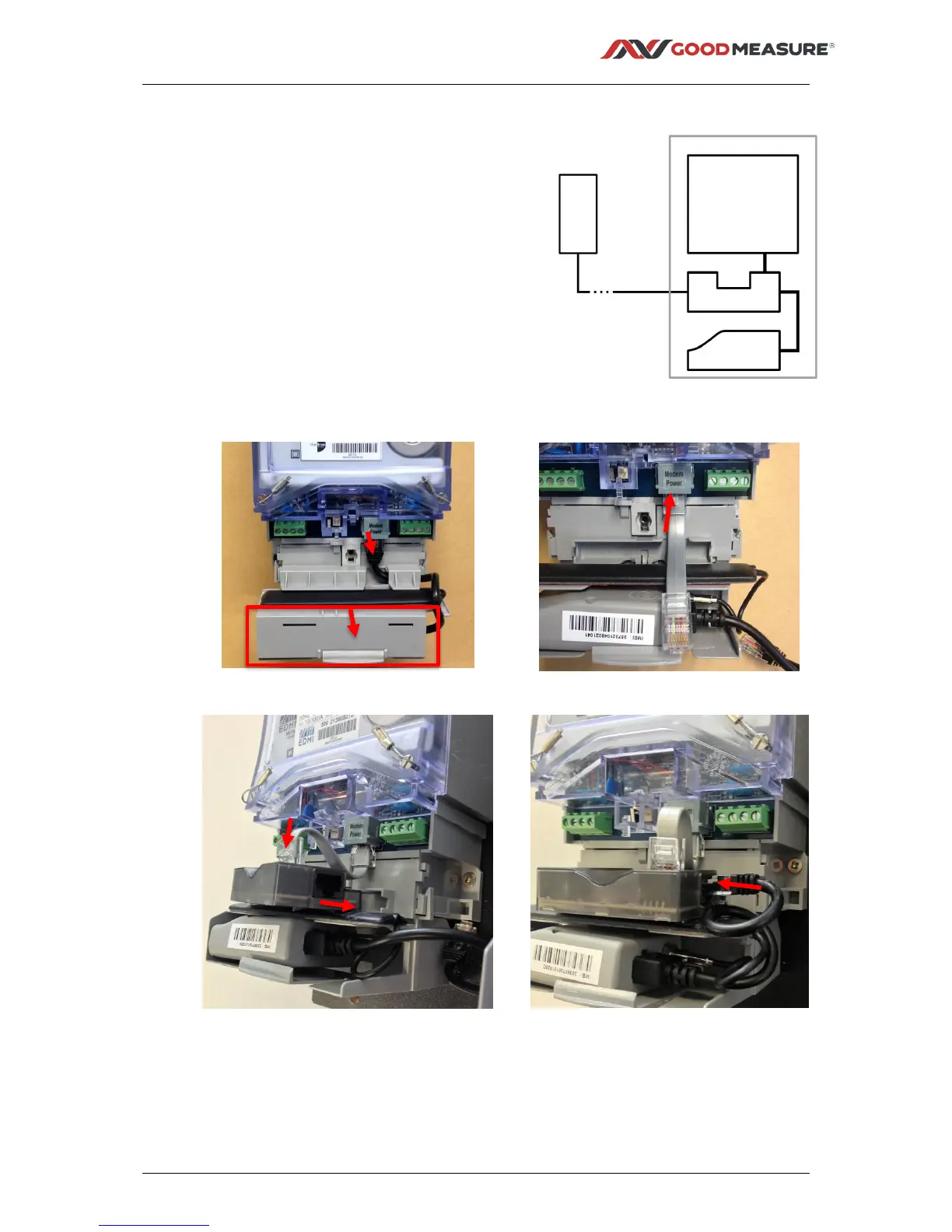
1. Remove the meter terminal cover, the internal
modem cover and unplug the RJ45 modem cable
connection.
2. Fit the short RJ45-RJ45 interconnect cable provided
to the meter.
3. Fit the Integrator into the slot above the modem and
plug the interconnect cable into the top Integrator
connector.
4. Plug the modem cable into the right hand end of the
Integrator.
5. If external MODBUS compatible energy meters or
sensors are to be connected, use the supplied orange
and white interface cable. Ensure that polarity is
correct: orange to the A (or +) terminal, and white to
the B (or -) terminal. Then connect to other MODBUS
devices using ‘daisy chain’ interconnections.
Modem cable connection tip: grip the RJ45 end of the cable in right hand and pull gently into
a horizontal position. Twist the cable one full turn anticlockwise then rotate plug inwards to insert
into the Integrator socket as shown in image 4 above. This twist helps prevent the terminal cover
snagging on the cable during reassembly.



 To Next Page