14
Quick Installation Guide V1.1-2022-02-21
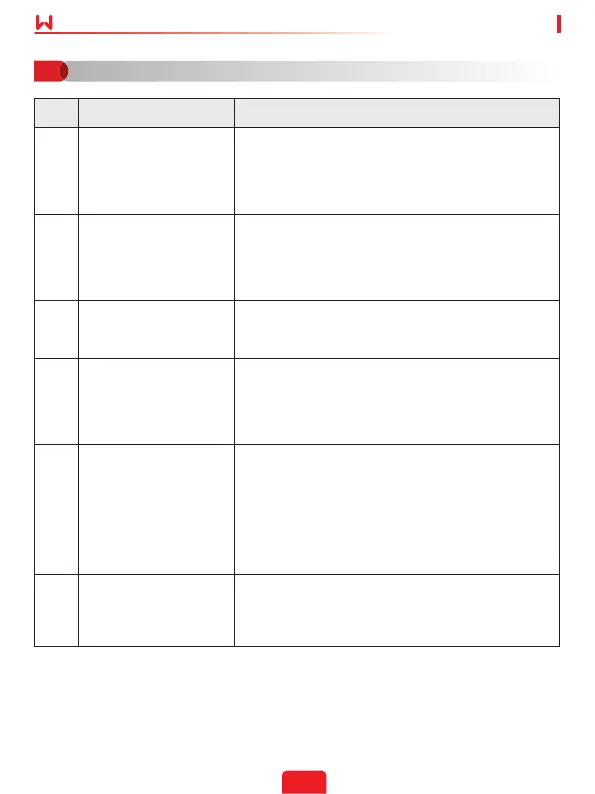
No. Problem Solutions
1 Cannot nd Solar-WiFi**
1. Make sure that the inverter is powered on and the
Wi-Fi/LAN Kit is connected properly.
2. Make sure that the smart device is within the
communication range of the Wi-Fi/LAN Kit.
3. Restart the inverter.
2
Unable to connect to
Solar-WiFi**
1. Enter the password: 12345678.
2. Make sure that no other smart device is connected
to Solar-WiFi**.
3. Restart the inverter and reconnect Solar-WiFi**.
4. Make sure the password is correct.
3
Cannot log in to
10.10.100.253
1. Switch browsers like Google Chrome, Firefox, IE,
Safari.
2. Restart the inverter and reconnect the WiFi.
4 Cannot nd router SSID
1. Put the router nearer to the inverter. Or add some
WiFi relay devices.
2. Check if the channel number of router is higher
than 13. If yes, modify it into a lower number at
router conguration page.
5
WiFi LED indicator blinks
twice continuously with
all conguration steps
done
1. Restart the inverter.
2. Check if the SSID, encryption method, encryption
algorithm and password on WiFi conguration
page is the same with that of Wireless Router , if it
is dierent , please modify it.
3. Restart Wireless Router.
4. Mover Wireless Router closer to the inverter or use
a wireless repeater to enhance WiFi signal.
6
WiFi LED indicator blinks
four times continuously
when all conguration
steps done
1. Connect smart device to network and access to
SEMS Portal App to check if the inverter is online.
2. Restart Wireless Router and the inverter.
Troubleshooting
07


 To Next Page