Need help?
Do you have a question about the Gooloo GTX280-Y and is the answer not in the manual?
Instructions to charge the unit before reading the manual.
Warning about using the unit with 12V batteries and potential dangers.
Description and identification of the power station's main parts and ports.
Explanation of icons and indicators on the power station's display screen.
Details on cigarette lighter socket, USB ports, AC socket, and indicator light.
Detailed specifications including capacity, ports, current, and operating conditions.
List of all items included in the product package.
Information on how many times the unit can charge various devices via different ports.
Details on achieving 100W fast charging using a PD charging cable.
Information on USB, Quick Charge 3.0, and Type-C output capabilities.
Explanation of 15V/10A DC and 110V/60Hz AC output functions and usage.
Instructions on how to turn on/off and cycle through LED flashlight modes.
Step-by-step guide on how to jump start a 12V vehicle.
Instructions on connecting and using the on-board inverter with the power station.
Answers to common questions about operating temperature and proper storage.
Answers to common questions about recharging and charging other devices.
Answers to common questions about heating, auto-shutdown, and turning off the unit.
Answers to common questions about jump starting vehicles and troubleshooting.
Important warnings regarding product usage, handling, and environmental conditions.
Further warnings on disassembly, supervision, charging temperatures, and vehicle starting.
Guidance on product maintenance, malfunction handling, storage, and disposal.
Information on online after-sales service, money-back guarantee, and replacement policy.
Details on warranty claim requirements, exclusions, and GOOLOO's liability.
Key 'Do Not' actions including submerging, disassembling, dropping, and extreme temperatures.
Details on warranty service, technical support, contact methods, and website.
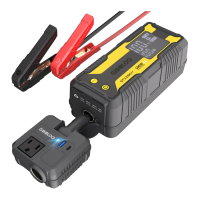
The GOOLOO GTX280-Y is a detachable inverter portable power station designed for outdoor emergency power supply. It offers multiple output ports to charge a wide range of devices, including laptops, phones, tablets, drones, cameras, CPAP machines, and mini-fridges.
The GTX280-Y serves as a versatile power source, capable of both charging various electronic devices and jump-starting 12V vehicle batteries. Its detachable inverter design allows for flexible use, providing both DC and AC power outputs. The device features a display screen that provides essential information such as battery power percentage, low current mode status, battery clip connection status, low temperature reminders, and readiness to start a vehicle, as well as charge/discharge power.
For charging personal electronics, the GTX280-Y includes USB-A and USB-C ports. The USB-C1 port supports Power Delivery (PD) for both input and output, allowing for fast charging of the unit itself and compatible devices. The inverter component provides additional USB-A and USB-C outputs, along with a 15V/10A cigarette lighter output socket and an AC socket, enabling it to power larger appliances up to 120W (rated) or 150W (peak).
The jump-starting function is a key feature, designed for 12V vehicle batteries. The device guides the user through the process with on-screen indicators, ensuring correct connection and readiness before starting the engine. It also includes a BOOST button for situations where the car battery is too low to be detected automatically.
To begin using the GTX280-Y, it is recommended to charge it first by connecting the inverter to the host unit using the 100W PD charging cable. The device supports fast charging, allowing for a full charge in approximately 2.8 hours when using the inverter's Type-C port with a PD100W charging cable. It can also be charged via a wall charger (not included) or compatible solar panels (60W/80W/100W/120W Max, not included), with charging time dependent on solar light intensity.
For USB output, standard USB cables can be connected to the 5V/2.4A USB port to charge smart devices. The Quick Charge 3.0 USB output supports 5V to 12V up to 18W for compatible smart devices. The Type-C output provides 5V to 20V up to 100W for Type-C compatible smart devices. The actual output voltage and current will vary based on the connected devices.
The 15V/10A DC output port, designed for a small round head connector, can power 15V vehicle products or electronics using an optional switch cable. The 15V/10A DC cigarette lighter output socket allows the inverter or other devices to be powered. The 110V/60Hz AC output provides power for electronic devices with consumption less than 150W, such as laptops, displays, and home appliances.
The device also features an LED flashlight with three modes: Normal, SOS, and Strobe, which can be activated by pressing the power button for 1-2 seconds after powering on. A light press cycles through the modes.
When jump-starting a vehicle, ensure the unit's battery power is above 20%. Connect the jumper cable to the unit, then connect the clamps to the car battery (red to positive, black to negative). The screen will display "READY" when correctly connected, indicating it's safe to start the engine. If the car battery is extremely low, the BOOST button can be used to initiate the start.
The inverter component is designed to be inserted into the automobile cigarette lighter socket or the GOOLOO GTX280-Y's dedicated socket. Users should ensure a tight connection. Before use, confirm the inverter's power indicator is on and that the electrical appliance's power consumption is below 150W. When not in use, the car inverter should be removed to prevent battery drain.
Regular recharging is crucial for the longevity of the GTX280-Y. If the LCD display shows capacity less than 5%, it should be recharged as soon as possible. For storage, it is recommended to recharge the unit every 3 months to prevent power shortage.
The device is equipped with safety protection technologies, including overcharge/discharge protection, fuse protection, and against-reverse plug protection. These features help prevent damage to the unit and connected devices.
Users should keep the product dry and avoid placing it in water or wet environments to prevent electric shock and damage. Foreign objects should not be inserted into the input and output interfaces. The unit should be used in a well-ventilated area and protected from falls.
Avoid using the product in environments with extreme temperatures (too high or too low), as this can lead to product malfunction, reduced service life, or damage. Specifically, the operating temperature range is -20°C to 60°C (-4°F to 140°F). Temperatures exceeding 60°C (140°F) can damage the internal battery cells, potentially causing swelling and unsafe conditions. Direct sunlight or hot temperatures should be avoided, and the unit should not be left in a parked car under direct sunlight for extended periods.
The charger may emit heat during normal use, which is not a cause for concern unless the temperature becomes excessively high, in which case usage should be stopped, and customer service contacted.
If the unit automatically shuts off after 30 seconds when charging light-current devices (like headphones or smartwatches), it's due to a minimum load current limitation (200mA). In such cases, the "Low Current Mode" should be activated by pressing the POWER and BOOST buttons simultaneously for 2-3 seconds.
The unit can charge other devices while it is being charged itself, but it cannot charge other devices while simultaneously starting a vehicle.
The GTX280-Y will automatically turn off after 30 seconds of inactivity. Alternatively, the POWER button can be pressed for approximately 10 seconds to force a shutdown.
In case of a malfunction, such as the unit not charging up or not charging other devices, users are advised to contact customer service with their order ID. If the unit fails to start a vehicle, ensure it is fully recharged, press the "BOOST" button after connecting the battery correctly (indicated by "READY" on the screen), and attempt to start the vehicle within 30 seconds. If the issue persists, contact customer service.
The product should not be disassembled by non-professional technicians, as this poses risks of electric shock, fire, or explosion. It should only be charged at ambient temperatures within the specified range. The device is not intended for use as a vehicle battery or a battery charger. When jump-starting, avoid continuous attempts more than 4 times within 10 minutes. If the engine doesn't start within 3 seconds, stop cranking and wait at least 30 seconds before trying again. Crucially, do not connect the jump starter's clamps to the battery in reverse after pressing the "BOOST" button.
The inverter's output power must be greater than that of the electrical appliance it powers. The unit should be stored in a ventilated, dry place, away from rain, flammable materials, and explosives, with an ambient temperature not exceeding 40°C. The plug of the on-board inverter should be kept clean to prevent poor contact or overheating.
If the car inverter is not in use, it should be removed from the cigarette lighter socket and stored properly. If a malfunction is suspected, discontinue use and seek repair from qualified personnel or contact customer service.
In extreme conditions, battery leakage may occur. If contact with skin or eyes happens, wash immediately with soap and water or flush eyes with cold water for at least 1 minute and seek medical attention. Lithium battery products should be disposed of according to local regulations at the end of their product life.
 General
| Battery Type | Lithium-ion |
|---|---|
| Output Voltage | 12V |
| USB-C Input | 5V/3A, 9V/2A, 12V/1.5A |
| USB Output 1 | 5V/2.4A |
| USB Output 2 | 5V/2.4A |
| DC Output | 12V/10A |
| USB Ports | 2 |
| Safety Features | Over-current protection, short circuit protection, overload protection, over-voltage protection, over-charge protection |
| USB Output | 5V/2.4A |

 To Next Page