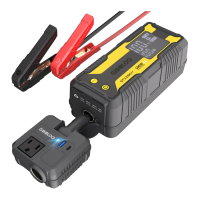
The GOOLOO GTX280 is a detachable inverter portable power station designed for outdoor emergency power supply. It features multiple output ports to charge a wide range of devices, including laptops, phones, tablets, drones, cameras, CPAP machines, and mini-fridges. The device incorporates GOOLOO's SUPERSAFE safety protection technology.
Function Description:
The GTX280 consists of a main host unit and a detachable car inverter. The host unit provides various DC and USB outputs, while the inverter adds AC output and additional USB/USB-C ports.
Host Unit (GTX280):
- Display Screen: Shows battery power percentage, low current mode indicator, battery clip reversal warning, battery low temperature reminder, and "Ready to Start the Vehicle" status. It also displays charge/discharge power.
- 12V Battery Clamps Output: Used for jump starting 12V vehicle batteries.
- DC Output Port (15V/10A, Max 150W): Powers 15V vehicle products or electronics.
- 15V/10A Cigarette Lighter Output Socket: Connects the inverter or powers devices requiring a cigarette lighter socket.
- USB1 Output Port (5V/2.4A): Standard USB charging for smart devices.
- USB2 Output Port (QC3.0, 5V/9V/12V): Quick Charge 3.0 compatible output for smart devices.
- USB-C1 In/Output Port (PD100W Max): Supports Power Delivery (PD) for both charging the unit and outputting power to compatible devices.
- Power Button: Turns the unit on/off and controls the LED light.
- BOOST Button: Used for jump starting vehicles when the battery is too low to detect.
- LED Light: Provides illumination with Normal, SOS, and Strobe modes.
Car Inverter:
- Cigarette Lighter Plug (12-16.8V/10A): Connects the inverter to the GTX280 host or an automobile cigarette lighter socket.
- USB3 Output Port (QC3.0, 5V/9V/12V): Quick Charge 3.0 compatible output.
- USB-C2 Output Port (PD30W Max): Power Delivery (PD) output for compatible devices.
- Vents: For heat dissipation.
- 15V/10A Cigarette Lighter Output Socket: Provides a cigarette lighter output.
- AC Outlet (Rated Power 120W, Peak 150W): Provides 110V/60Hz AC power for electronic devices with power consumption less than 150W.
- Indicator Light: Shows the inverter's operational status.
Important Technical Specifications:
- Capacity: 280Wh
- Starting Current: 600A (3s)
- Peak Current: 3000A
- USB-C1 In/Out: PD100W Max (5V/3A, 9V/3A, 12V/3A, 15V/3A, 20V/5A); Backwards Compatibility
- USB-C2 Out: PD30W Max
- USB1 Out: 5V/2.4A
- USB2 Out: QC3.0 18W Max (5V/3A, 9V/2A, 12V/1.5A)
- USB3 Out: QC3.0 18W Max (5V/3A, 9V/2A, 12V/1.5A)
- DC OUT: 15V/10A (150W Max)
- AC Out: 110V~60HZ (Rated Power 120W, Peak 150W)
- Input: 12-16.8V/10A cigarette lighter input
- Full Charge Time: Approximately 2.8 hours using the inverter's Type-C port with the PD100W charging cable.
- Lifetime: > 1000 Cycles
- Operating Temp: -20°C~60°C / -4°F~140°F
- Battery Type: Lithium polymer battery
Usage Features:
-
Charging the GTX280:
- PD100W Max Speed Charging: Connect the inverter to the GTX280 host with a 100W PD charging cable. A 100W wall charger (purchased separately) can also be used.
- Wall Charger (Not included): Around 2.8 hours.
- Type-C Charger: Around 2.8 hours.
- Solar Panels (60W/80W/100W Max, Not included): Charging time depends on solar light intensity.
- It is recommended to recharge the unit if the LCD display shows capacity less than 5% or every 3 months if not in use for a long time.
-
Charging Other Devices:
- USB Output: Connect a standard USB cable to the 5V/2.4A USB output port.
- Quick Charge 3.0 USB Output: Supports 5V to 12V output up to 18W.
- Type-C Output: Supports 5V to 20V output up to 100W.
- 15V/10A DC Output: Plug the DC head into the 15V 10A output port and press the switch button.
- 110V/60Hz AC Output: Connect devices with power consumption less than 150W to the AC outlet on the inverter.
- Low Current Mode: For devices needing light charging current (e.g., headphones, smartwatches), press the POWER and BOOST buttons simultaneously for 2-3 seconds to activate this mode. This prevents the unit from automatically shutting off in 30 seconds due to minimum load current limitation (200mA).
-
Jump Starting a Vehicle:
- Ensure battery power is >20%.
- Insert the jumper cable into the unit.
- Connect the clamps to the car battery: Red to positive (+), Black to negative (-).
- When the screen shows "READY" (Solid), start the vehicle engine.
- If the car battery is too low to detect or totally dead, press the BOOST button.
- Do not start the vehicle continuously more than 4 times within 10 minutes. If the engine fails to start within 3 seconds, stop cranking and wait at least 30 seconds before trying again.
- If "READY" (Solid) appears, clamps are connected correctly. If "X" appears, clamps are reversed.
- If the unit can't start a vehicle, fully recharge it, press "BOOST" after connecting correctly, and start within 30 seconds.
-
Using the Inverter:
- Insert the inverter's cigarette lighter plug into the automobile cigarette lighter socket or the GTX280's 15V/10A cigarette lighter output socket. Ensure a tight connection; if loose, open the shrapnel on both sides of the insert head before inserting.
- Confirm the inverter's power indicator is on and the electrical appliance's power is below 150W.
- Insert the power plug of the appliance into the inverter's socket.
- Remove the inverter from the cigarette lighter socket when not in use to avoid draining battery power.
-
LED Flashlight:
- Power on the unit, then press the power button for 1-2 seconds to turn on the LED light.
- Press lightly to cycle through Normal, SOS, Strobe, and Off modes.
Maintenance Features:
- Recharging Frequency: Recharge every 3 months to prevent power shortage if not in use for a long time.
- Storage Temperature: Store at ambient temperature of -20~60°C / -4~140°F. Avoid direct sunlight or hot temperatures (>60°C/140°F) to prevent battery damage, swelling, and safety risks. Do not leave in a parked car under direct sunlight for long periods.
- Cleaning: Clean dirt at the plug of the on-board inverter to avoid poor contact or abnormal overheating.
- Ventilation: Use the product under good ventilation.
- Dry Environment: Keep the product dry and do not place it in water or wet places.
- Disposal: Lithium battery products should be disposed of according to local regulations at the end of their life.
Safety Warnings:
- Read the manual carefully before use.
- Do not use with other electronic products that exceed specifications.
- Do not use damaged output cables or plug-in terminals.
- Do not insert foreign matters into input/output interfaces.
- Prevent the product from falling from height.
- Do not use in environments with too high or too low temperatures.
- Do not expose to fire or temperatures higher than 60 degrees.
- Do not attempt to disassemble the product or allow non-professional technicians to do so.
- Do not allow people without proper knowledge or ability to operate the device without supervision.
- Only charge at ambient temperature of -20~60°C / -4~140°F.
- Do not use it as a vehicle battery or a battery charger.
- Do not connect the jump starter's clamps to the battery reversely after pressing the "BOOST" button.
- The output power of the inverter must be greater than that of the electrical appliance.
- Place in a ventilated, dry place, protected from rain, away from inflammables and explosives, with ambient temperature not greater than 40°C.
- If the car inverter is not in use, remove it from the cigarette lighter socket.
- If a malfunction is suspected, stop operation, cut off input/output, and seek repair from qualified personnel or contact customer service.
- Stay away from children.
- In case of battery leakage, wash hands/exposed parts with soap and water. If it enters eyes, flush with cold water for at least 1 minute and seek medical attention.
Warranty and Customer Service:
- Warranty: 18 Months Limited Warranty Service, Lifetime Technical Service.
- Money Back Guarantee: 30 Days through Amazon.
- Replacement: Defective units replaced within 18 months due to manufacturing issues.
- Contact: fiona@gooloo.com (recommended for issues, attach order ID) or 1-888-886-1805 (Mon-Fri, PST 9:00a.m.-5:00p.m.).
- Website: www.gooloo.com for FAQ and more information.
- Disclaimer: Warranty requires original receipt (order ID) and does not cover damage from normal wear, physical abuse, improper installation, misuse, modification, or unauthorized repairs. GOOLOO's discretion for repair/replacement.

 Need help?
 General

 To Next Page