
 Need help?
Do you have a question about the GoPro HERO 7 SILVER and is the answer not in the manual?
Details on GoPro setup, charging, card installation, filming time, charging station, and app usage recommendations for optimal battery life.
Instructions for powering the GoPro Hero 7 on and off, indicated by a 3-second press.
Explains tapping to select items or change settings on the GoPro Hero 7.
How to swipe left or right to navigate between Video, Photo, and Time Lapse modes.
Instructions on swiping down to open the Dashboard and swiping up to access the Media Gallery.
How to press and hold the screen to turn on and adjust Exposure Control settings.
Steps to start and stop video recording using the Shutter button after selecting Video mode.
Instructions on how to take a photo using the Shutter button after selecting Photo mode.
Guide to downloading the free GoPro Quik app for syncing, viewing, editing, and sharing footage.
How to request footage upload via Dropbox or Google Drive for cloud download.
Information on obtaining a copy of footage on a Micro SD card with an adapter upon returning to port.
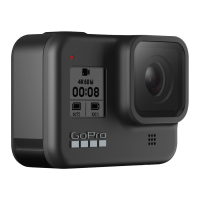
This document serves as a quick guide for the GoPro Hero 7, available in both Silver and White editions, published in 2022. It provides essential information for users to operate the camera, capture footage, and manage their media.
Before beginning your adventure, it's important to note that the rental GoPro Hero 7 comes pre-configured. It is fully charged, and a 32GB SD card is already installed, providing approximately one hour of filming time. For convenience, a charging station is available on the vessel. Users are encouraged to download the GoPro QUIK app if they wish to download their data at the end of the tour. However, it's advised to avoid using the QUIK app to control the camera during use, as this can significantly reduce battery life.
To power the camera on or off, locate the power button. A long press (approximately 3 seconds) will initiate the power cycle.
The GoPro Hero 7 features a responsive touch screen interface for intuitive control.
The main screen displays several key indicators:
The GoPro Hero 7 offers three primary capture modes: Video, Photo, and Time Lapse Video. You can easily switch between these modes by swiping left or right on the touch screen.
There are several convenient ways to retrieve your captured footage:
This guide aims to provide a comprehensive overview of the GoPro Hero 7's functions and usage, ensuring a smooth and enjoyable experience for all users.
 General
| Video Resolution | 4K30 |
|---|---|
| Photo Resolution | 10MP |
| Touch Screen | Yes |
| Voice Control | Yes |
| GPS | No |
| Built-in Wi-Fi | Yes |
| Built-in Bluetooth | Yes |
| Waterproof | 10m (33ft) without a housing |
| Battery Life | Approximately 1-2 hours |
| Dimensions | 62.3 x 44.9 x 28.3mm |













 To Next Page