1.
For the latest features and optimal performance, be sure your
HERO11 Black has the latest software. The fastest and easiest way to
update it is with the GoPro Quik app. You can also update it manually.
Make Sure You Have the Latest Software
The Quik app turns your phone into a remote control for your
HERO11 Black. And, it brings your best shots to life by automatically
creating highlight videos from your favorite photos and videos,
complete with beat-synced music and eects.
Get the GoPro Quik App
2.
Your GoPro should arrive with a partially charged battery, but it’s a
good idea to top it o so you’re ready for whatever comes up.
Get a Full Charge
3.
For maximum runtime and the best cold-weather performance, only use
GoPro Enduro batteries with your HERO11 Black. Non-GoPro batteries
may fit in your camera, but could limit its performance. They will also
void your camera’s warranty and may cause safety risks.
Use Real GoPro Batteries
4.
Use HERO11 Black’s Extended Battery mode to maximize your
camera’s runtime. It uses the most energy-ecient resolutions and
frame rates to extend battery life. Swipe down on the rear touch screen
to access the Dashboard. Swipe left and tap Video Mode to access
Extended Battery mode.
Maximizing Battery Life
5.
Top 11 Tips for Your GoPro HERO11 Black
6.
You’ll need an SD card that’s capable of meeting the high-performance
demands of HERO11 Black. Use a brand-name card that fits these requirements:
• microSD, microSDHC™ or microSDXC™
• Rated Class v30, UHS-3 or higher
• Capacity up to 512GB
Get an SD Card That Can Keep Up

 Need help?
 General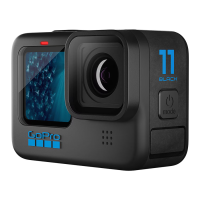

 To Next Page