The Basics
The First Step
You may need to upgrade your camera’s software before you can use
Volta. For step-by-step instructions, go to GoPro.com/update.
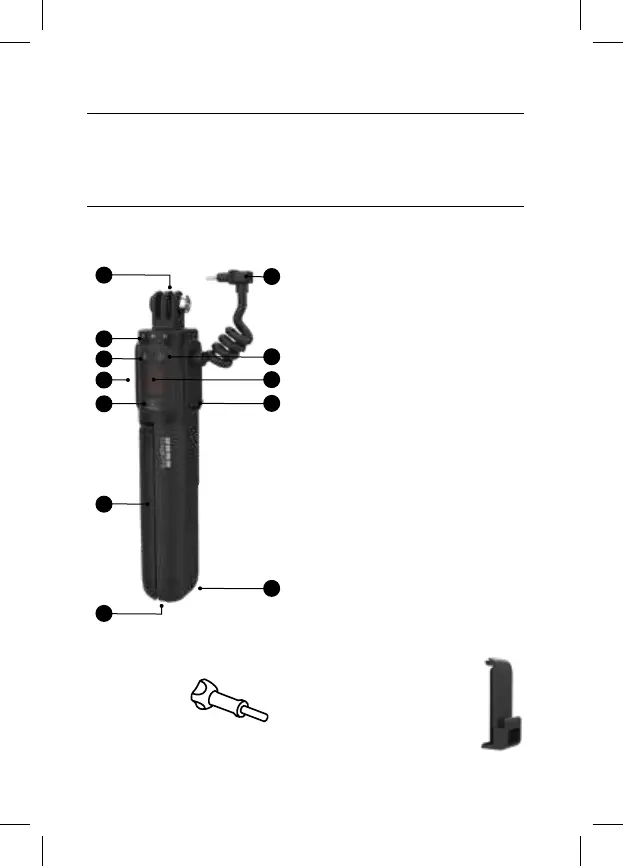
1. Camera Mounting Fingers
2. LED Battery/Camera
Status Indicators
3. Bluetooth® Button
4. Flip-Out Mounting Fingers
5. Mode Button
6. Tripod Legs
7. 1/4-20 Mount
8. Camera Cable
9. Battery Status Button
10. Shutter Button
11. USB Charging Port
(Under Port Cover)
12. Lanyard Attachment Point
1
2
3
5
6
7
4
9
8
12
10
11
USB Pass-Through Door
Lets you plug your GoPro
into Volta while keeping it
weather resistant.
Thumb Screw
Secures your
GoPro to Volta.
Volta (Battery Grip/Tripod/Remote)



 To Next Page