Need help?
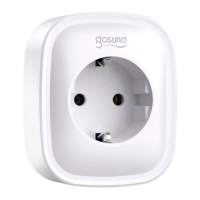
Do you have a question about the gosund SP111 and is the answer not in the manual?
First steps for connecting the smart socket using Easy Mode, including power and button press.
Completing Easy Mode connection by confirming indicator light and entering WiFi details.
Essential safety precautions for using the smart socket correctly and preventing hazards.
Detailed instructions for setting up the Echo speaker and connecting it to the Alexa application.
Guide to enabling the Gosund skill within the Alexa app to control the smart socket.
How to control the smart socket using voice commands via Amazon Echo.
 General
| Type | Smart Plug |
|---|---|
| Wi-Fi | 2.4GHz |
| Compatibility | Amazon Alexa, Google Assistant |
| Energy Monitoring | Yes |
| Rated Current | 16A |
| Max Power | 3680W |
| Product Name | Gosund SP111 Smart Plug |
| Frequency | 50/60Hz |
| Operating Temperature | -10°C to 40°C |
| Features | Remote Control, Timer, Energy Monitoring |
| App Support | Gosund App, Smart Life App |
| Dimensions | 49*49*83mm |

 To Next Page