11
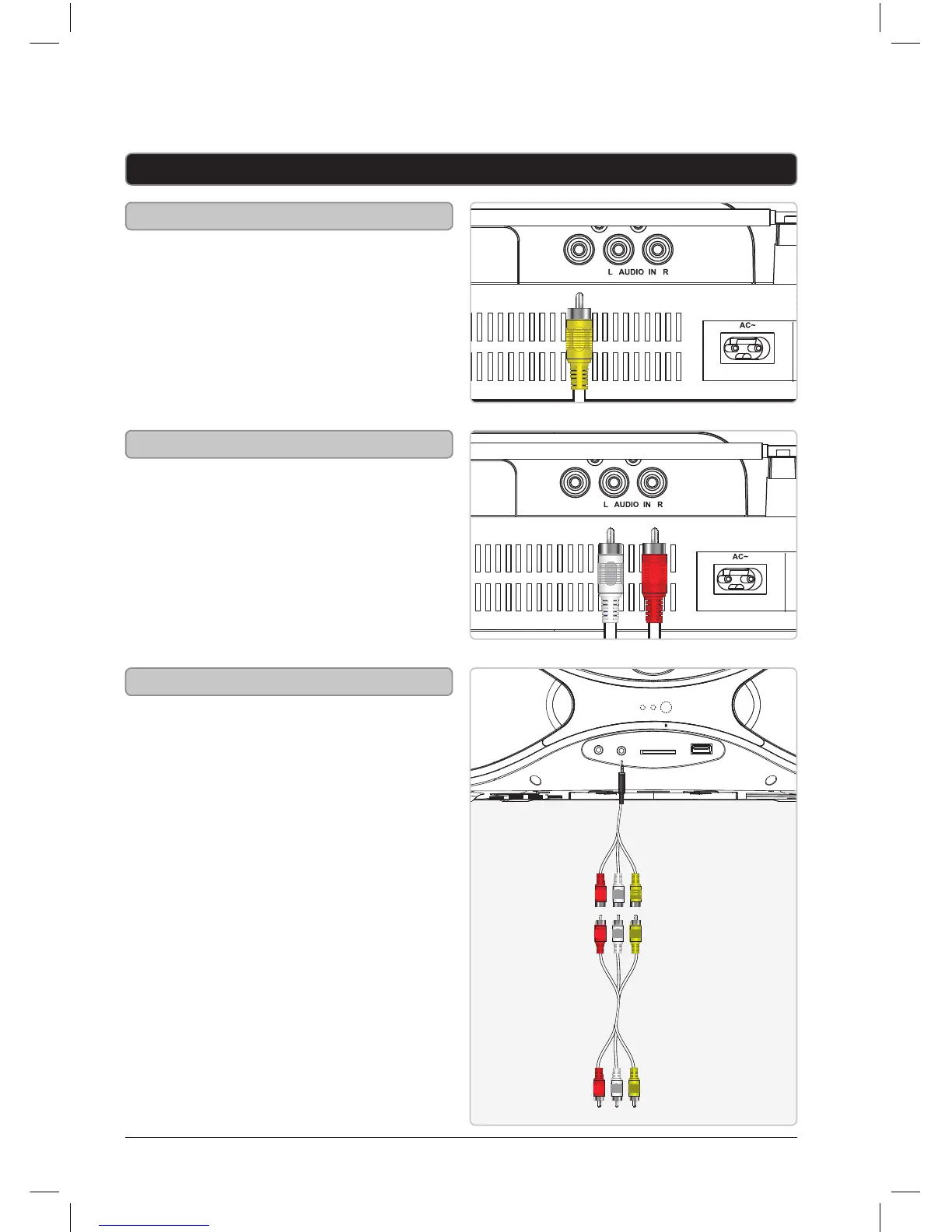
Using the AV Input
Requires an 3.5mm to RCA audio/
video adapter (included) .
1. Connect the included 3.5mm
to RCA audio/video adapter
to the AV Input and the RCA
output on an another device.
Note: You may also need to plug
an RCA AV cable (included) into the
adapter to nish connecting.
2. Adjust the Radio/OFF/DVD/
AV switch to DVD/AV mode.
3. Press the DVD/AV button
to switch to AV mode.
4. Use the native controls on the
connected device to play your
audio/video through the unit.
AV Input & AV Outputs
RCA Audio Output
1. Connect an RCA AV cable
(included) to the RCA Audio
Output and a television.
2. Adjust the connected television
to the proper input setting.
3. Sound from a loaded disc can
now be played through the unit
to the connected television.
1. Connect an RCA AV cable
(included) to the Composite
Video Output and a television.
2. Adjust the connected television
to the proper input setting.
3. Video from a loaded disc can
now be played through the unit
to the connected television.
Using the Composite Video Output


 To Next Page