Introduction
FM
MAX
DVD/AV
SETUP
PLAY/PAUSE
STOP/USB/SD
NEXT
PREV
MIN
VOLUME
TUNING
MHz KHzAM
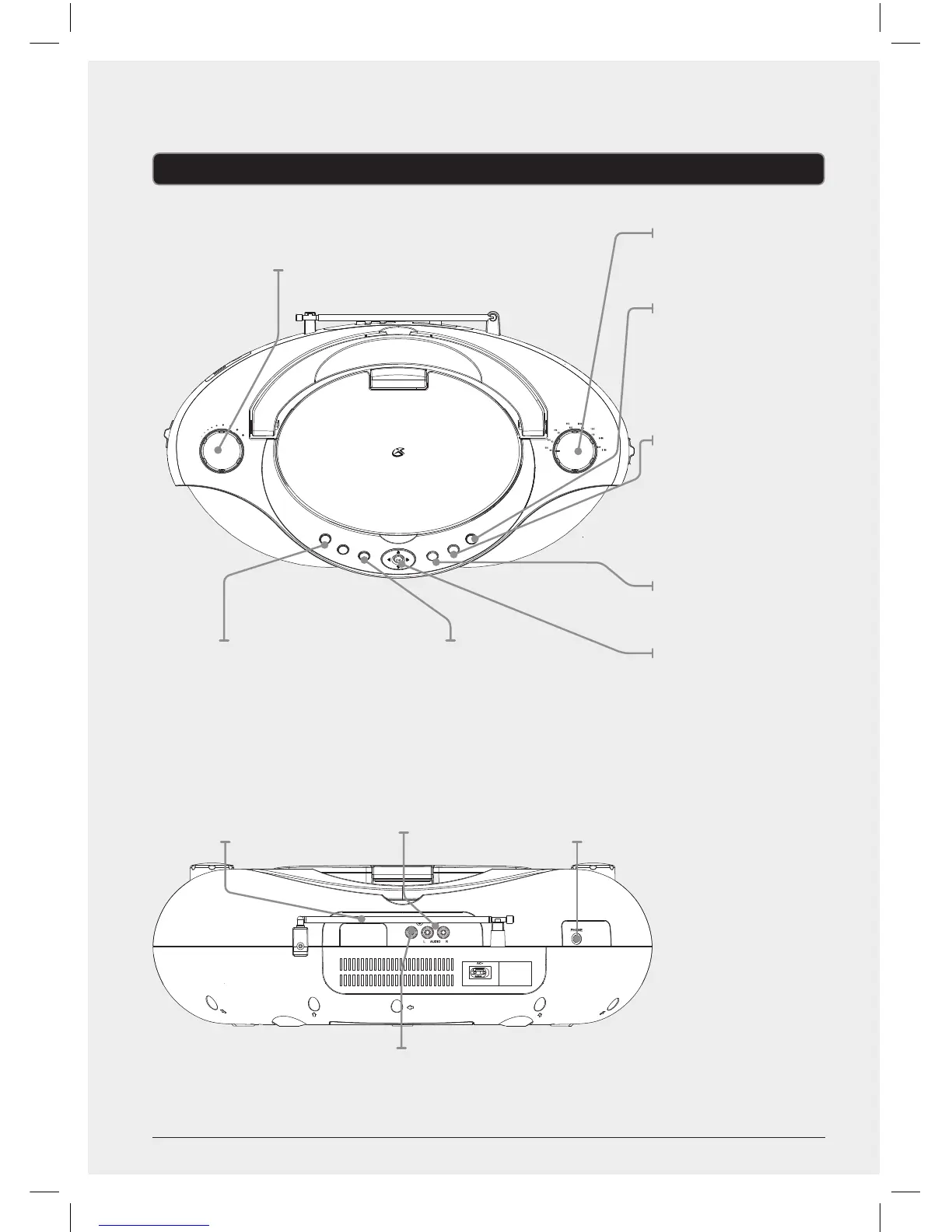
Volume
Turn to adjust
the volume.
Tuning
Adjust to tune
the radio.
Play/Pause
Press to play or
pause a loaded disc.
Stop/USB/SD
Press to stop
a loaded disc
during play.
In DVD mode,
press and hold to
enter USB/Card
selection mode.
Setup
Press to access the
DVD setup menu.
Arrows/OK
Press to make
selections in disc
or system menus.
DVD/AV
Press to switch
between DVD
and AV mode.
VIDEO
Telescopic FM
Antenna
RCA Audio Output
Composite
Video Output
Stereo Headphone
Jack
Next/Prev
Press to skip between audio tracks
or DVD chapters. Press and hold
to search through an individual
audio track or DVD chapter.
Search feature not applicable for CD+G
6
Note: Screen does not rotate 360
degrees. Do not attempt to forcibly
turn the screen past 270 degrees
as this may damage the unit.


 To Next Page