Power
Plug the AC/DC power adapter (included) into the
DC Power Input on the unit, and a standard power outlet.
Battery Backup
The battery backup is intended for short power outages only.
The clock radio’s primary functions cannot run o of the battery
backup alone. Requires 2, AAA-size, batteries (not included).
LED Display
Snooze
Press to snooze the alarm after it sounds.
In on mode, press repeatedly to set the sleep timer.
Alarm 1 Buzzer/
Radio Indicator
Alarm 2 Buzzer/
Radio Indicator
PM Indicator
FCC Warnings
Warning: Changes or modications to this unit not expressly approved by the party responsible for compliance could void the user’s authority to operate the equipment.
NOTE: This equipment has been tested and found to comply with the limits for a Class B digital device, pursuant to Part 15 of the FCC Rules. These limits are designed to provide
reasonable protection against harmful interference in a residential installation. This equipment generates, uses, and can radiate radio frequency energy and, if not installed and used in
accordance with the instructions, may cause harmful interference to radio communications. However, there is no guarantee that interference will not occur in a particular installation.
If this equipment does cause harmful interference to radio or television reception, which can be determined by turning the equipment off and on, the user is encouraged to try to correct
the interference by one or more of the following measures:
• Reorient or relocate the receiving antenna.
• Increase the separation between the equipment and receiver.
• Connect the equipment into an outlet on a circuit different from that to which the receiver is connected.
• Consult the dealer or an experienced radio/TV technician for help.
Additional Warnings
• The apparatus shall not be exposed to dripping or splashing and that no objects lled with liquids, such as vases, shall be placed on apparatus.
• Do not place the unit on top of any soft, porous, or sensitive surfaces to avoid damaging the surface. Use a protective barrier between the unit and surface to protect the surface.
• Do not mix old and new batteries.
• Do not mix alkaline, standard (carbon-zinc), or rechargeable (ni-cad, ni-mh, etc) batteries.
• Batteries should be recycled or disposed of as per state and local guidelines.
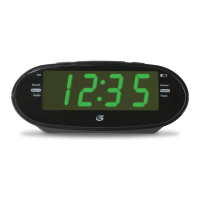
Clock Radio with Dual Alarm
User’s Guide for Model C224B v981-01
FUNCTIONS AND CONTROLS
Tuning/Min/Hour
Press to tune the radio.
Press to adjust the minute
or hour when setting
the clock or alarm.
Preset/Clock
With the Radio on, press to
cycle through preset radio
stations. In o mode,press and
hold to adjust the clock.
Volume/AL1/AL2
Press to adjust the volume.
Press to begin setting
Alarm 1 or Alarm 2.
Radio/Power
Press to power on the Radio.
Press and hold to power o
the Radio. Press briey
to switch between AM
and FM bands.

 Need help?
 General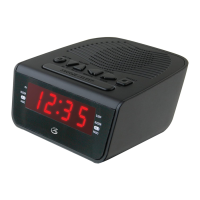

 To Next Page