5
Features
• Supports Bluetooth
• Supports A2DP
(Advanced Audio Distribution Profile)
• Supports automatic device re-connect
• Wireless range: 60 feet
• CD player: CD, CD-R/RW
• Karaoke: CD+G
• LED light effects
• Automatic voice control
• Echo control
• Balance control
• Microphone volume control
• Top-load disc player
• Composite video output
• 2 microphone inputs
• RCA stereo audio outputs
• 3.5mm audio input (Aux In)
• Play/pause button
• Skip forward/back button
• Repeat 1 or ALL play
• Programmable tracks
• Built-in speaker
• DC power input:
requires an AC/DC power adapter (included)
Includes
• RCA A/V cable
• AC/DC power adapter
• 1 Microphone
Note: This karaoke system comes with a single
microphone only. For duet singing, please connect
any microphone with 1/4” plug into the additional
mic jack provided
Setup
Table of Contents Your Bluetooth Karaoke Party Machine
Your Bluetooth Karaoke Party Machine. . . . . . . . . . . . . . . . . . . . . . . . . . . . . . . . . . . . . . . . . . . . . . . . . . . . . . . . . . . . . . . . . . 5
Features
Includes
Setup . . . . . . . . . . . . . . . . . . . . . . . . . . . . . . . . . . . . . . . . . . . . . . . . . . . . . . . . . . . . . . . . . . . . . . . . . . . . . . . . . . . . . . . . . . . . . . . . 5
Power
Orientation . . . . . . . . . . . . . . . . . . . . . . . . . . . . . . . . . . . . . . . . . . . . . . . . . . . . . . . . . . . . . . . . . . . . . . . . . . . . . . . . . . . . . . . . . . . 6
Front
Rear
Audio & Video Output . . . . . . . . . . . . . . . . . . . . . . . . . . . . . . . . . . . . . . . . . . . . . . . . . . . . . . . . . . . . . . . . . . . . . . . . . . . . . . . . . 8
RCA Audio Output
RCA Video Output
CD & CD+G . . . . . . . . . . . . . . . . . . . . . . . . . . . . . . . . . . . . . . . . . . . . . . . . . . . . . . . . . . . . . . . . . . . . . . . . . . . . . . . . . . . . . . . . . . . 9
CD vs. CD+G
Loading and Playing a CD
Loading and Playing a CD+G
Programming a Loaded CD or CD+G
Automatic Voice Control
Bluetooth . . . . . . . . . . . . . . . . . . . . . . . . . . . . . . . . . . . . . . . . . . . . . . . . . . . . . . . . . . . . . . . . . . . . . . . . . . . . . . . . . . . . . . . . . . . 10
Pairing a Bluetooth Device for the First Time
Playing Audio Wirelessly
Aux In . . . . . . . . . . . . . . . . . . . . . . . . . . . . . . . . . . . . . . . . . . . . . . . . . . . . . . . . . . . . . . . . . . . . . . . . . . . . . . . . . . . . . . . . . . . . . . . 11
Using the Aux Input (3.5mm Audio Input)
Company Information . . . . . . . . . . . . . . . . . . . . . . . . . . . . . . . . . . . . . . . . . . . . . . . . . . . . . . . . . . . . . . . . . . . . . . . . . . . . . . . . 12
Contact Information
Warranty
International Support
Green Initiative
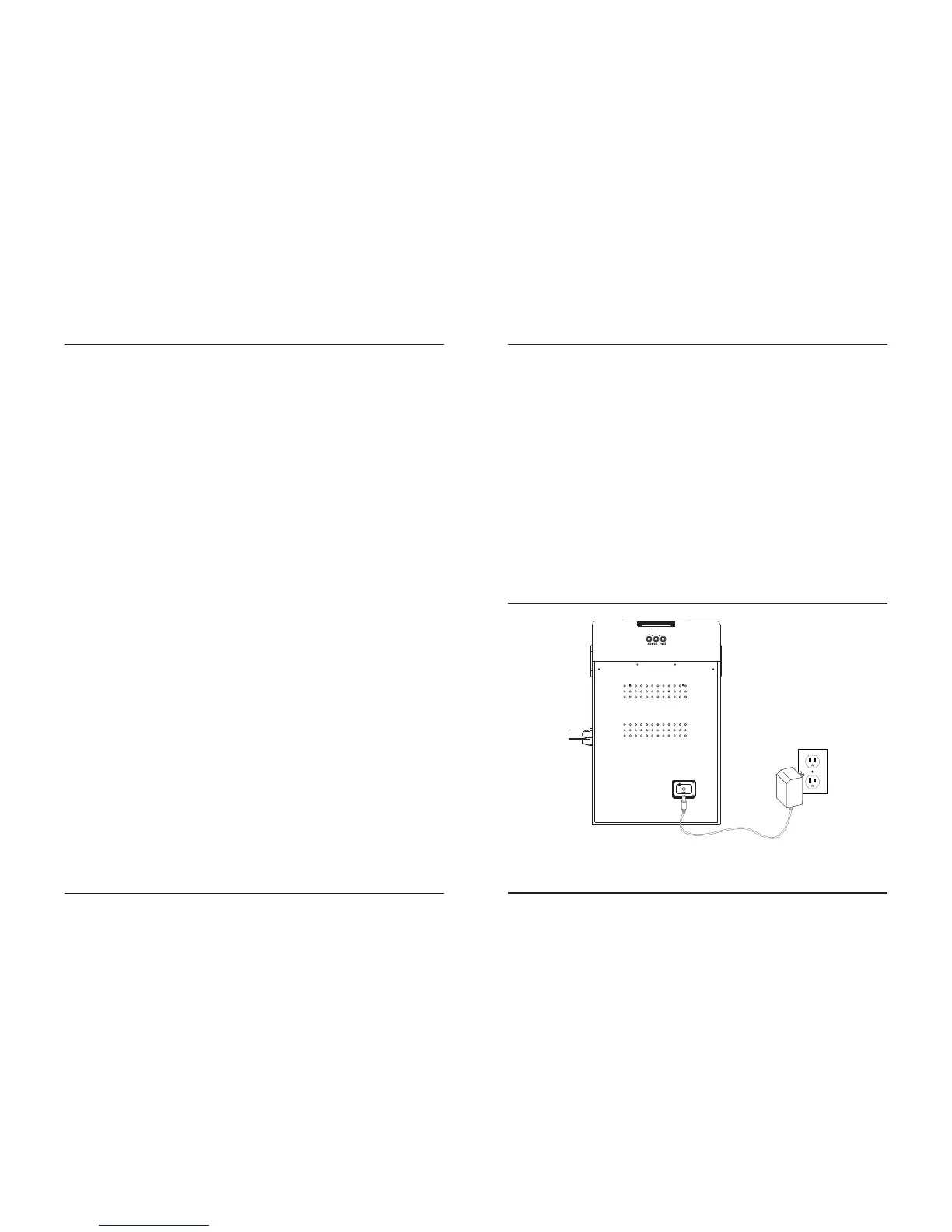
Power
Plug the small end of the power cord into the DC Input on the back of the speaker, and the large plug
into a standard wall outlet.


 To Next Page