EasyManua.ls Logo

GPX PD908B - Page 7

GPX PD908B
12 pages
Print Icon
To Next Page IconTo Next Page
To Previous Page IconTo Previous Page
Loading...
Customer Support: 1-314-621-2881 GPX - PD908B 7
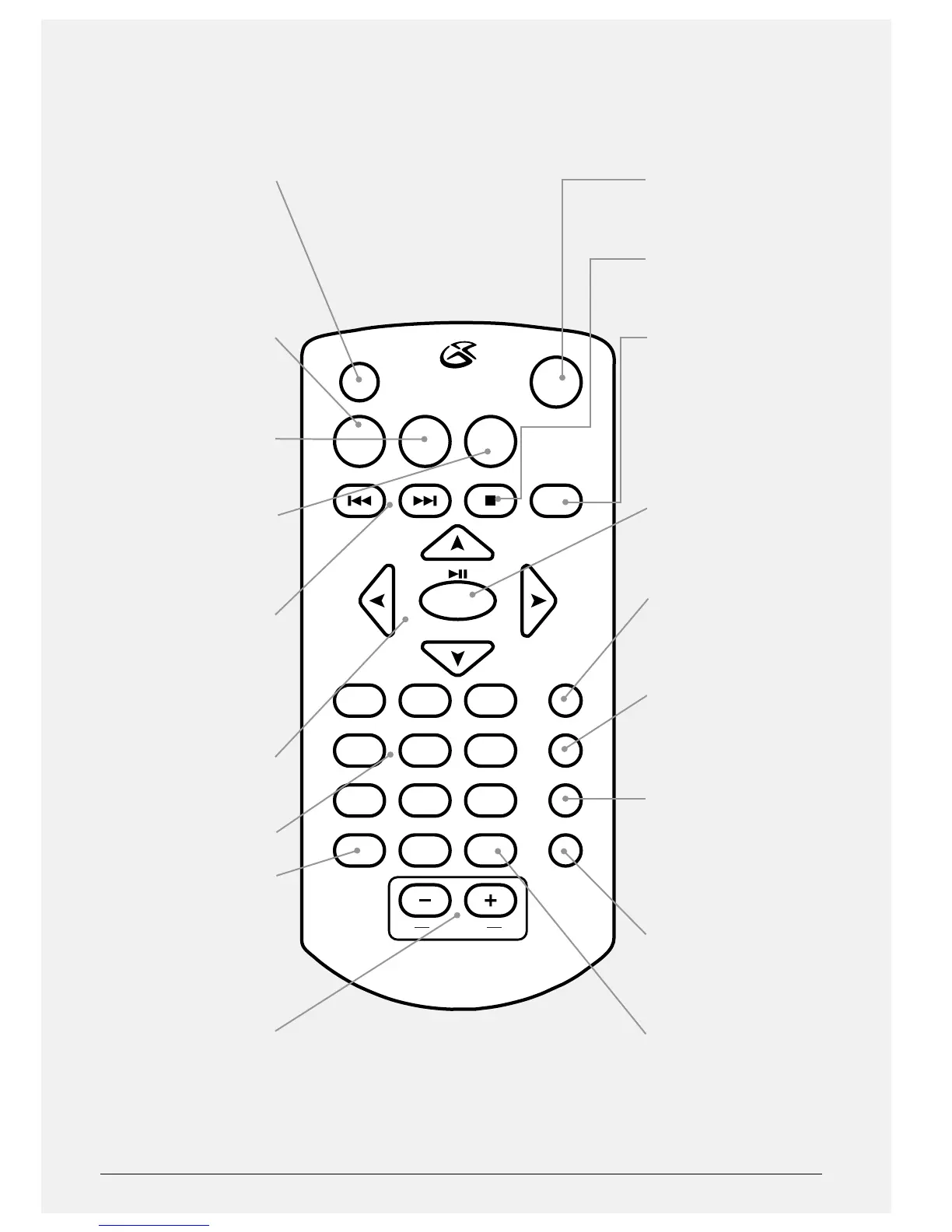
VOLUME
ZOOM
DISPLAY MODE
MUTE
TITLE MENU
REV FWD
SETUP
STOP
ANGLE SLOW
OK
321
654
98
0
7
PROGRAM REPEAT
AUDIO
SEARCH
SUBTITLE
OSD/
WIDE
DISPLAY MODE
Press and hold to turn
the display o or on.
Press and use the
DIRECTION buttons to
adjust the brightness
and contrast.
TITLE
Press to access the title
menu of the loaded
DVD.
MENU
Press to access the main
menu on a loaded DVD.
SETUP
Press to access the
portable DVD players
setup menu.
SKIP/SEARCH
Press to skip between
chapter and tracks on a
loaded disc. Press and
hold to fast forward or
rewind a loaded disc.
DIRECTION
Press to navigate
menus.
NUMBER KEYPAD
PROGRAM/ANGLE
Press to program
chapter or tracks to play
in a specied order.
Press and hold to view
supported DVDs in
alternate angles.
VOLUME
Press to adjust the
volume.
MUTE
Press to mute the
volume.
STOP
Press to stop a DVD or
CD during play.
OSD/WIDE
Press to view the on-
screen display. Press
and hold to adjust the
aspect ratio.
PLAY/PAUSE/OK
Press to play or pause
a loaded disc. Press to
make selections on a
loaded DVD or in the
setup menu.
SUBTITLE
Press to switch between
the subtitle options for
a loaded DVD.
AUDIO
Press to switch between
the audio options for a
loaded DVD.
SEARCH
Press, and use the
NUMBER KEYPAD to
enter a specic chapter,
title, or track to search
for.
REPEAT
Press to repeat the
current chapter or track,
or the entire disc.
ZOOM/SLOW
Press to zoom in or
out on a loaded DVD.
Press and hold to view
a loaded DVD in slow
motion.

Related product manuals