12
Wireless Headphones
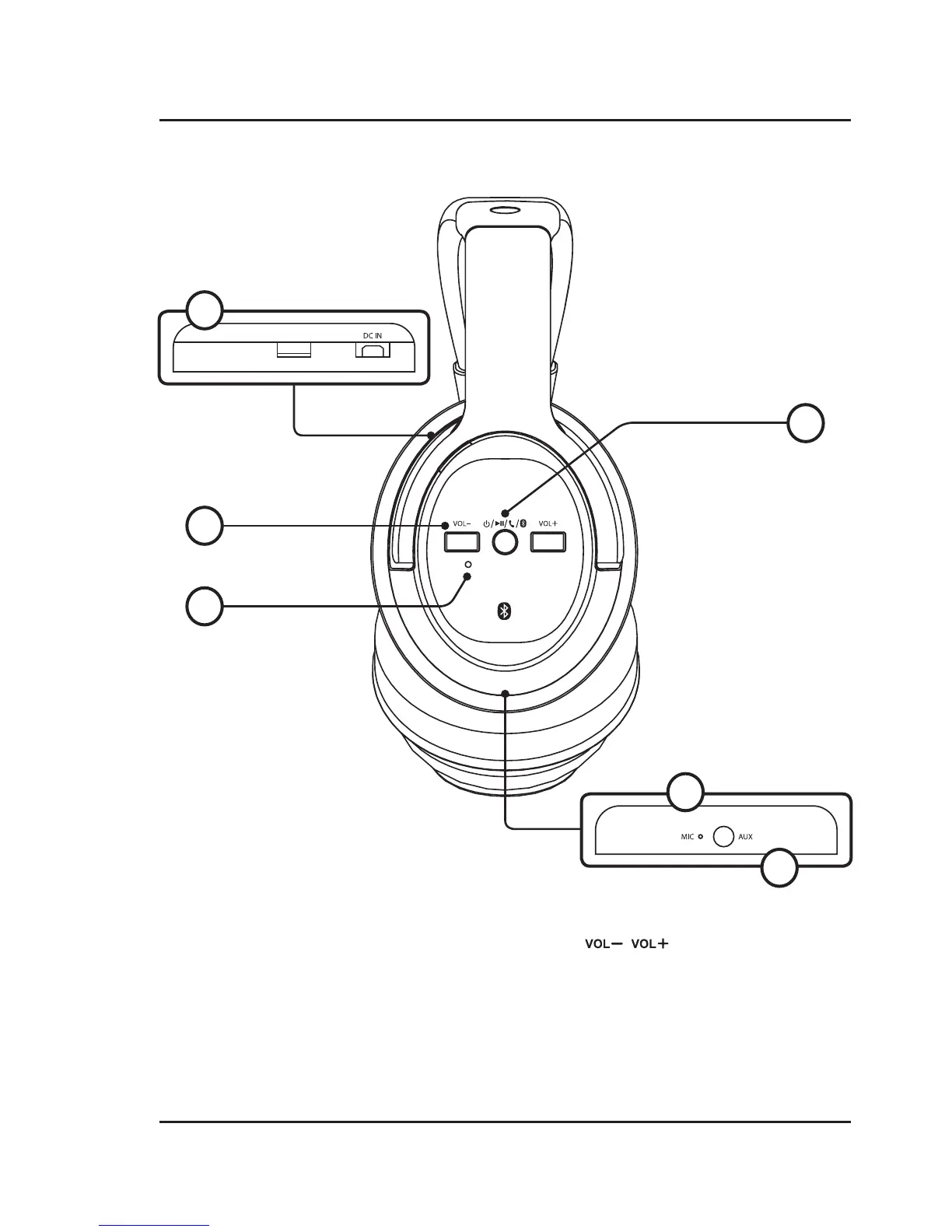
Features & Controls
1. DC Power Port
Connect Micro-USB to USB power cable (included)
to charge battery.
2. Power / Play / Speakerphone / Pair
Power ON + Pair Bluetooth - Press and hold until
blue/red flashing indicator and voice prompt.
Power ON - Press and hold for 5 seconds to power
ON or OFF.
Play/Pause - Press to play or pause audio.
Speakerphone - Press to answer incoming call.
3. Volume
Press to adjust the volume level.
4. LED Indicator Light
Power ON + Bluetooth Paired - Solid blue light.
Pairing Bluetooth - Flashing blue/red light.
Charging Battery - Solid red light.
Charging Complete - No lights.
5. Microphone
6. Aux In (3.5mm audio line input)
3
4
1
2
5
6


 To Next Page