30
CAUTION
• The steam escaping may damage wall-papers, wall cupboards, undert lamps,
etcetera. For this reason, turn the pour opening away from walls and furniture.
• Hot steam may be scalding.
ELECTRICAL CONNECTION
For safe and fault-free operation of the unit, the following requirements have to be
met during the electrical connection:
• Before connecting the unit, compare the connecting data (voltage and frequen-
cy) on the type plate with those of your energy network. These details must cor-
respond so that no damage occurs to the unit. In case of doubt ask your trained
electrician.
• The socket has to be protected at least by a 10 amps circuit breaker.
• Make sure that the power cable is not damaged and is not laid across hot sur-
faces or sharp edges.
• The connecting cable must not be stretched tightly.
• The electric safety of the unit is ensured only when it is connected to a socket with protec-
tive conductor installed correctly. Operation on a socket without protective conduc-
tor is forbidden. If in doubt, let the house installation checked by a trained electrician.
The manufacturer shall not assume responsibility for damage which has been
caused by absent or interrupted protective conductor.
PRIOR TO FIRST USE
Fill the unit with clear cold tap water and boil in order to clean the unit. Subse-
quently, pour out the water for hygienic reasons.
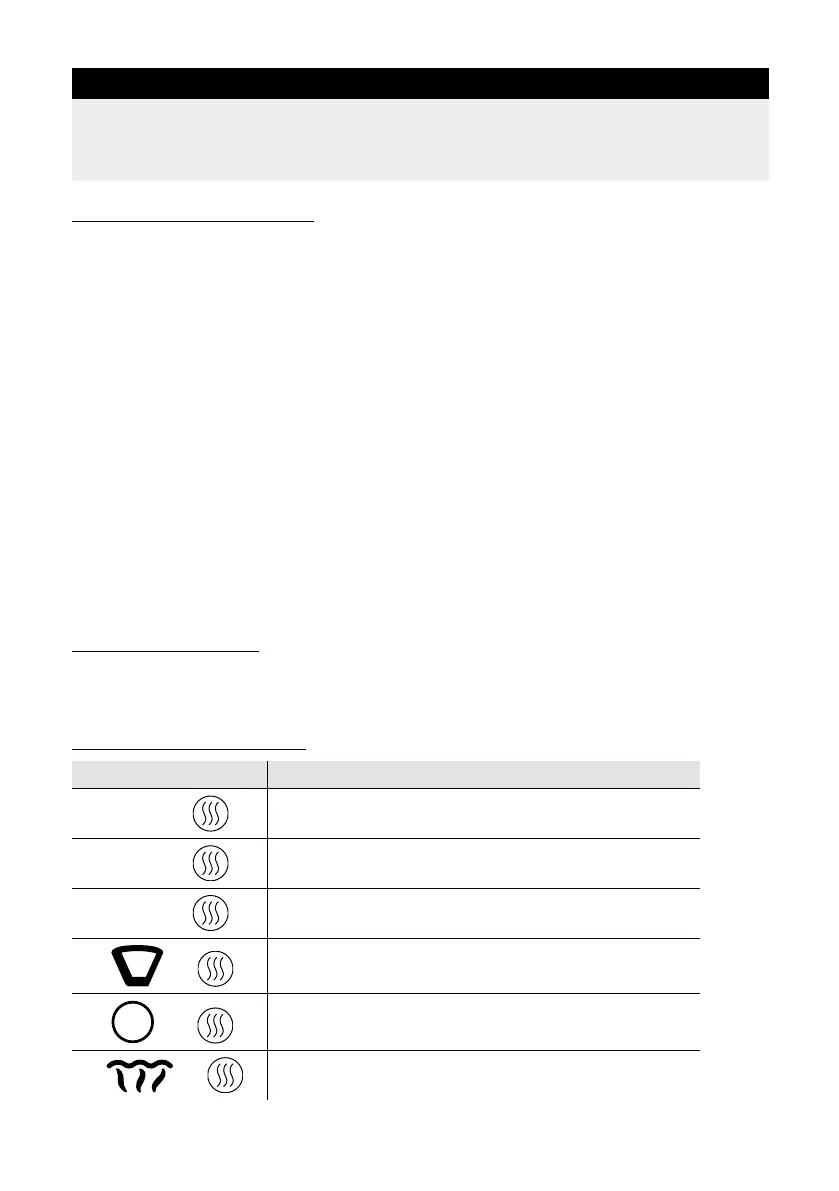
BUTTON COMBINATIONS
Combination Explanation
60 +
60 deg. C for keeping warm for approx. 30 minutes
70 +
70 deg. C for keeping warm for approx. 30 minutes
80 +
80 deg. C for keeping warm for approx. 30 minutes
+
Water temperature for hand-brewed lter coffee for
keeping warm for approx. 30 minutes
40
+
Heating baby food
+
Only for disinfection of baby bottles and acces-
sories; the process take about 4 minutes.


 To Next Page