4. Operation of the Control System
24 / 57
4. Operation of the Control System
The operation of the system is carried out via a microprocessor in the control unit. The microprocessor
allows for the set-up of operating parameters, the display of operating conditions and the query of system
parameters as well as the programming of working times through a specialist company.
Adjustments are made by scrolling through numerical values using the two arrow keys . The set-
tings are then confirmed by pressing the button.
The individual dialogues can be terminated ahead of time by pressing or will be terminated automati-
cally after 2 minutes.
The control system is broken down into the following display pages:
4. Basic level: Status of the cycle sequence with the elapsing remaining time, as well as the display of
error messages.
5. Operator level: The operator can access the operator level by pressing the button and enter oper-
ator-specific settings.
6. Service level: A password-protected service level can be accessed from the operator level using an
additional code. This level is reserved for trained personnel. Here adjustments or changes can be
made and diagnostic data is retrieved.
Figure 2: view of the operating unit
4.1 Control Programme
The control system switches the outputs for air compressors and stepper motors on a timer.
The timing is determined by the set sequence tables. A complete cleaning cycle is started for each start
time in accordance with the selected sequence table.
By setting up holiday times in the operator level, the complete sequence of cleaning cycles can be sup-
pressed for the set period of time. Only one holiday cycle with greatly reduced activity takes place at this
time. During this time, no treated wastewater will be removed, as there should be no supply.
4. Operation of the Control System
26 / 57
4.2 Operating the Control System
You can start different queries from the automatic mode.
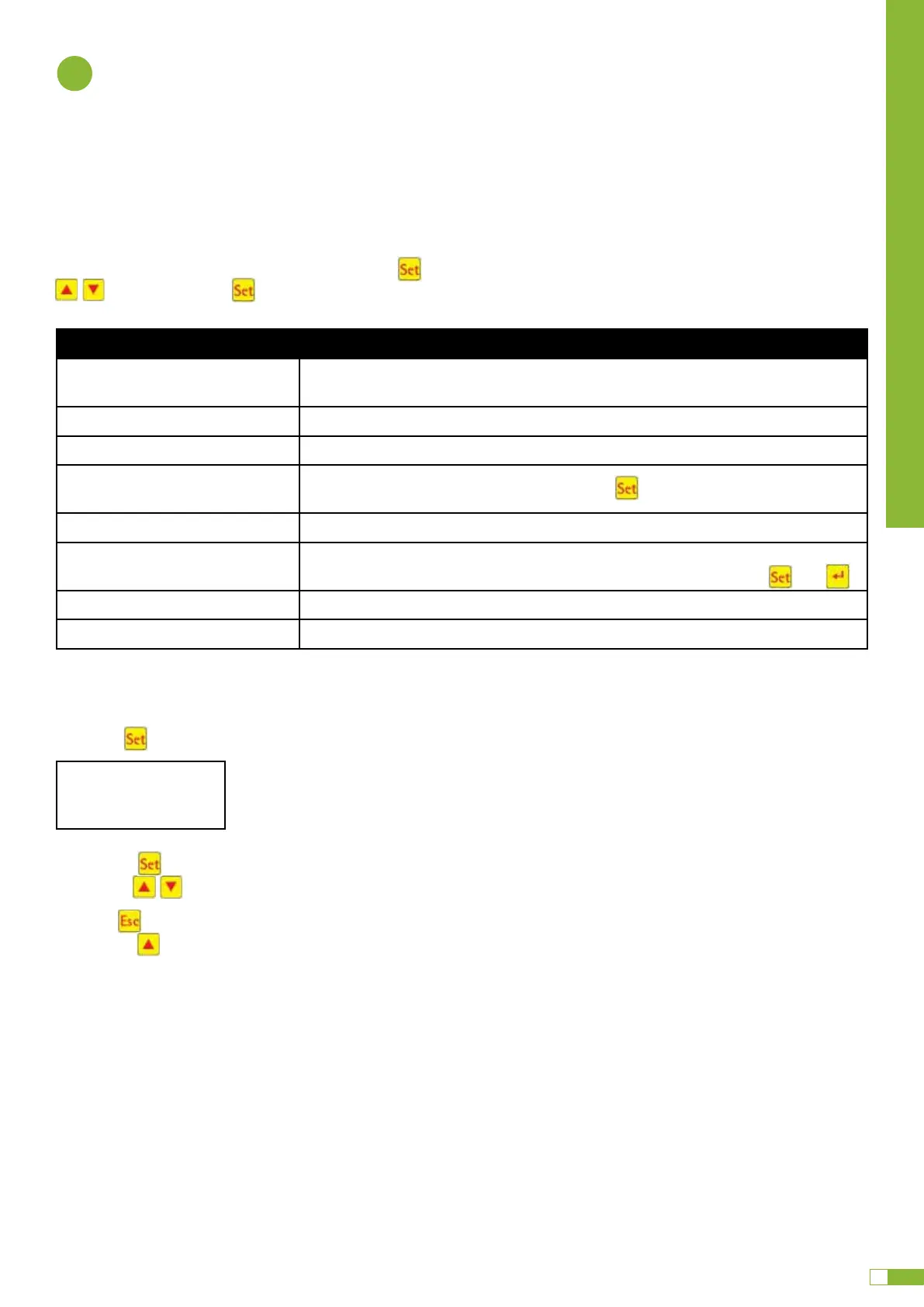
You can access the first operating level by pressing . You can now call up the individual queries using
the arrow keys and then pressing :
Display Meaning
Operating mode
Remaining time
Remaining time in current work phase
Operating hours Display of the operating hours of the valve and compressor
Manual operation Manual control of the valve
Date
Time
Current time, day and date. Can be set using
Holiday mode Holiday mode set-up (max. 90 days)
Faults Operational faults which occur are stored here and can be read. It is possible to
switch between the error message and the corresponding date using
and
Settings The current settings can be viewed using the arrow keys
Service menu For qualified personnel
4.2.1 Operating Hours Query
Press the button. On the screen will appear:
By pressing again, the operating hours for the valves and the compressor can be displayed in se-
quence using the arrow keys .
Pressing
.
Note: If you do not press any buttons for a period of 10 minutes, normal operation will begin automatical-
ly.
Operating hours
meter reading
. OPERATION OF THE CONTROL SYSTEM
Graf UK Ltd
4
OPERATION OF THE CONTROL SYSTEM
4.2 Operating the Control System
You can start dierent queries from the automatic mode.
You can access the first operating level by pressing . You can now call up the individual queries using the arrow keys
and then pressing :
4. Operation of the Control System
24 / 57
4. Operation of the Control System
The operation of the system is carried out via a microprocessor in the control unit. The microprocessor
allows for the set-up of operating parameters, the display of operating conditions and the query of system
parameters as well as the programming of working times through a specialist company.
Adjustments are made by scrolling through numerical values using the two arrow keys . The set-
tings are then confirmed by pressing the button.
The individual dialogues can be terminated ahead of time by pressing or will be terminated automati-
cally after 2 minutes.
The control system is broken down into the following display pages:
4. Basic level: Status of the cycle sequence with the elapsing remaining time, as well as the display of
error messages.
5. Operator level: The operator can access the operator level by pressing the button and enter oper-
ator-specific settings.
6. Service level: A password-protected service level can be accessed from the operator level using an
additional code. This level is reserved for trained personnel. Here adjustments or changes can be
made and diagnostic data is retrieved.
Figure 2: view of the operating unit
4.1 Control Programme
The control system switches the outputs for air compressors and stepper motors on a timer.
The timing is determined by the set sequence tables. A complete cleaning cycle is started for each start
time in accordance with the selected sequence table.
By setting up holiday times in the operator level, the complete sequence of cleaning cycles can be sup-
pressed for the set period of time. Only one holiday cycle with greatly reduced activity takes place at this
time. During this time, no treated wastewater will be removed, as there should be no supply.
4. Operation of the Control System
24 / 57
4. Operation of the Control System
The operation of the system is carried out via a microprocessor in the control unit. The microprocessor
allows for the set-up of operating parameters, the display of operating conditions and the query of system
parameters as well as the programming of working times through a specialist company.
Adjustments are made by scrolling through numerical values using the two arrow keys . The set-
tings are then confirmed by pressing the button.
The individual dialogues can be terminated ahead of time by pressing or will be terminated automati-
cally after 2 minutes.
The control system is broken down into the following display pages:
4. Basic level: Status of the cycle sequence with the elapsing remaining time, as well as the display of
error messages.
5. Operator level: The operator can access the operator level by pressing the button and enter oper-
ator-specific settings.
6. Service level: A password-protected service level can be accessed from the operator level using an
additional code. This level is reserved for trained personnel. Here adjustments or changes can be
made and diagnostic data is retrieved.
Figure 2: view of the operating unit
4.1 Control Programme
The control system switches the outputs for air compressors and stepper motors on a timer.
The timing is determined by the set sequence tables. A complete cleaning cycle is started for each start
time in accordance with the selected sequence table.
By setting up holiday times in the operator level, the complete sequence of cleaning cycles can be sup-
pressed for the set period of time. Only one holiday cycle with greatly reduced activity takes place at this
time. During this time, no treated wastewater will be removed, as there should be no supply.
4. Operation of the Control System
24 / 57
4. Operation of the Control System
The operation of the system is carried out via a microprocessor in the control unit. The microprocessor
allows for the set-up of operating parameters, the display of operating conditions and the query of system
parameters as well as the programming of working times through a specialist company.
Adjustments are made by scrolling through numerical values using the two arrow keys . The set-
tings are then confirmed by pressing the button.
The individual dialogues can be terminated ahead of time by pressing or will be terminated automati-
cally after 2 minutes.
The control system is broken down into the following display pages:
4. Basic level: Status of the cycle sequence with the elapsing remaining time, as well as the display of
error messages.
5. Operator level: The operator can access the operator level by pressing the button and enter oper-
ator-specific settings.
6. Service level: A password-protected service level can be accessed from the operator level using an
additional code. This level is reserved for trained personnel. Here adjustments or changes can be
made and diagnostic data is retrieved.
Figure 2: view of the operating unit
4.1 Control Programme
The control system switches the outputs for air compressors and stepper motors on a timer.
The timing is determined by the set sequence tables. A complete cleaning cycle is started for each start
time in accordance with the selected sequence table.
By setting up holiday times in the operator level, the complete sequence of cleaning cycles can be sup-
pressed for the set period of time. Only one holiday cycle with greatly reduced activity takes place at this
time. During this time, no treated wastewater will be removed, as there should be no supply.
Display Meaning
Operating mode
Remaining time
Remaining time in current work phase
Operating hours Display of the operating hours of the valve and compressor
Manual operation Manual control of the valve
Date
Time
Current time, day and date. Can be set using
Holiday mode Holiday mode set-up (max. 90 days)
Faults Operational faults which occur are stored here and can be read. It is possible to
switch between the error message and the corresponding date using and
Settings The current settings can be viewed using the arrow keys
Service menu For qualified personnel
4. Operation of the Control System
24 / 57
4. Operation of the Control System
The operation of the system is carried out via a microprocessor in the control unit. The microprocessor
allows for the set-up of operating parameters, the display of operating conditions and the query of system
parameters as well as the programming of working times through a specialist company.
Adjustments are made by scrolling through numerical values using the two arrow keys . The set-
tings are then confirmed by pressing the button.
The individual dialogues can be terminated ahead of time by pressing or will be terminated automati-
cally after 2 minutes.
The control system is broken down into the following display pages:
4. Basic level: Status of the cycle sequence with the elapsing remaining time, as well as the display of
error messages.
5. Operator level: The operator can access the operator level by pressing the button and enter oper-
ator-specific settings.
6. Service level: A password-protected service level can be accessed from the operator level using an
additional code. This level is reserved for trained personnel. Here adjustments or changes can be
made and diagnostic data is retrieved.
Figure 2: view of the operating unit
4.1 Control Programme
The control system switches the outputs for air compressors and stepper motors on a timer.
The timing is determined by the set sequence tables. A complete cleaning cycle is started for each start
time in accordance with the selected sequence table.
By setting up holiday times in the operator level, the complete sequence of cleaning cycles can be sup-
pressed for the set period of time. Only one holiday cycle with greatly reduced activity takes place at this
time. During this time, no treated wastewater will be removed, as there should be no supply.
4.2.1 Operating Hours Query
Press the button. On the screen will appear:
Operting hours
meter reading
By pressing again, the operating hours for the valves and the compressor can be displayed in sequence using the
arrow keys .
Pressing once will take you back to the display “display operting hours”. You can access the “manual mode” menu
by pressing .
k Note: If you do not press any buttons for a period of 10 minutes, normal operation will begin automatically.
4. Operation of the Control System
24 / 57
4. Operation of the Control System
The operation of the system is carried out via a microprocessor in the control unit. The microprocessor
allows for the set-up of operating parameters, the display of operating conditions and the query of system
parameters as well as the programming of working times through a specialist company.
Adjustments are made by scrolling through numerical values using the two arrow keys . The set-
tings are then confirmed by pressing the button.
The individual dialogues can be terminated ahead of time by pressing or will be terminated automati-
cally after 2 minutes.
The control system is broken down into the following display pages:
4. Basic level: Status of the cycle sequence with the elapsing remaining time, as well as the display of
error messages.
5. Operator level: The operator can access the operator level by pressing the button and enter oper-
ator-specific settings.
6. Service level: A password-protected service level can be accessed from the operator level using an
additional code. This level is reserved for trained personnel. Here adjustments or changes can be
made and diagnostic data is retrieved.
Figure 2: view of the operating unit
4.1 Control Programme
The control system switches the outputs for air compressors and stepper motors on a timer.
The timing is determined by the set sequence tables. A complete cleaning cycle is started for each start
time in accordance with the selected sequence table.
By setting up holiday times in the operator level, the complete sequence of cleaning cycles can be sup-
pressed for the set period of time. Only one holiday cycle with greatly reduced activity takes place at this
time. During this time, no treated wastewater will be removed, as there should be no supply.
4. Operation of the Control System
24 / 57
4. Operation of the Control System
The operation of the system is carried out via a microprocessor in the control unit. The microprocessor
allows for the set-up of operating parameters, the display of operating conditions and the query of system
parameters as well as the programming of working times through a specialist company.
Adjustments are made by scrolling through numerical values using the two arrow keys . The set-
tings are then confirmed by pressing the button.
The individual dialogues can be terminated ahead of time by pressing or will be terminated automati-
cally after 2 minutes.
The control system is broken down into the following display pages:
4. Basic level: Status of the cycle sequence with the elapsing remaining time, as well as the display of
error messages.
5. Operator level: The operator can access the operator level by pressing the button and enter oper-
ator-specific settings.
6. Service level: A password-protected service level can be accessed from the operator level using an
additional code. This level is reserved for trained personnel. Here adjustments or changes can be
made and diagnostic data is retrieved.
Figure 2: view of the operating unit
4.1 Control Programme
The control system switches the outputs for air compressors and stepper motors on a timer.
The timing is determined by the set sequence tables. A complete cleaning cycle is started for each start
time in accordance with the selected sequence table.
By setting up holiday times in the operator level, the complete sequence of cleaning cycles can be sup-
pressed for the set period of time. Only one holiday cycle with greatly reduced activity takes place at this
time. During this time, no treated wastewater will be removed, as there should be no supply.
4. Operation of the Control System
24 / 57
4. Operation of the Control System
The operation of the system is carried out via a microprocessor in the control unit. The microprocessor
allows for the set-up of operating parameters, the display of operating conditions and the query of system
parameters as well as the programming of working times through a specialist company.
Adjustments are made by scrolling through numerical values using the two arrow keys . The set-
tings are then confirmed by pressing the button.
The individual dialogues can be terminated ahead of time by pressing or will be terminated automati-
cally after 2 minutes.
The control system is broken down into the following display pages:
4. Basic level: Status of the cycle sequence with the elapsing remaining time, as well as the display of
error messages.
5. Operator level: The operator can access the operator level by pressing the button and enter oper-
ator-specific settings.
6. Service level: A password-protected service level can be accessed from the operator level using an
additional code. This level is reserved for trained personnel. Here adjustments or changes can be
made and diagnostic data is retrieved.
Figure 2: view of the operating unit
4.1 Control Programme
The control system switches the outputs for air compressors and stepper motors on a timer.
The timing is determined by the set sequence tables. A complete cleaning cycle is started for each start
time in accordance with the selected sequence table.
By setting up holiday times in the operator level, the complete sequence of cleaning cycles can be sup-
pressed for the set period of time. Only one holiday cycle with greatly reduced activity takes place at this
time. During this time, no treated wastewater will be removed, as there should be no supply.
4. Operation of the Control System
25 / 57
4.1.1 Display of Operating Status
The operating status is indicated by the LEDs (green = operational / red = fault) and as text on the screen.
In normal operating mode (aeration mode), the display appears as follows:
In automatic mode, the liquid crystal display shows the current work phase and the remaining time left in
this phase.
If a fault occurs, the red LED is turned on. A message indicating which component is faulty appears in the
liquid crystal display (e.g. Fault Compressor 0.0A).
4.1.2 The following work phases are displayed
Display
Process performed
Denitrification
Y3 valve (plug X1.1) is actuated intermittently; the activated sludge is briefly
mixed with the wastewater. This is followed by long pauses (response times).
Ventilation Y3 valve (plug X1.1) is actuated; the system is aerated in intervals over a long
period of time.
Sedimentation phase No valves are actuated, the activated sludge settles in the system.
Activity phase Y4 valve (plug X1.2) is actuated; the clear water is pumped into the drain.
Cycle pause/
holiday mode
Y3 valve (plug X1.1) is actuated; the system is aerated in intervals (considerably
less than in the aeration phase).
Rest: XXX:XXmin Display of remaining time.
Symbol Key assignment Function
Enter key Selection of operating mode, confirmation of entries
Scroll Display of operating modes and queries Programming of
the system by entering figures
Acknowledgement
Acknowledgement of entries without saving
Acknowledgement of fault messages
Aeration
Rest: 120:10min
4. Operation of the Control System
24 / 57
4. Operation of the Control System
The operation of the system is carried out via a microprocessor in the control unit. The microprocessor
allows for the set-up of operating parameters, the display of operating conditions and the query of system
parameters as well as the programming of working times through a specialist company.
Adjustments are made by scrolling through numerical values using the two arrow keys . The set-
tings are then confirmed by pressing the button.
The individual dialogues can be terminated ahead of time by pressing or will be terminated automati-
cally after 2 minutes.
The control system is broken down into the following display pages:
4. Basic level: Status of the cycle sequence with the elapsing remaining time, as well as the display of
error messages.
5. Operator level: The operator can access the operator level by pressing the button and enter oper-
ator-specific settings.
6. Service level: A password-protected service level can be accessed from the operator level using an
additional code. This level is reserved for trained personnel. Here adjustments or changes can be
made and diagnostic data is retrieved.
Figure 2: view of the operating unit
4.1 Control Programme
The control system switches the outputs for air compressors and stepper motors on a timer.
The timing is determined by the set sequence tables. A complete cleaning cycle is started for each start
time in accordance with the selected sequence table.
By setting up holiday times in the operator level, the complete sequence of cleaning cycles can be sup-
pressed for the set period of time. Only one holiday cycle with greatly reduced activity takes place at this
time. During this time, no treated wastewater will be removed, as there should be no supply.


 To Next Page
 Loading...