Repair Manual MSG 90.6PG Commercial Vehicles, Omnibuses – November 2017
Material no. 1153450_c
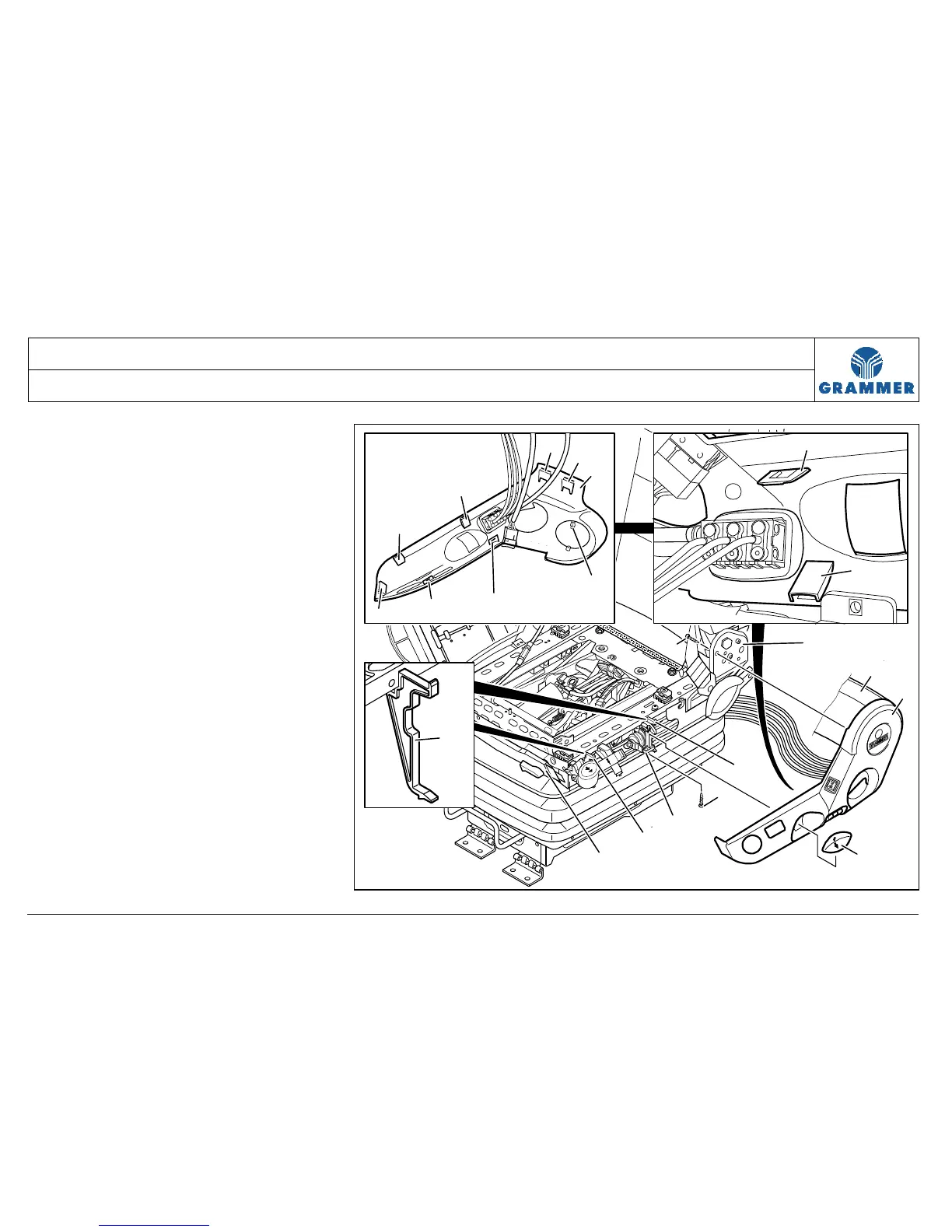
3.4 Left covering in position for repair – removal and attachment
Page 3 of 3
5 Detach the left covering (1) at the
bottom of the supports (4). To do this,
carefully pull the lower snap-in hooks
(8) at the height of the supports (4)
first in downward and then in outward
direction.
6 Carefully pull the central snap-in hook
(11) at the left covering (1) out of the
seat frame (6).
7 Carefully detach the front snap-in
hook (10) at the left covering (1) from
the front covering (13).
8 Carefully detach the rear snap-in hook
(9) at the left covering (1) from the
rear covering (12).
9 Carefully pull off the left covering (1)
over the operator levers and put it on
the left side of the seat.
10 Mount the components in reverse
order of their removal.
7
1
8
5
3
4
4
6
13
14
2
1
12
4
11
7
8
1
9
9
8
10
7
2172


 To Next Page