Repair Manual MSG 90.6PG Commercial Vehicles, Omnibuses – November 2017
Material no. 1153450_c
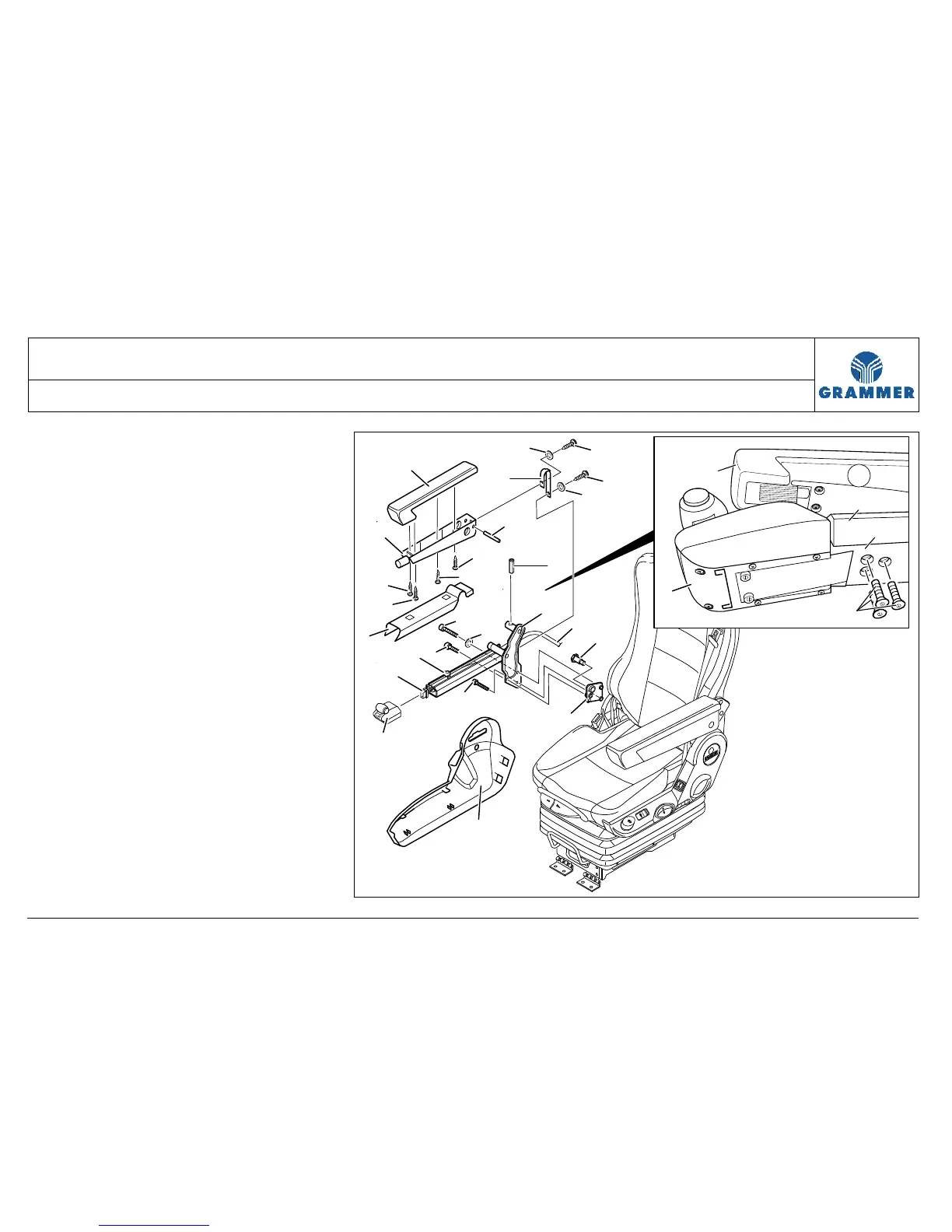
3.25 Operator console and armrest for electro-pneumatic gearshift (EPS) –
removal and installation (delivery option)
Page 3 of 5
Removal and installation
1 Disconnect the electrical connection
between the plug of the EPS cable (6)
and the EPS control element (3).
2 Unscrew three countersunk screws
(22) and remove the control element
(3) from the EPS console (4).
Installation note:
Hand-tighten the countersunk
screw (22).
3 Lift off the cover (5) at the EPS
console (4).
4 Mark the point where the EPS cable
(20) is fastened to the EPS console
(4) by means of cable tie (7) and
remove the cable tie (7).
5 Pull the EPS cable (20) out of the EPS
console (4) in backward direction.
13
15
12
14
5
3
4
16
16
15
17
2
1
20
9
6
7
11
11
11
11
8
19
18
2222
10
21
22
4
5
13
12
3


 To Next Page