Repair Manual MSG 90.6PG Commercial Vehicles, Omnibuses – November 2017
Material no. 1153450_c
3.25 Operator console and armrest for electro-pneumatic gearshift (EPS) –
removal and installation (delivery option)
Page 5 of 5
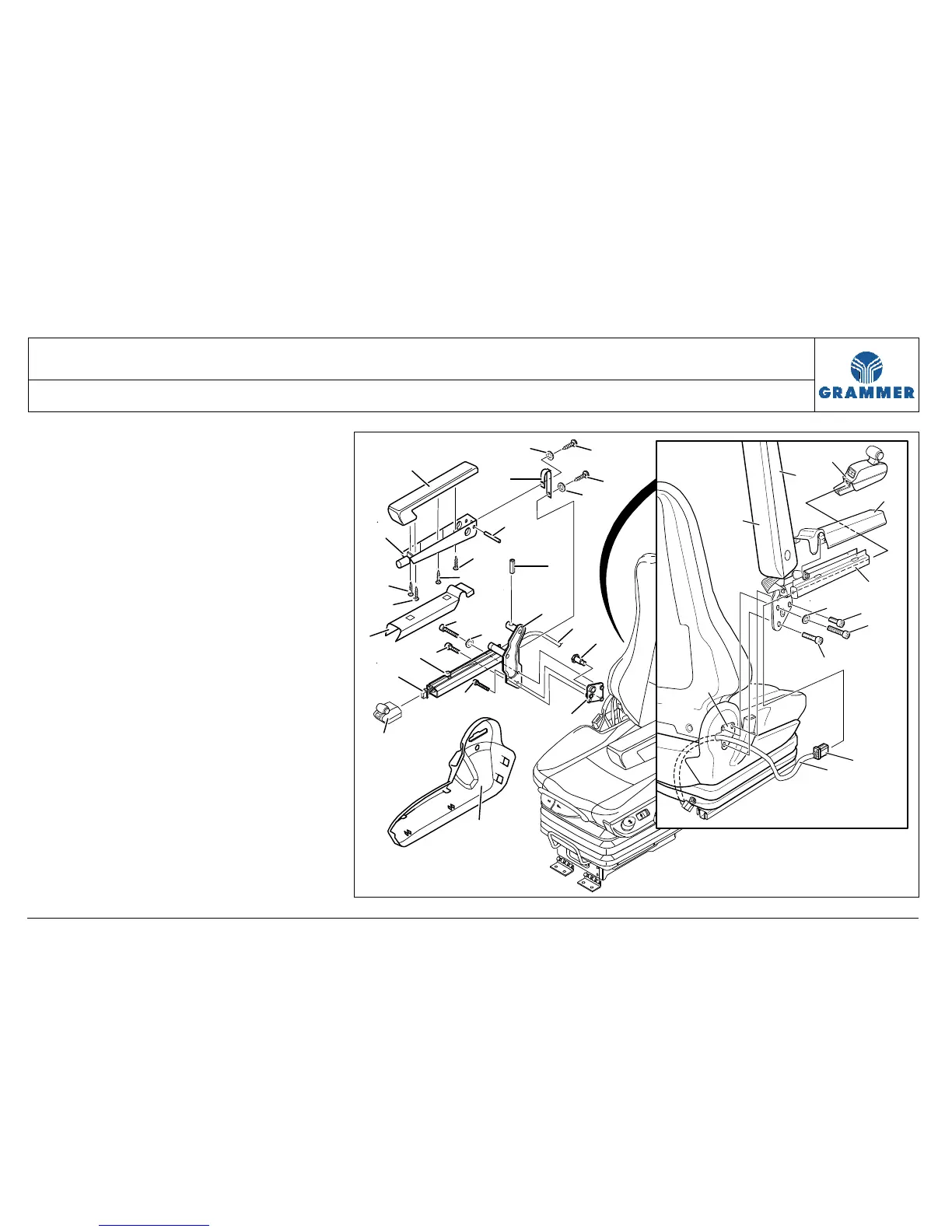
8.1 Unscrew four rounded head screws
(11) and remove the top of the
armrest (13).
Installation note:
Hand-tighten the rounded head
screw (11).
8.2 Drive out the pin (17) at the bottom
of the armrest (12).
8.3 Drive out the clamping sleeve (18) at
the EPS console (4).
8.4 Remove the bottom of the armrest
(12) at the EPS console (4).
9 Remove the support for the EPS
console at the seat frame (see
Chapter 3.30).
10 Re-install the components in the
reverse order of their removal.
13
15
12
14
5
3
4
16
16
15
17
2
1
20
9
6
7
11
11
11
11
8
19
18
2223
10
21
3
20
6
8
4
5
1
3
13
12
10
9
19


 To Next Page