Repair Manual MSG 90.6PG Commercial Vehicles, Omnibuses – November 2017
Material no. 1153450_c
3.55 Microphone support – removal and installation
(seat with climate control system)
Page 3 of 3
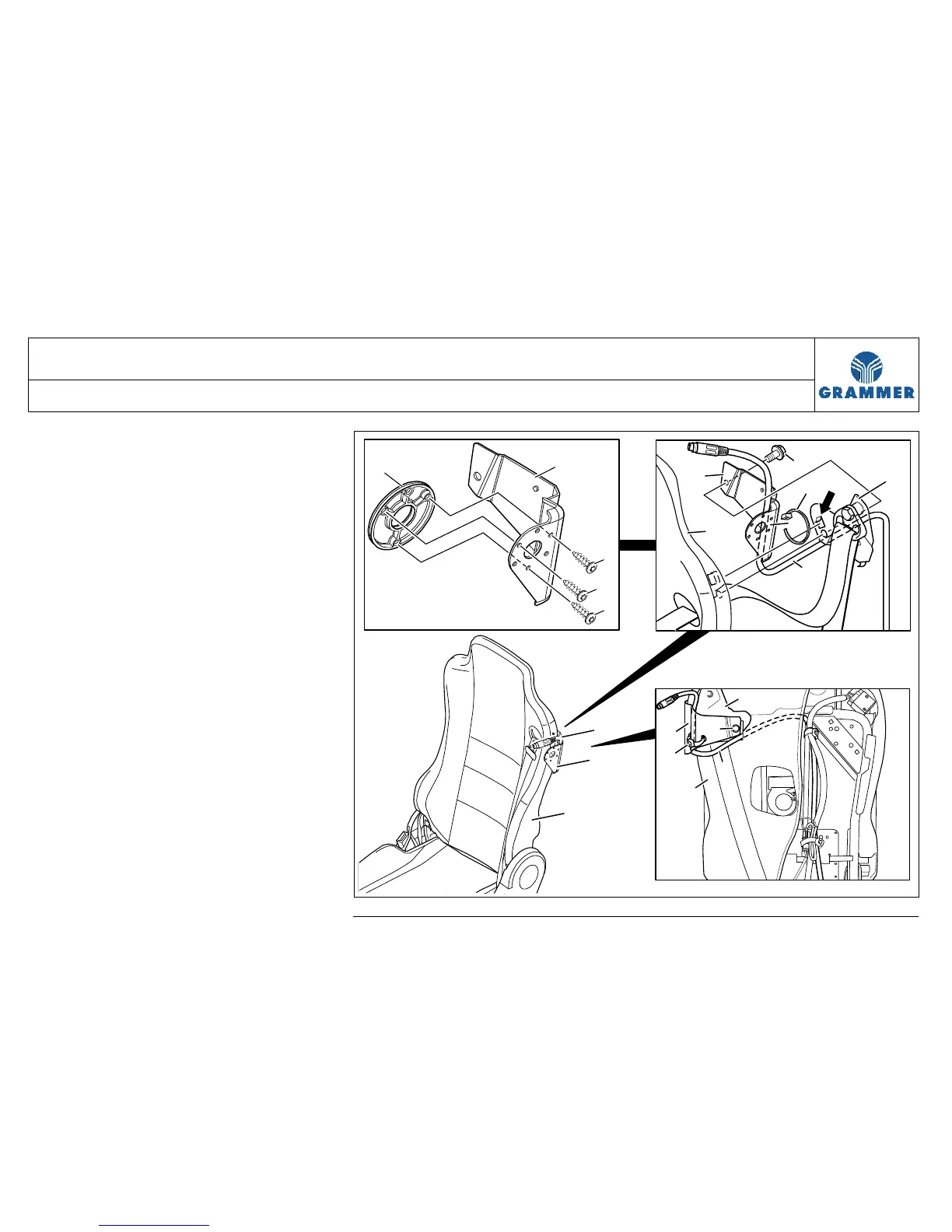
5 Mark the point where the microphone
cable (2) is fastened at the
microphone support (1) with cable tie
(5) and remove the cable tie (5).
Installation note:
The locking head of the cable tie (5)
must be located inside between
microphone support (1) and
backrest (3).
6 Remove the microphone cable (1).
7 Microphone support (1) with
adapter plate (7):
Unscrew the three rounded head
screws (8) and remove the adapter
plate (7).
Installation note:
Rounded head screw (8), 6 Nm.
8 Re-install the components in the
reverse order of their removal.
1
8
7
8
8
3
1
2
6
2
4
1
3
5
2
4
5
1
3
6
2553


 To Next Page