8
2.3 CHANNEL SETTING
DIP SWITCH:
SW1 SW2 SW3 SW4 SW5 SW6 DESCRIPTION
DOWN (ON) CHANNEL 1
DOWN(ON) CHANNEL 2
DOWN(ON) CHANNEL 3
DOWN(ON) CHANNEL 4
DOWN(ON) Optional
DOWN(ON) Optional
2.4GHz Receiver Channel seting:
SWITCH 1 CHANNEL 1
SWITCH 2 CHANNEL 2
SWITCH 3 CHANNEL 3
SWITCH 4 CHANNEL 4
2.4 INSTALLATION FOR IBM PC USER
The Grand ULTIMATE WIRELESS is a “Plug and Display” video converter. The only
requirement to get the output of the computer on the TV is to make the proper
connection and ensure that your computer display is set within the supported
parameters. Please read the following sections carefully for the installation of the
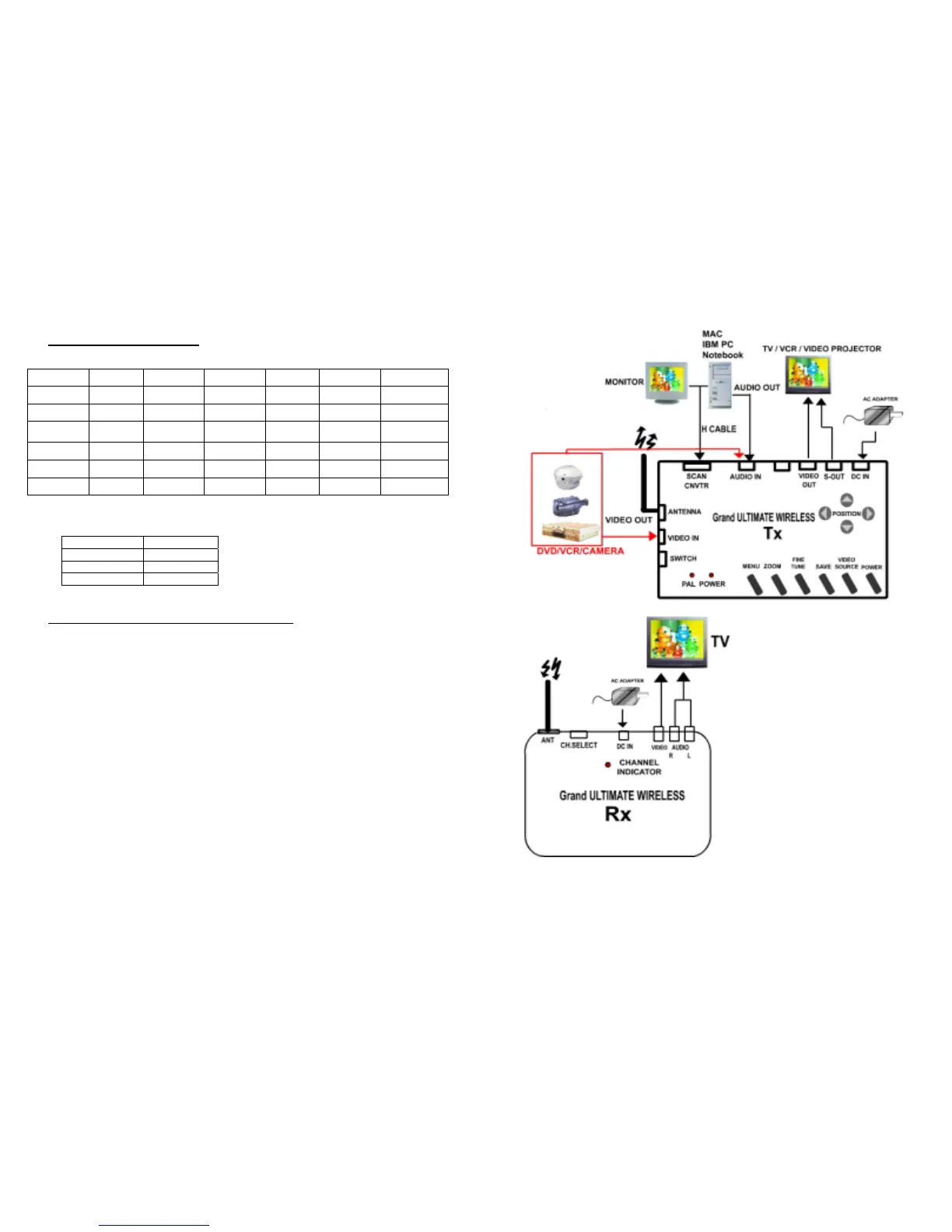
hardware. Please refer to Fig.2 for and overview of the process.
Fig.2 Grand ULTIMATE WIRELESS Installation
7



 To Next Page