4.
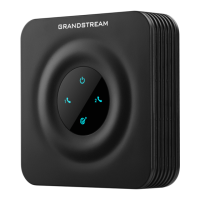
Connect the supplied Ethernet Cable from any
LAN port on your Internet Modem to the WAN
port of the Comwave VoIP Adapter.
Connect your telephone to the PHONE 1 port of
the VoIP Adapter.
Connect the VoIP Adapter to the power bar.
Note: Wait 5 minutes and do not disconnect as
you could cause damage to the VoIP Adapter.
Test your phone line, you should have a dial tone
and be able to make calls.
1
step
2
step
3
step
4
step
Can’t make calls?
1
2
3
4
Disconnect the power from
both the Internet Modem
and VoIP Adapter and wait 1
minute.
Connect your Internet
Modem to a power bar and
wait 2 minutes.
Connect the VoIP Adapter
to the power bar and wait 5
minutes.
Still unable to make a call?
Open a ticket online at
www.comwave.net/help
If you do not hear dial tone or
are unable to make or receive
calls, try the following steps to
resolve the issue quickly.


 To Next Page
 Loading...