EasyManua.ls Logo

Grasslin EM/1 DIGI 20 - User Manual

Grasslin EM/1 DIGI 20
3 pages
Print Icon
To Next Page IconTo Next Page
Loading...
Grässlin (UK) Ltd
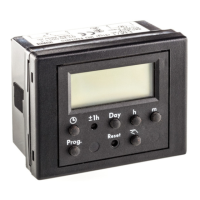
Digital timeswitch module:
EM/1 DIGI 20 (with relay)
Seven – day & 24 hour digital timeswitch module
Twenty programme spaces. Volt-free N/O contact, rated
10 Amperes resistive @ 250v
When first connected to power supply, the display will show all day numbers flashing, the time at
00:00, timed function, and OFF output.
Setting the time
Press and hold the clock symbol button, now press the day, hours and minutes buttons to vary
any of these settings. Once current time input is completed, release the clock symbol button.
Setting programmed switching operations
Press the Prog. button. Enter the switching instruction ON or OFF with the button;
then the day or days for the switching instruction to occur; then the time of the switching instruction
with the h & m buttons. Each press of the Prog. button saves the last (completed) entry, and steps
through to the next programme space. If you want to change any of the settings, you can do so
while the setting is showing in the display. Press the day, hours or minutes buttons to alter the
timing as you require. Once you have completed your changes, press the Prog. key to confirm and
step to the next programme space in the memory. Press the clock symbol button to revert
to timed display.
Manual switch
After you have set the current time and any programme instructions you require, you should press
this button once to switch ON, if you require the output to be ON now. The timeswitch will follow
the programme settings in the memory from now on.
At any time, you can use the manual switch to change the output to ON or OFF. The display
symbols are:
Timed OFF Manual OFF Fixed ON
Timed ON Manual ON Fixed OFF
The Manual ON and OFF selections are self-resetting. I.E. this manually chosen output will revert
to the timed setting with the next timed instruction. Fixed ON and Fixed OFF outputs will remain in
that condition until you next use the manual switch to change back to Timed or Manual
control.
Summer / Winter change
The change of the clocks from GMT to BST and back can be effected by pressing the recessed
± 1h button. Press this button with a biro or a pencil.
Reset
The timeswitch can be reset (all information deleted), by pressing the Reset button with (e.g.) a
biro or a pencil.
Grässlin (UK) Ltd, Tower House Vale Rise Tonbridge Kent TN9 1TB Tel. 01732 359888 Fax. 01732 354445
Question and Answer IconNeed help?

Do you have a question about the Grasslin EM/1 DIGI 20 and is the answer not in the manual?

Summary

Setting the Time

Setting Programmed Switching Operations

Manual Switch Operation

Manual Switch Display Indicators

Icons indicating Timed OFF/ON, Manual OFF/ON, and Fixed OFF/ON states for output control.

Summer; Winter Time Change

Resetting the Timeswitch

Setting the Time

Setting Programmed Switching Operations

Manual Switch Operation

Manual Switch Display Indicators

Icons for Timed OFF/ON, Manual OFF/ON, and Fixed OFF/ON states, plus AUTO and FIX modes.

Summer; Winter Time Change

Resetting the Timeswitch

Timeswitch Controls Overview

Summer Time; Winter Time Changeover

Button for adjusting clocks for seasonal time changes.

Entering Time

Function to set the current time on the device.

Selecting Days of the Week

Button to choose specific days for switching operations.

Entering Hours

Button to set the hour for switching operations.

Entering Minutes

Button to set the minute for switching operations.

Entering Switching Time

Function to input the desired time for a program event.

Deselecting Days of the Week

Function to remove specific days from a switching program.

Manual Switch Channel 1

Button for manual operation of channel 1.

Manual Switch Channel 2

Button for manual operation of channel 2.

Overview

This document describes two digital timeswitch modules from Grässlin (UK) Ltd: the EM/1 DIGI 20 and the EM/2 DIGI 32. Both devices are designed for controlling electrical circuits based on programmed time schedules.

EM/1 DIGI 20 (with relay)

Function Description: The EM/1 DIGI 20 is a seven-day and 24-hour digital timeswitch module. It allows users to program switching operations (ON/OFF) for a connected circuit over a weekly cycle. The device features a relay output, meaning it can directly switch electrical loads.

Important Technical Specifications:

  • Programme Spaces: 20
  • Contact Type: Volt-free N/O (Normally Open) contact
  • Rated Current: 10 Amperes resistive
  • Rated Voltage: 250V

Usage Features:

  • Initial Setup: When first connected to power, the display shows all day numbers flashing, time at 00:00, "timed" function (indicated by a clock symbol), and "OFF" output.
  • Setting the Time: To set the current time, press and hold the clock symbol button. While holding, use the day, hours (h), and minutes (m) buttons to adjust the settings. Release the clock symbol button once the time is set.
  • Setting Programmed Switching Operations:
    1. Press the "Prog." button.
    2. Select "ON" or "OFF" using the hand switch button.
    3. Choose the day(s) for the switching instruction using the day button.
    4. Set the time for the instruction using the h and m buttons.
    5. Each press of the "Prog." button saves the current entry and moves to the next programme space.
    6. To modify an existing setting, select it using the "Prog." button until it appears on the display, then use the day, h, or m buttons to make changes. Confirm changes by pressing "Prog." again.
    7. To return to the timed display, press the clock symbol button.
  • Manual Switch: This feature allows for immediate manual override of the programmed schedule.
    • After initial setup and programming, press the manual switch button once to turn the output ON if desired. The timeswitch will then follow its programmed settings.
    • At any time, the manual switch can be used to change the output to ON or OFF.
    • Display Symbols:
      • Timed OFF: (Clock symbol with a line through it)
      • Manual OFF: (Hand symbol with a line through it)
      • Fixed ON: [O]
      • Timed ON: (Clock symbol)
      • Manual ON: (Hand symbol)
      • Fixed OFF: (Square with a circle inside)
    • Self-Resetting Feature: Manual ON and OFF selections are self-resetting. This means the output will revert to the timed setting with the next scheduled instruction.
    • Fixed ON/OFF: Fixed ON and Fixed OFF outputs will remain in that state until the manual switch button is pressed again to revert to Timed or Manual control.
  • Summer/Winter Change: A recessed "± 1h" button allows for a one-hour adjustment to the clock for daylight saving time changes (GMT to BST and vice versa). This button should be pressed with a biro or pencil.

Maintenance Features:

  • Reset: The timeswitch can be reset, deleting all stored information, by pressing the recessed "Reset" button with a biro or pencil.

EM/2 DIGI 32

Function Description: The EM/2 DIGI 32 is also a seven-day and 24-hour digital timeswitch module, but it offers two independent channels (CH1 and CH2) for controlling separate circuits. It utilizes Cmos output technology.

Important Technical Specifications:

  • Programme Spaces: 32
  • Output Type: Cmos output

Usage Features:

  • Initial Setup: When first connected to power, press the "Reset" button. The display will show the time at 00:00, "timed" function (AUTO), and "OFF" output.
  • Setting the Time: Similar to the EM/1, press and hold the clock symbol button. While holding, use the day, hours (h+), and minutes (m+) buttons to adjust the settings. Release the clock symbol button once the time is set.
  • Setting Programmed Switching Operations:
    1. Press the "CH1" button to program channel 1, or "CH2" for channel 2.
    2. Each press of the "CH1" or "CH2" button will alternately select "ON" then "OFF" programme spaces.
    3. Once a blank programme space is visible, use the day button to select the day(s) for the switching instruction.
    4. Set the time for the instruction using the h+ and m+ buttons.
    5. Each press of the "CH1" or "CH2" button saves the current entry and moves to the next programme space.
    6. To modify an existing setting, select it using the "CH1" or "CH2" button until it appears on the display, then use the day, h+, or m+ buttons to make changes. Confirm changes by pressing "CH1" or "CH2" again.
    7. To return to the timed display, press the clock symbol button.
  • Manual Switch: This feature allows for immediate manual override of the programmed schedule for each channel.
    • At any time, the manual switch (represented by a hand symbol) can be used to change the output to ON or OFF.
    • Display Symbols:
      • Timed OFF: (Clock symbol with a line through it)
      • Manual OFF: (Hand symbol with a line through it)
      • Fixed ON: (FIX ON)
      • Timed ON: (Clock symbol)
      • Manual ON: (Hand symbol)
      • Fixed OFF: (FIX OFF)
    • Self-Resetting Feature: Manual ON and OFF selections are self-resetting. This means the output will revert to the timed setting with the next scheduled instruction.
    • Fixed ON/OFF: Fixed ON and Fixed OFF outputs will remain in that state until the manual switch button is pressed again to revert to Timed or Manual control.
  • Summer/Winter Change: A recessed "± 1h" button allows for a one-hour adjustment to the clock for daylight saving time changes (GMT to BST and vice versa). This button should be pressed with a biro or pencil.

Maintenance Features:

  • Reset: The timeswitch can be reset, deleting all stored information, by pressing the recessed "Reset" button with a biro or pencil.

Both devices are manufactured by Grässlin (UK) Ltd, located at Tower House Vale Rise Tonbridge Kent TN9 1TB. Contact information includes Tel. 01732 359888 and Fax. 01732 354445.

Grasslin EM/1 DIGI 20 Specifications

General IconGeneral
BrandGrasslin
ModelEM/1 DIGI 20
CategoryThermostat
LanguageEnglish

Related product manuals