EasyManua.ls Logo

Grasslin FM/1 digi 42 - User Manual

Grasslin FM/1 digi 42
4 pages
Print Icon
To Next Page IconTo Next Page
Loading...
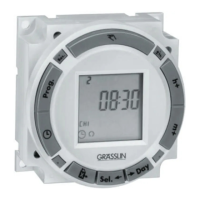
The FM/1 digi 42 is a compact electronic 24 hour/7 day time
switch module, with heavy duty relay contacts for switching low or
line voltage loads. Applicable for time of day control of pumps, fans,
heaters, HVAC control circuits, lighting, machinery and many other
types of commercial, industrial, and agricultural equipment. All digi
42 models offer holiday programming.
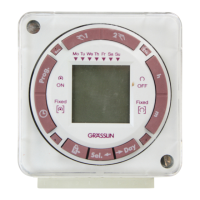
All models feature large keys with unique “circular programming”
for easy programming, a large LCD display and battery backup.
TECHNICAL DATA:
Channels: 1
Programs: 42
Holiday program: Yes
Daylight time changeover: Automatic
Manual 3 way override: On-Auto-Off
Shortest switching time: 1 minute
Reserve carryover: 7 days
6 month reserve carryover: Optional
Input voltage models available: 12VDC
24VAC/DC
120VAC
208/240VAC
Switching output: SPDT relay
Switch ratings: 16A res. @ 277VAC
1000W Tungsten @ 250VAC
500W @ 125VAC
Input draw: 4VA
Input frequency: 50 or 60Hz
Wiring connections: 1/4” quick connects
Ambient temperature: –20°F to 140°F (–28°C to 60°C)
UL and Canadian UL recognized: File E83486
INSTALLATION & WIRING:
Note: Although the FM models contain some degree of spike and electrical
noise protection, as with all electronic devices, these units can be affected by
electrical noise. Therefore, it is recommended that they be powered from a
voltage source that has no switching devices or inductive loads connected.
1. Check the input and output ratings marked on the unit to make sure this
product is suitable for your supply voltage, load, and application.
2. Disconnect supply power prior to installation to prevent electrical shock.
3. Wire in accordance with National and Local electrical code requirements.
MOUNTING OPTIONS:
The standard FM/1 models may be surface mounted inside a panel or flush
mounted with FM-F mounting kit, available from Grasslin. Indoor NEMA 1
(E110 or E150), and outdoor NEMA 3R (E200) enclosures are available for
stand-alone mounting.
A mounting base (MB-FMPC) is available for printed circuit board mount-
ing. A clear plastic dust cover (DC-FME) is also available.
Models are also available with screw terminals and DIN rail mounting, or
for flush mounting with housing and clear cover. (Digi 42A & 42E)
FM/1 digi 42
One Channel Electronic Time Switch
Dimensions
Terminal Connections
M
LOAD
POWER
TIMER INTERNAL WIRING
COM NO NC
TIME
SWITCH
FIELD WIRING
1 2 3 4 5
FM/1 digi 42
Question and Answer IconNeed help?

Do you have a question about the Grasslin FM/1 digi 42 and is the answer not in the manual?

Summary

Technical Data

Channels

Specifies the number of channels the time switch supports.

Programs

Indicates the maximum count of programmable events.

Holiday Program

Feature for setting schedules for holidays.

Daylight Time Changeover

Automatic adjustment for Daylight Saving Time.

Manual Override

Describes the manual control modes (On-Auto-Off).

Switching Time

Minimum programmable interval for switching.

Reserve Carryover

Battery backup duration for maintaining settings.

Input Voltage Models

Available input voltage options for the unit.

Switching Output

Type and rating of the relay output.

Input Draw

Power consumption of the time switch.

Wiring Connections

Type of electrical connectors used.

Ambient Temperature

Operating temperature range for the device.

UL & Canadian UL Recognition

Safety certifications obtained.

Installation and Wiring

Installation Notes

Important considerations before installation and wiring.

Wiring Requirements

Guidelines for electrical code compliance during wiring.

Mounting Options

Standard Mounting

Surface and flush mounting methods for standard models.

Enclosure Options

Available indoor and outdoor enclosures.

Alternative Mounting

Options for PCB, DIN rail, and housing mounting.

Keypad Description

Key Functionality

Explanation of individual keypad button functions.

LCD Display Elements

Description of symbols and indicators on the LCD screen.

Setting the Time

Manual Time Setting

Procedure for setting the current hour, minute, and day.

AM;PM or Military Time

How to select between 12-hour and 24-hour time formats.

Manual Daylight Time Changeover

Spring and Fall Adjustment

Instructions for manually adjusting the time for DST.

Automatic Daylight Time Changeover

Programming DST Dates

Setting up automatic time changes for DST until 2079.

Programming 24 Hour or 7 Day Schedules

Program Entry Basics

Guidelines for writing out and entering ON/OFF programs.

Manual Override Functions

How to temporarily or continuously override the set schedule.

Reviewing Programs

Procedure to check existing programmed schedules.

Changing or Deleting Programs

Steps to modify or remove existing programs.

Holiday Program

Entering Holiday Schedule

How to set up a special schedule for holidays or vacations.

Implementing Holiday Program

Scheduling Holiday Days

Selecting specific days and duration for holiday operation.

Reviewing;Deleting Holiday

Checking and cancelling a scheduled holiday program.

Troubleshooting

Flashing Days Error

Resolving issues where days are flashing and keys are unresponsive.

Program Not Active

Troubleshooting why a program is not turning the output ON.

Program Entry Failure

Resolving issues where a program will not be accepted.

Grasslin FM/1 digi 42 Specifications

General IconGeneral
TypeDigital Time Switch
Voltage230 V AC
Current16A
Program TypeDaily/Weekly
Number of Programs42
DisplayLCD
Number of Channels1
Mounting TypeDIN Rail
Switching Capacity at 250V AC16A
Frequency50 Hz
Contact TypeChangeover Contact

Related product manuals