GB - 27
ADJUSTING THE UNIT TO TRACK
STRAIGHT
Check and adjust tire pressure. Increase
pressure on side unit tracks to. DO NOT
exceed maximum recommended tire
pressure (See Specifications on page 36).
If tire pressure adjustment does not solve
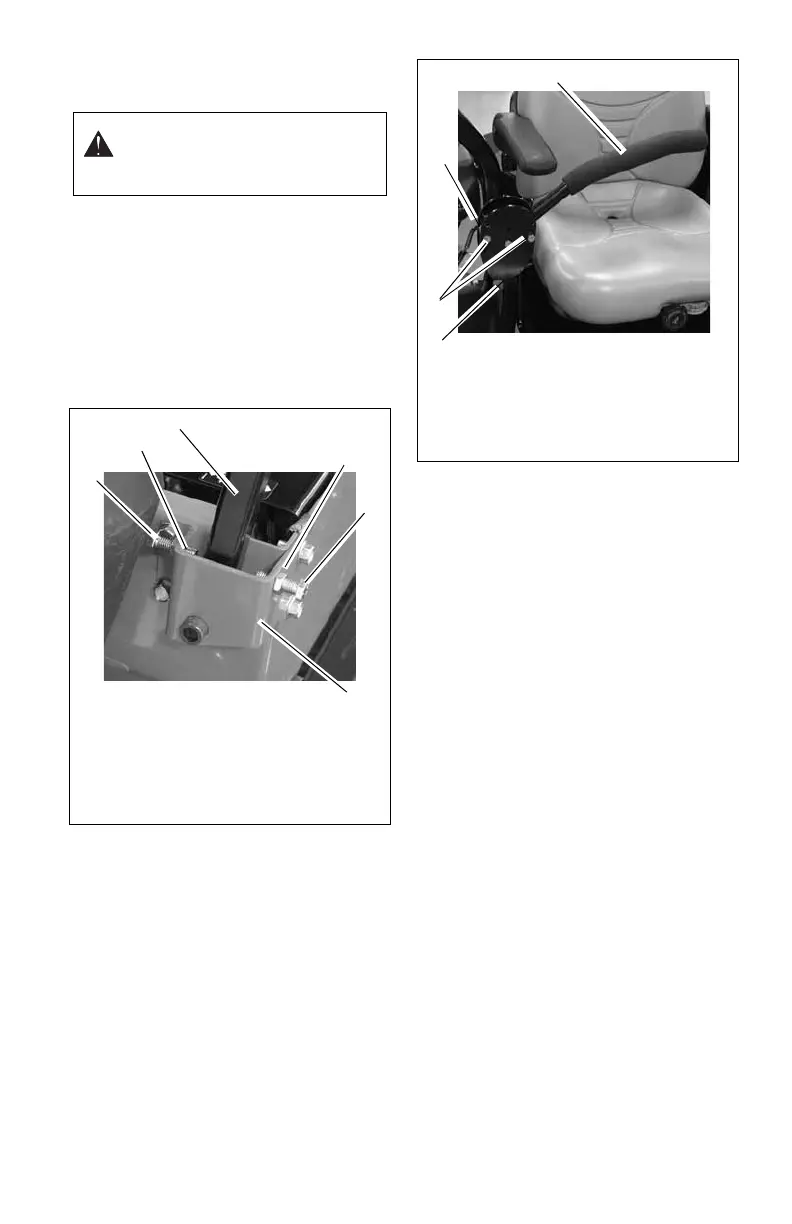
tracking problem, adjust the limiter bolts on
the stop bracket (Figure 16). Front bolts
adjust forward and rear bolts adjust reverse.
Lengthen the limiter bolt (move closer to
lever) on side which is too fast.
ADJUSTING THE HEIGHT OF THE
STEERING LEVER HANDLES
NOTE: Align handlebars by adjusting
eccentric spacer until the handlebar height is
the same.
1. Remove mounting hardware and move
handlebar up or down until the steering
levers are at the appropriate height.
2. Install mounting hardware.
ADJUSTING THE PARKING
BRAKE
The parking brake should not need
adjustment, however if the parking brake
does not hold the unit properly, the brake may
need adjustment.
Check Adjustment
NOTE: Be sure to check the parking brake on
both sides of the unit (Figure 18).
1. Engage parking brake and set both
transmission bypass valves to the
neutral position. See Moving the Unit
with the Engine Off on page 17.
2. Push the unit forward.
If the unit easily rolls forward the
transmission brakes are not fully
engaging. Adjust the brake actuator
travel to set the brake.
WARNING: Prior to adjusting the
tracking of the unit, shut OFF
engine, engage parking brake, and
remove the ignition key.
Figure 16
1. Limiter Bolt
2. Jam Nut
3. Steering Lever
4. Stop Bracket
1
2
3
1
4
2
Figure 17
1. Handle
2. Eccentric
Spacer
3. Steering Lever
4. Mounting
Hardware
1
3
2
4



 To Next Page