EasyManua.ls Logo

Gravis GamePad - Page 4

Gravis GamePad
17 pages
Print Icon
To Next Page IconTo Next Page
To Previous Page IconTo Previous Page
Loading...
USING
THE
GAMEPAD
|
The
GamePad
is
simple
to
use,
if
you
follow
the
set
up
instructions
included
in
this
chapter.
Keep
the
button
diagrams
handy!
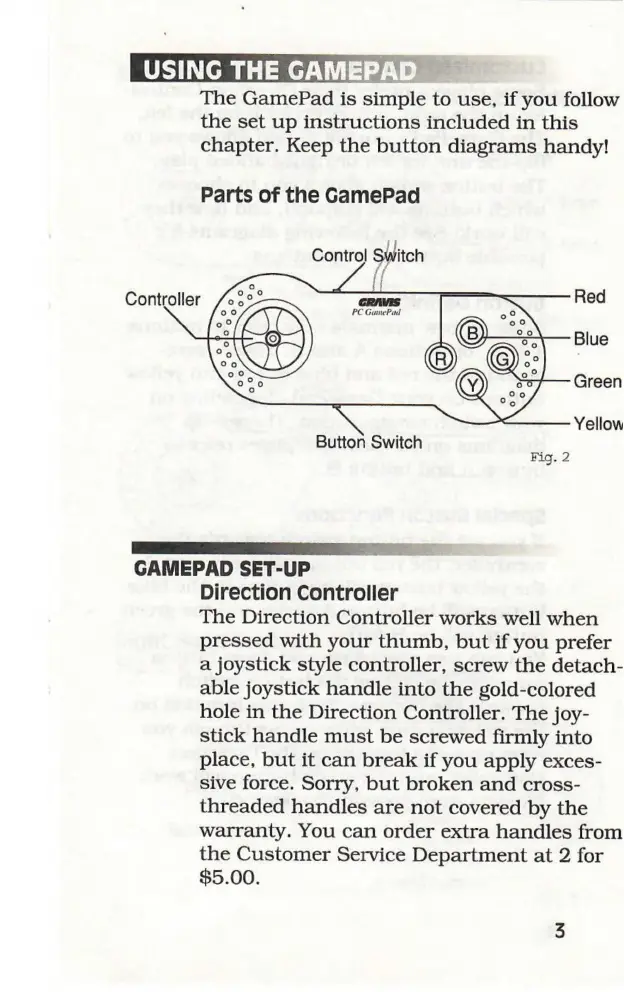
Parts
of
the
GamePad
Control
Switch
7
/
Controller
Button
Switch
Fig.
2
mec
GAMEPAD
SET-UP
Direction
Controller
The
Direction
Controller
works
well
when
pressed
with
your
thumb,
but
if
you
prefer
a
joystick
style
controller,
screw
the
detach-
able
joystick
handle
into
the
gold-colored
hole
in
the
Direction
Controller.
The
joy-
stick
handle
must
be
screwed
firmly
into
place,
but
it
can
break
if
you
apply
exces-
sive
force.
Sorry,
but
broken
and
cross-
threaded
handles
are
not
covered
by
the
warranty.
You
can
order
extra
handles
from
the
Customer
Service
Department
at
2
for
$5.00.