Need help?
Do you have a question about the Gravotech Laser Workstation LW2 Touch and is the answer not in the manual?
Expresses gratitude for choosing Gravotech LW2 Touch and welcomes the user to the engraving solutions.
Emphasizes reading the manual for security and productivity, covering installation and use of the equipment.
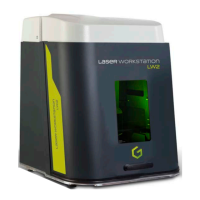
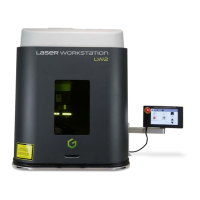
The LW2 Touch is a station allowing the attachment of a marking head. It is equipped with a motorized Z-axis mounted to a table.
The LW2 Touch machine is covered by a general 24-month warranty under normal conditions of use and maintenance.
Identifies the marking equipment via a rear plate and advises having model/serial numbers ready for Gravotech support.
Explains symbols on the ID plate: alternating current, fuse, CE logo, and WEEE disposal instructions.
General safety rules for operating the machine, including turning off before maintenance, avoiding unplugging cables, and protecting from dust.
Details the components included in the packaging of the LW2 Touch machine, including protective foam, wedges, box, and pallet.
Safety precautions for laser devices, covering personnel safety, machine classification, and installer responsibilities.
Describes warranty labels and glass protection index information for the laser machine.
Specific hygiene and safety instructions, detailing restricted areas and their regulations.
General safety instructions for laser operation, including avoiding exposure and proper handling of the machine.
Guidelines on when safety glasses are necessary based on laser class and recommendations for users of class 4 laser stations.
Discusses hazards from fumes and toxic particles emitted when marking certain materials, and extraction system requirements.
Details secondary radiation risks from class 4 laser devices, such as fire, UV, X-rays, and high-intensity light.
Discusses special integration needs to prevent beam reflection from certain materials like copper, gold, silver, and polished materials.
Provides a labeled diagram of the LW2 Touch machine, identifying key components like the door, laser protection glass, and Z-axis.
Describes the startup procedure and initial interface displayed on the color touch screen when the tablet is started.
Details the layout and functions of the main screen interface, including icons for menus, start/stop, and door controls.
Explains how to operate the door manually and notes that it's disabled in automatic mode.
Describes the control of the motorized Z axis via the touch screen, including absolute distance and axis origin set.
Details the automatic door operation, activation conditions, indicator lights, and its compatibility with marking management modes.
Covers marking parameter settings: configuration, network, adjustment, system info, and updates.
Guides on setting up the machine's network connection, including IP address, subnet mask, and gateway settings.
Details screen calibration, date, time, brightness, buzzer activation, and unit settings.
Provides technical information about the machine, such as model, serial numbers, versions, IP address, and MAC address.
Instructions for updating the machine's software via USB key, including selecting and installing files.
Explains how to back up all machine data to a single file using a USB key.
Guides on restoring previously backed-up data to the machine using a USB key.
Details the 'File' menu functions, including marking files, logos, and fonts.
Lists available fonts for use in marking files.
Explains how to connect a USB key for file imports and updates.
Allows modification of variable content within marking files, with PC disconnection possible.
Describes security modes like Supervisor, Operator, and Technician, and password protection for mode switching.
Instructions on how to change the supervisor password for security mode.
Details the functions accessible in Operator mode, such as main menu options and marking parameters.
Covers saving parameters and accessing functions like safety circuit reset, fume extraction, and marking area lighting.
Details loading marking files and file simulation, noting that operators cannot delete files.
Describes the 'Set variable' function within the 'Variables' menu.
Explains the password-protected Technician mode for firmware configuration and authorized personnel only.
Instructions on how to activate the emergency stop button and reset the safety circuit.
Details how to acknowledge faults and return the head to its origin position.
Safety instructions for electrical connections, emphasizing machine power-off and grounding requirements.
General physical installation instructions, stressing power-off connections and last connection of power supply.
Step-by-step guide on how to open the machine casing by unscrewing screws.
Instructions for removing counterweights after opening the casing.
Initial steps for Fiber series (+ Energy) laser installation: removing screws and opening the flange.
Guides placing the laser on its support and attaching the marking head with screws.
Instructions for inserting and fastening the optical head into the marking head using screws.
Details connecting marking head to CCU (17/19-point connectors) and laser module installation.
Steps for Hybrid, Green, CO2 Energy series laser installation: removing screws and opening flange.
Guides placing the laser on its support and reclosing/locking the flange.
Details Control Unit connection for Fiber series: connector view and power supply.
Instructions for connecting the marking head to the CCU using specific cables and ensuring correct connection.
Details the connection to the DB37M connector (Ref: 54260).
Details the connection to the DB37F connector (Ref: 50875).
Shows how to connect the USB port on the machine.
Illustrates the connection of the touch screen tablet to the LW2 Touch machine.
Shows the connection for optional RD1/RD2 rotary devices.
Steps for connecting the ES30 fume extractor, including removing the cover and attaching the exhaust tube adapter.
Details connecting the ES30 fume extractor cable to the LW2 Touch.
Illustrates the power supply connection for both LW2 Touch and the Control Unit.
Discusses integration/operating positions for Fiber/Hybrid/CO2 series, including air circulation and cleaning.
Provides instructions for laser startup and notes on protective goggles.
Instructions on how to use the emergency stop button on the CCU or LW2 Touch.
Lists accessories: 3D modules, autofocus, focusing diodes, fume extraction adapters with item codes.
Details different rotary device options (RD1, RD2, RDM, RD Jewel) for marking cylinders.
Lists safety accessories, specifically extra pairs of glasses with suitable filter lenses for different laser energy series.
Lists wearing parts (door seals) and spare parts (screens, cables).
Instructions for visually inspecting bellows for burning or perforation.
Annual maintenance: raising bellows and re-lubricating Z-axis screw.
Describes cleaning Z-axis sensors (carriage position detection) using an air gun.
Provides overall LW2 Touch dimensions: height, width, depth, and key component locations.
Dimensional drawings for LW2 Touch with Fiber/Hybrid/CO2 series, including axis and marking area.
Provides dimensions of the work table, including marking areas and fastening hole locations.
Lists max part heights for focal lenses across laser series, with calculation examples.
Details noise emission test code: measurement methods, materials, and test conditions.
States that the equivalent continuous sound level (Laeq) is below 70 dB(A).
Lists dimensions, net weight, packaging weight, object dimensions, and classification.
Details marking area sizes for different focal lenses across various laser series (Fiber, Hybrid, Green, CO2).
Lists safety door specs: force on body, kinetic energy, and contact pressure.
Details electrical specs: voltage, frequency, power, protection, and phases.
Specifies operating temp, storage temp, and humidity level requirements.
Provides laser beam specs: wavelength, power, pulse duration, and frequency.
Details aiming/focusing diode specs: power, wavelength, and classification.
Lists materials for marking across laser series, indicating contrasting/non-contrasting marks.
 General
| Brand | Gravotech |
|---|---|
| Model | Laser Workstation LW2 Touch |
| Category | Measuring Instruments |
| Language | English |

 To Next Page