Need help?
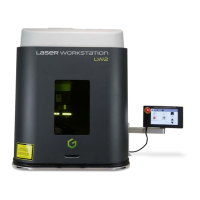
Do you have a question about the Gravotech Laser Workstation LW2 and is the answer not in the manual?
Expresses gratitude for choosing LW2.
Provides important user guidance and safety notes.
Describes the LW2 marking head and Control Unit assembly.
Details warranty terms and usage conditions.
Explains how to identify the machine via its plate.
Outlines safety precautions for the work environment.
Details the contents of the LW2 packaging.
Provides advice for proper unpacking and handling.
General safety advice for laser operation.
Explains warranty labels and glass protection index.
Specific hygiene and safety instructions for the workstation.
Discusses risks from marking specific materials.
Identifies key components of the machine.
Explains the functions of the remote control buttons.
Details how the marking program operates with units.
Guides through opening the machine's casing.
Instructions for releasing counterweights.
Instructions for removing the laser if present.
Guides placement of the laser in the LW2.
Details optical head connection steps.
Instructions for connecting the marking head to the CCU.
Details how to connect the Control Unit.
Steps for connecting the marking head and CCU.
Illustrates DB37F connector connection.
Illustrates DB37M connector connection.
Steps for connecting the remote control.
How to establish RS232 PC communication.
Details the RD1/RD2 connection.
Instructions for connecting the ES30 fume extractor.
Shows power connection for LW2 and UC.
Refers to user manual for dismantling.
Details integration and operating positions for LW2.
Refers to user manual for laser startup.
Explains how to use the emergency stop button.
Lists available accessories and options with codes.
Details spare and wearing parts for the machine.
Guides on inspecting bellows for damage.
Provides a detailed dimensional drawing of the LW2.
Provides a detailed dimensional drawing of the Fiber-Series.
Shows dimensional details of the Fiber series table.
Illustrates max part volume with 100mm focal lens.
Illustrates max part volume with 160mm focal lens.
Illustrates max part volume with 254mm focal lens.
Illustrates max part volume with 330mm focal lens.
Details measurement methods for noise emission.
Provides the machine's noise emission level.
Specifies laser beam parameters for different series.
Details the machine's electrical specifications.
Lists operating and storage environmental conditions.
Provides specs for the aiming/focusing diode.
 General
| Brand | Gravotech |
|---|---|
| Model | Laser Workstation LW2 |
| Category | Measuring Instruments |
| Language | English |

 To Next Page